
Many entrepreneurs and small teams run into limits with basic Gutenberg blocks when building business sites. Pricing tables, testimonials, custom forms, and conditional content start to matter fast. Stacking five or six plugins to cover those gaps slows sites and clutters the dashboard.
Otter by ThemeIsle aims to keep work inside the block editor. It adds extra blocks, useful patterns, and visibility controls to reduce plugin sprawl and speed up page creation. The pitch fits people who want to skip bulky page builders and still ship polished pages.
This review looks at Otter’s coverage of common business needs, ease of use for non‑developers, effects on site speed and Core Web Vitals, upkeep requirements, and whether it meaningfully trims the plugin list. Expect direct, practical observations for anyone weighing this block addon.
What Otter Blocks adds to Gutenberg and when entrepreneurs should use it
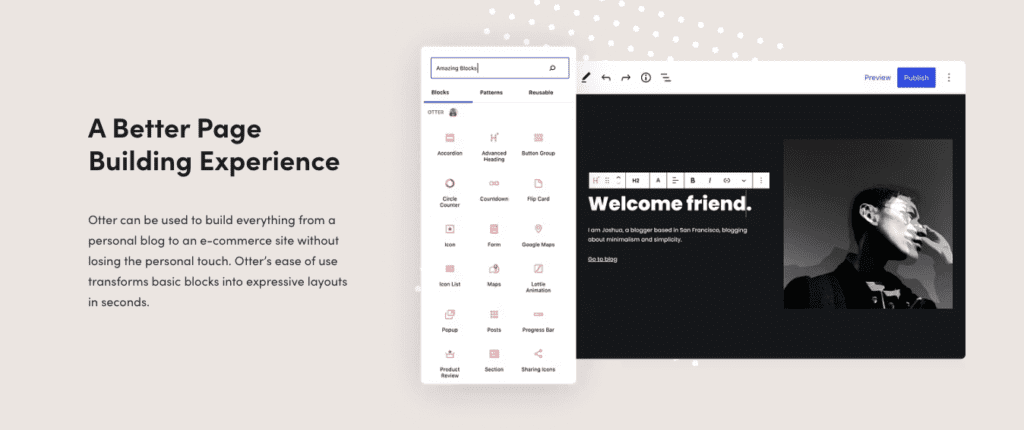
Otter Blocks packs a focused set of blocks that cover everyday needs without piling on clutter. It skips the bloat and sticks to what gets pages shipped.
The Section or Container block works as a flexible wrapper. Users group content, set widths, and control layout with simple settings. It keeps pages structured and readable. Advanced Heading goes beyond a plain title with style controls for size, weight, spacing, and highlights so headlines stand out. Buttons Group lines up multiple calls to action side by side, useful when visitors should choose between signing up or learning more.
Accordion and Toggle keep long content tidy by revealing details on click. Perfect for FAQs, specs, or feature breakdowns. Tabs swap between content panes in the same space, which helps show several services or plans without stuffing the page.
Business-focused blocks do the heavy lifting where it counts. Pricing Tables compare service tiers at a glance. Testimonials add social proof with client quotes and avatars. Countdown timers push urgency for sales or events. Google Maps drops a location right into a contact page. Lottie animations add light motion that draws the eye without extra weight. Forms capture leads directly in Gutenberg, so no extra plugins are needed.
Each block includes practical controls for spacing with margins and padding, layout with responsive columns that stack on mobile, typography choices, and crisp SVG icons. A custom CSS field is there for one-off tweaks. These tools help match brand style without fuss.
Ready-made Patterns and full-page templates cover common needs like About sections, Services, and high-conversion landing pages. They import fast and remain fully editable as normal blocks, so teams don’t start from zero and still keep full control.
Conditional display rules push personalization further. Show or hide any block by device type, user role, date or time window, or URL query parameters. A CTA for returning customers, a mobile-only banner, a limited-time offer – set it up right in the editor with no code.
How easy Otter is to use in Gutenberg and how it handles mobile
Otter Blocks works like part of Gutenberg, not a bolt-on that forces a new workflow. It uses the editor’s native controls, so changes to layout, color, and spacing feel familiar. No odd panels to hunt through. People stay focused on the page they’re making instead of learning a new interface.
Mobile behavior in Otter is practical. Every block has per-device settings for font size, margins, padding, and column behavior. Picture a three-column pricing table on desktop. When the viewport dips under 768 pixels, it stacks into a single vertical list for easy reading. No extra setup is required:
- Desktop view: 3 columns side by side.
- Screen width drops under 768px.
- Columns stack vertically for easy reading on phones.
This level of control keeps designs consistent across screens and avoids custom CSS or fiddly breakpoints.
Getting started feels approachable. Blocks include inline help and tooltips right next to the settings, with quick notes on what each option changes. Onboarding patterns speed up assembly with ready-made sections that are faster to adjust than building everything from scratch with core blocks.
Accessibility gets real attention. Otter outputs semantic HTML, so headings stay as proper h-tags instead of generic containers. Accordions include ARIA attributes, which helps screen readers move through content in a predictable way. Those choices reduce cleanup work later if accessibility compliance becomes a requirement.
Performance, reliability, and maintenance expectations for business sites
Otter loads only the CSS and JavaScript needed for the blocks used on a page. No extra code sits in the way, so pages stay quick when every millisecond matters. Its block-level enqueue system avoids dumping styles and scripts across the site, trimming weight so pages feel faster and more responsive.
Lightweight blocks and minimal render‑blocking scripts make it friendly with Core Web Vitals, including Largest Contentful Paint (LCP) and Cumulative Layout Shift (CLS). Business users can check performance before and after adding blocks with Lighthouse or WebPageTest. Those results confirm whether features like forms or animations affect speed or trigger layout shifts.
ThemeIsle ships steady updates alongside major WordPress releases. Compatibility stays tight, security patches land fast, and new blocks arrive without surprises. Changelogs list what changed in plain terms, useful for anyone tracking fixes and additions without reading source code.
Otter bundles essentials such as forms, pricing tables, tabs, accordions, and conditional display into one plugin. Fewer separate plugins mean fewer updates, fewer conflicts, and fewer headaches when features interact. Teams already spread thin get simpler maintenance and still offer rich content options.
Free vs Pro, WooCommerce options, and how Otter compares to other block plugins
Otter Blocks’ free version covers the basics small business sites use every day: containers, headings, buttons, tabs and accordions for tidy content, testimonials to build trust, pricing tables to show offers, and forms for lead capture. These blocks take care of routine marketing jobs without extra add-ons. For owners who want a simple way to extend Gutenberg without piling on complexity, this often does the job.
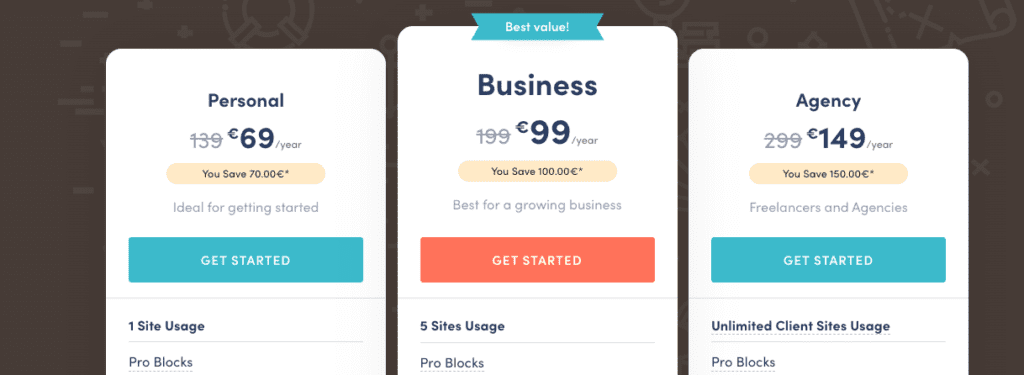
Pro adds tools for sites that need tighter control or richer features. WooCommerce builder blocks stand out, letting teams create custom product grids and single product layouts inside Gutenberg. Smaller stores get conversion-focused designs without bulky page builders. Pro also brings more animations and visibility rules to change what visitors see by device, user role, or timing. It adds dynamic flair and personalization without code.
Compared with Stackable, Spectra, and Kadence Blocks, Otter aims for balanced features and speed. Kadence focuses on design system controls. Spectra pairs closely with Astra. Stackable delivers polished UI and motion. Otter stays in the middle, avoids bloat, and still covers common needs with extras like conditional display.
Quick look at Free vs. Pro:
- Free: Core marketing blocks (containers, headings, buttons), tabs and accordions for clean structure, testimonials, pricing, and forms for trust and leads
- Pro: WooCommerce grid and single product blocks, more animation options, dynamic visibility conditions, a larger pattern library
Your decision comes down to workflow and goals. If Pro replaces several plugins – for Woo layouts, motion effects, and conditional logic – or saves hours on landing pages with ready-made patterns, the upgrade pays off. If your needs stop at simple layout wrappers or toggles, Free keeps the stack lean.
The best next step is a staging test on a homepage or key landing page. Track edit speed compared to your current setup, and watch site speed after adding blocks. If Otter trims plugin clutter without slowing performance – and makes page building smoother – it earns a spot in your toolbox.
If Spectra is the other plugin on your shortlist, we put Spectra vs Otter head to head on blocks, bloat and WooCommerce support.
Our roundup of the best Gutenberg plugins runs Superb Addons, Spectra and CoBlocks through the same questions.


Leave a Reply