
Framer can handle SEO without extra setup, but the plan a solopreneur chooses determines what’s available and what costs extra. Framer’s pricing page lists “Built-in SEO” as a Basic-tier feature, so core on-page controls come with the entry plan. The real differences show up on Pro, which adds site redirects, a staging environment, and branching with previews, tools that matter when URLs change or content gets tested.
Localization is an add-on on Basic, which means multilingual SEO costs extra per language rather than being bundled into the base plan. Framer prices are also region-priced. The figures referenced in this article were read in DKK, so local numbers will vary depending on where a site owner is based.
The sections that follow break down the specific controls Framer gives site owners, where the platform’s architectural limits sit compared to more traditional setups, and what the plan tiers cost over time. The takeaway up front: Framer can hold its own for SEO, but the plan choice shapes the workflow more than most builders make obvious.
On this page
- What Framer SEO Costs: Basic vs Pro in DKK
- Framer SEO Settings You Can Actually Control on Basic
- Writing Framer Meta Descriptions and Titles That Get Clicks
- Framer Sitemaps and Built-In Technical SEO
- Framer Redirects: Why Basic Users Need a Plan for URL Changes
- Framer Structured Data Compared to WordPress
- Framer SEO Checklist: Order of Setup After Launch
- Is Framer Good for SEO? The Bottom Line for Solopreneurs
- Frequently asked questions
What Framer SEO Costs: Basic vs Pro in DKK
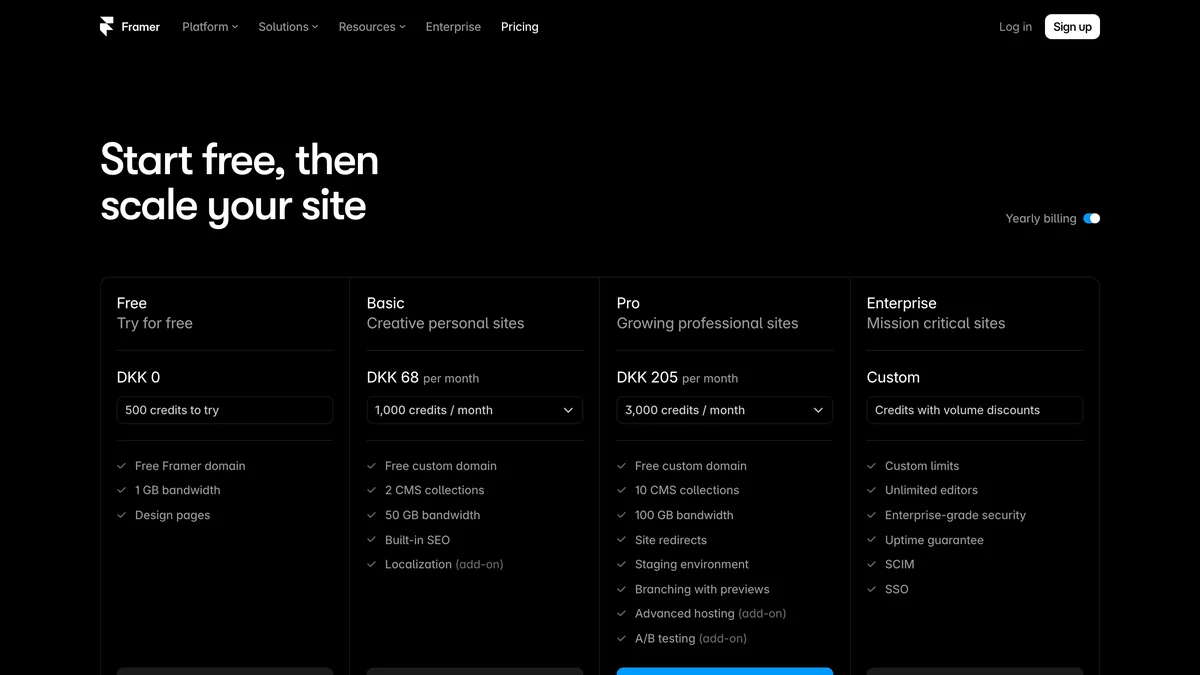
Framer’s pricing is region-priced, so the exact figures depend on where a site owner is based.
| Feature | Basic | Pro |
|---|---|---|
| Monthly price | DKK 68 | DKK 205 |
| CMS collections | 2 | 10 |
| Bandwidth | 50 GB | 100 GB |
| Site redirects | Not included | Included |
| Staging environment | Not included | Included |
| Branching with previews | Not included | Included |
The cost question for Framer SEO is whether the entry plan is enough or whether the Pro tier pays for itself. Basic at DKK 68 a month is affordable, and for a simple site with a couple of CMS collections, it covers the essentials. The moment a site grows past two collections or starts pushing against 50 GB of bandwidth, the upgrade pressure builds.
Pro costs nearly triple what Basic does, which is a meaningful jump for a solo founder tracking monthly costs. But it is the only way to get site redirects and a staging environment, and both protect SEO directly. Redirects matter when a URL changes. Without them, an old link returns a 404 and any accumulated authority is lost. Staging matters because it lets a site owner test content changes before they go live, which reduces the risk of shipping a broken page or a mistyped meta tag to production.
Localization is an add-on on Basic, so each additional language sits on top of the base plan rather than being bundled in. That means a site running two or three languages on Basic pays DKK 68 plus the per-language fee for every one of them, month after month. The cost adds up quickly for a solopreneur targeting multiple markets, and it is worth factoring into the plan decision from the start rather than discovering it after the first language is added.
Framer SEO Settings You Can Actually Control on Basic
The Framer SEO settings available on Basic cover the essentials a solopreneur needs to rank a simple site, and none of them require touching a line of code. The controls are per-page, which means each page gets its own title tag, meta description, Open Graph image, and an index/no-index toggle. That granularity matters because it lets a site owner tailor every URL to the search intent behind it rather than relying on site-wide defaults.
The controls worth knowing about:
Per-page title tags are set on each page individually, no code required. Every page should carry its own title rather than inheriting a site-wide default.
For title length, keep titles under 60 characters and place the primary keyword near the front. Search engines truncate longer titles in results, and a keyword up front signals relevance faster.
Per-page meta descriptions are set on each page, aiming for 150-160 characters. Lead with the specific outcome or value a visitor gets from the page, not a generic welcome line. A description that answers the searcher’s question earns the click more reliably than one that describes the site.
The exact menu locations for these fields were not verified for this article, so the focus here is on what each field should contain rather than where it sits in the interface. The principle is straightforward: a unique title and a description that matches the search intent behind each page. Two pages targeting different queries should never share the same title tag, and a description that reads like boilerplate wastes the space search engines give it.
For a blog under 100 posts, keeping the taxonomy lean helps these settings work harder. Five to eight categories and 15 to 25 tags keep the site structure clean, which makes it easier to write distinct titles and descriptions for each page instead of stretching similar ones across overlapping sections.
Writing Framer Meta Descriptions and Titles That Get Clicks
A Framer meta description works hardest when it is written for the query behind the page. The controls are per-page, so a site owner can tailor each one. Four principles keep that work focused.
A Framer meta description should run 150-160 characters and open with the main benefit or answer. Search engines cut off longer descriptions in results, and a description that starts with boilerplate wastes the opening that shows in the snippet. Leading with the concrete outcome a page delivers tells a searcher what the click will get them.
Page titles should stay under 60 characters and lead with the keyword a solopreneur would type. Titles longer than that get truncated in Google results, and the first few words carry the most weight for both display and relevance. A title that mirrors the searcher’s own phrasing signals a match faster than a clever or abstract one.
Treat the meta description as ad copy. State what the page delivers and why it is worth the click rather than describing the site or repeating the title. A line that reads like a pitch answers the “why click this” question before the searcher finishes the thought.
Every page gets its own custom metadata, or Framer falls back to a site-wide default. Pages without overrides inherit the global fallback, which means an entire site can end up showing the same generic title and description in results. That wastes a chance for relevance, since search engines use the title and description to decide what a page is about. A unique title and description per page is the cheapest SEO win a solopreneur can make in Framer.
Each URL gets its own title tag, meta description, and Open Graph image, so a site owner can tailor the metadata to match each page’s search intent instead of settling for one-size-fits-all defaults. For a CMS-driven blog, mapping the meta title and description fields to CMS columns means every post gets auto-populated, unique metadata without hand-writing each one. That combination of manual control on static pages and automation on collections covers both ends of a typical solopreneur site.
Framer Sitemaps and Built-In Technical SEO
Because “Built-in SEO” is a Basic-tier feature, the sitemap comes with the entry plan at DKK 68 a month, no Pro upgrade required. Framer automatically generates a sitemap.xml file at the site’s root URL, and it includes CMS collection pages, blog posts, case studies, and product pages the moment they are published.
Every time a site owner publishes a change, the sitemap updates on its own. New blog posts, new CMS items, new pages all appear without a manual step or a plugin to configure.
Getting the sitemap in front of Google still takes one deliberate action. After launch, the sitemap URL should be submitted to Google Search Console so Google knows the site exists and where its pages live. Google typically begins crawling a new site within 1 to 3 days of sitemap submission, but a brand-new domain can take 2 to 8 weeks to appear in search results. That window is normal, not a sign something is broken. Submitting the sitemap early just shortens the wait on the front end.
A sitemap does not require Pro. Basic’s Built-in SEO covers it. What Pro adds in this area is site redirects, which the next section covers in full. The short version: Framer handles page discovery for free on the entry plan, but managing URL changes after the fact is where the paid tier starts to matter.
Framer Redirects: Why Basic Users Need a Plan for URL Changes
Site redirects are a Pro feature on Framer, which means a Basic user at DKK 68 a month has no way to create a 301 redirect when a page URL changes. That single gap is one of the more consequential Framer SEO limitations for solopreneurs, because it turns an otherwise routine edit into a permanent problem.
A site owner on Basic decides to rename a blog post slug or reorganize a product page URL. The change itself takes seconds in the editor. But the old URL now returns a 404, and any backlinks pointing at it, any bookmarks a visitor saved, any social shares that linked to it, all break at once. Without a redirect, there is no way to tell search engines or browsers that the content moved. The accumulated authority those links carried goes nowhere.
This is why URL structure needs to be treated as a decision made once, carefully, before publishing on Basic. Choosing descriptive, stable slugs at launch and sticking with them avoids the trap entirely. Renaming a slug later means either accepting the broken links or upgrading to Pro to fix them properly.
The Pro tier at DKK 205 a month changes the picture. It includes the redirect manager, which lets a site owner set up 301 and 302 redirects through the interface rather than touching config files. Combined with the staging environment and branching with previews, Pro gives a solopreneur the tools to restructure content safely: test the changes in staging, preview them on a branch, and ship with redirects in place so nothing breaks in the process. For a site that expects to grow, expand its content library, or reorganize its architecture, that DKK 137 monthly difference between plans starts to look like a low-cost safeguard against a gradual loss of rankings.
Framer Structured Data Compared to WordPress

Framer does not include a native structured data builder, so adding JSON-LD schema means pasting custom code into the site head. There is no interface for Article, FAQ, Product, or LocalBusiness schema. A site owner writes the raw JSON-LD by hand and injects it through a custom code head block under Project Settings → General → Custom Code. It is doable, but it is manual, and it is the kind of task that assumes a comfort level with markup.
WordPress with plugins like Yoast or RankMath handles schema generation and real-time SEO scoring by default. Yoast asks a few questions about the content type and produces the right structured data automatically, while also flagging issues as a post is written. Framer leaves those settings to the site owner or an external tool. There is no native audit or scoring feature, nothing equivalent to the live checklist those plugins show in the editor.
Framer’s statically generated output and built-in technical SEO are strong. Pages are pre-built at publish time and served through a global edge CDN, with no server-side rendering delay. WordPress wins on SEO workflow depth, and Framer wins on technical performance. The right choice depends on which side a site owner values more: a guided, automated workflow or a fast, clean output that asks for more hands-on setup in exchange.
Schema is one part of that choice, and the Framer vs WordPress comparison covers the rest.
For solopreneurs, the practical advice is to budget for the gap. Plan at least 2-3 hours of technical setup after launch to cover schema and other gaps Framer does not handle natively. That time covers writing and injecting JSON-LD for the page types that matter most, checking the robots.txt file, and verifying the sitemap is being picked up in Search Console.
Framer SEO Checklist: Order of Setup After Launch
A Framer SEO checklist that works in practice follows a specific order, because each step builds on the one before it. The sequence below takes a site owner from metadata through indexing to schema and URL stability, and it maps cleanly onto what Framer does natively versus what needs manual attention.
Set a unique title and meta description on every page. Each title should stay under 60 characters and lead with the keyword a searcher would type. Each meta description should run 150-160 characters and open with the value or outcome the page delivers. Framer’s per-page controls make this straightforward, and skipping it means the site-wide fallback shows up in search results instead.
Submit the sitemap to Google Search Console and confirm it is being crawled. Framer generates the sitemap automatically at the site’s root URL, but Google needs to be told where it lives. After submission, indexing for a new domain typically takes 2-8 weeks. That window is normal, and checking the sitemap report in Search Console shows whether Google has picked it up.
Add Organization schema (JSON-LD) via custom code if rich results are desired. Framer has no native structured data builder, so Organization schema goes in through a custom code head block. This step is optional but worth doing, since it gives search engines a clear signal about the business behind the site.
If on Basic, lock in URL slugs now. Without Pro redirects, any later slug change sends the old URL to a 404 and loses the link equity it accumulated. Deciding on stable, descriptive slugs at launch and sticking with them is the cheapest safeguard a Basic user has.
For a solopreneur working through this checklist, the pattern is simple: handle what Framer automates, verify what it generates, and plan around the gaps that require manual setup or a Pro upgrade. The order matters because metadata and indexing establish the baseline, schema enhances it, and URL stability protects everything that comes after. Working through these four steps in sequence covers the essentials without leaving any part of the setup to chance.
Is Framer Good for SEO? The Bottom Line for Solopreneurs
Framer is good for SEO, with one qualification that has more to do with planning than with the platform itself. Basic includes Built-in SEO, and nearly every on-page control a solo founder needs, from per-page titles and descriptions to an auto-generated sitemap, is available without touching the Pro tier. A site owner who sets up metadata properly, submits the sitemap, and adds schema through custom code gets a solid technical foundation on the entry plan.
The main friction is plan gating. Site redirects require Pro, and localization is an add-on on Basic, which means those two needs, not the core SEO features, determine the real monthly cost. A single-market site with stable URL slugs runs comfortably on Basic at DKK 68 a month. A site that expects to restructure content, expand into multiple languages, or grow its CMS collections will hit the Pro boundary sooner than the marketing pages suggest. That is not a flaw in Framer’s SEO capability. It is a pricing decision a solopreneur should make deliberately rather than discovering after a URL change breaks a collection of backlinks.
The WordPress comparison clarifies the trade. Framer trades the plugin ecosystem for cleaner output: statically generated pages, a global edge CDN, and technical SEO handled at the platform level. WordPress offers guided schema generation and real-time SEO scoring through plugins, but at the cost of more components to maintain. For a solo founder who would rather not manage a plugin stack, Framer’s simpler architecture is a fair exchange, and migrating from WordPress without changing the domain does not inherently hurt rankings when redirects are handled correctly.
For a solopreneur who can commit to permanent URL structures on Basic, the answer is a clear yes. The platform delivers strong SEO fundamentals without a developer, covers metadata and sitemap generation automatically, and keeps the technical side fast and clean. The responsibility that stays with the site owner is discipline: stable slugs, unique metadata per page, and a realistic read on when the Pro upgrade becomes necessary. Framer does not do the thinking for anyone, but it gives the tools to execute well. For most solo founders, that is the right balance.
Frequently asked questions
Is Framer good for SEO?
For a solopreneur who can commit to permanent URLs, yes. Framer lists built-in SEO as a Basic-tier feature, so the core on-page controls arrive with the entry plan, and metadata and sitemap generation are handled without a plugin stack. What stays your job is stable slugs and unique metadata on every page.
Do you need Framer Pro for SEO?
Only for two things. Site redirects are a Pro feature, so if URLs will change after launch, Basic gives you no way to repair them. Pro also adds a staging environment and branching with previews, which matter when content gets tested before it ships.
Does Framer handle multilingual SEO?
Localization is an add-on on Basic rather than an included feature, and it is priced per language. Multilingual SEO therefore costs extra on top of the plan.


Leave a Reply