I’ve been a solo operator long enough to know the drill. You need pages live fast – landing pages, lead forms, pricing tables. No budget for a designer. No time for headaches. You want clean, on-brand pages, and you need them now.
Here’s the decision I keep seeing: pick an addon with a big block library like Otter, more pieces to drop in, or go with Superb Addons, which leans into layout and design tools out of the box. Both aim to speed up page creation. They just solve the problem in different ways.
I’m focused on what moves the needle: free tier access, how fast full pages come together, control over the design system, and real costs. Fresh tests on WordPress with block themes, no caching tricks, no staging magic. Real results, not fluff. If you’re after the best Gutenberg addon for solopreneurs and founders who want results without fuss, this will help sort the choice.
On this page
- Superb Addons vs Otter in Gutenberg, where features overlap and differ
- Choosing block variety or layout power to match your workflow
- How to use Theme Designer in Superb Addons for flexible, on‑brand design
- Templates and patterns that speed up publishing in the free tier
- Gutenberg plugin performance, pricing, and value for most users
Superb Addons vs Otter in Gutenberg, where features overlap and differ
Superb Addons and Otter both try to make Gutenberg page building faster. Each ships with core blocks – buttons, grids, testimonials – and a library of patterns and section templates. Drop them in, tweak a few settings, ship the page.
Both speed up common builds. Landing pages with calls to action, feature highlights, and social proof come together fast. You won’t be stuck searching for basics in either one.
Here’s the split. Superb Addons leans into layout and design system control. Global spacing that updates whole sections, color tokens that sync across the site, typography presets that keep headings and body text consistent. Fewer clicks, broad changes.
Otter goes broad on block variety. Countdowns for sale timers, smooth sliders, tidy pricing tables, compact FAQ blocks, and more. Lots of specific pieces to assemble into a final layout.
In practice:
- Superb Addons lets you drop full hero sections or CTAs in one move.
- Otter asks for several smaller blocks to build the same areas.
- Superb emphasizes cohesive design control, Otter emphasizes variety.
- The trade-off sits between global style settings and raw block count.
I’d pick Superb Addons for fast results and consistent design from the start. I’d reach for Otter when a larger toolbox of unique blocks matters more, even if it needs extra setup.
Choosing block variety or layout power to match your workflow

Gutenberg builds tend to fall into two camps: Otter’s grab bag of blocks or Superb’s tight layout kits. Otter packs in niche pieces like countdowns for flash sales, smooth sliders, and ready-to-use pricing tables. Fewer extra plugins, fewer moving parts. Superb focuses on pre-styled sections where spacing and typography line up across the page. Drop in a full hero or feature section in one move and move on.
A landing page test with a hero, features, social proof, and a call to action made the contrast obvious. Superb Addons needed fewer total blocks since each kit bundles multiple elements in one. Edits stayed light because global style controls covered most tweaks. Otter took more individual blocks to reach a similar layout, but it suited anyone who likes to dial in each detail and fine-tune every piece.
The learning curve splits too. Otter suits people who want to tweak block by block and customize every corner. Superb suits non-designers or busy teams who want clean baseline pages fast without debating spacing or font choices.
Workflow notes:
- Otter offers specialized blocks, which reduces reliance on third-party add-ons.
- Superb needs fewer edits because cohesive layout kits speed up build times.
- Maintenance leans toward Superb since centralized style settings push changes across pages, while Otter often needs per-block updates unless styles tie closely to the theme.
How to use Theme Designer in Superb Addons for flexible, on‑brand design
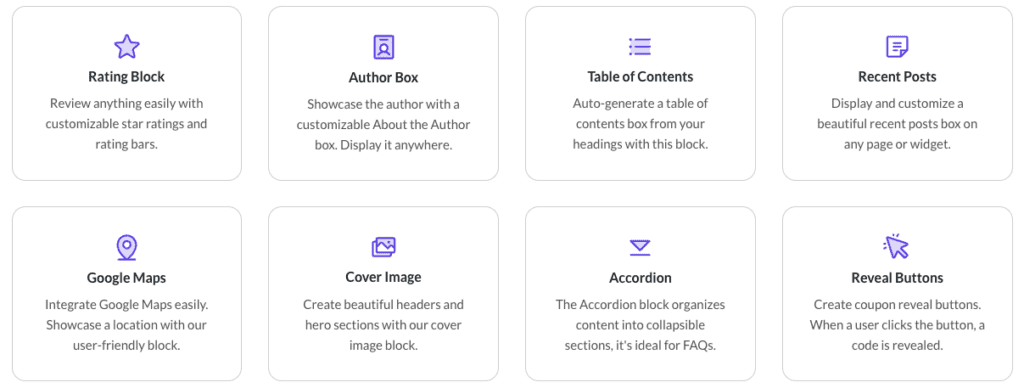
I think Superb Addons’ Theme Designer works like a steady design assistant that keeps branding tight with almost no extra lift. Set colors, fonts, and spacing once, then drop in new blocks and sections. They follow the rules by default. Pages stay consistent, and the busywork drops fast.
I like how Superb uses design tokens, basically reusable style shortcuts for color and typography. Teams stay aligned because everyone pulls from the same set. No random shades slipping in, no rogue font sizes.
Global changes feel fast. I tweaked the base spacing scale in Theme Designer, and paddings and margins across earlier sections updated on their own. No digging through blocks one by one. Big layout shifts land in minutes.
Accessibility gets real attention. The system enforces type scales and contrast presets, so text stays readable across the site. Per-block styling tends to miss these basics, which hurts people and causes cleanup later.
Time savings show up during rebrands or mid-project refreshes. Swapping in a new color palette for an existing page took under two minutes with Theme Designer. Doing it block by block usually takes 10 to 15 minutes.
Here’s why Theme Designer workflows help:
- Styles set once get inherited automatically by new sections
- Design tokens keep colors and fonts consistent across edits
- Global spacing adjustments update all relevant areas at once
- Built-in accessibility settings reduce styling mistakes
- Quick restyling saves loads of editing time during updates
Templates and patterns that speed up publishing in the free tier
Templates and patterns make it fast to ship pages with Gutenberg add-ons. Grab a ready-made section or form, tweak a few details, and publish. It saves time and keeps styles consistent across the site.
Superb Addons nails this with a free library of clean forms and extra design helpers. Lead-gen pages work with their built-in forms alone, so no extra plugin hunt just to capture emails. Templates sit in clear groups like hero sections, features, and pricing tables. Picking what fits feels quick.
Otter’s free tier offers more block types and patterns, but locks many advanced templates behind premium. Want complex layouts or specialized forms without paying? Expect basic Gutenberg form workarounds or extra plugins. The broader categories help with discovery, yet they don’t always speed up finding one exact pattern.
- Superb organizes patterns by page sections like hero, features, and pricing, which speeds selection
- Otter offers wider block variety but groups them broadly, pushing exploration over speed
- Superb swaps full sections while keeping spacing and styles intact
- Otter needs per-block tweaks after swaps to maintain consistent spacing
- Free-tier limits push upgrades sooner on Otter for complex builds, while Superb’s free set covers more upfront
Here’s a real snag mid-build. Swapping one hero template for another in Superb kept margins and font sizes lined up without extra work. Swapping a similar part in Otter meant fixing each block afterward to keep things tidy. Tight deadlines make that grind feel long.
Gutenberg plugin performance, pricing, and value for most users
Superb Addons and Otter feel quick on a mid-range laptop. With one plugin active, edits didn’t lag, and page previews loaded fast. Lighthouse scores on simple landing pages came out close when using block themes and default images. Heavy media slowed both at about the same rate.
Where things split is free vs. premium features. Superb Addons includes forms and advanced design controls without extra plugins or fees. Otter locks many of those behind paid plans, which pushes solo founders into extra costs sooner if they want integrated forms or specialized blocks.
Pricing lines up with that picture. Superb’s premium tier costs less than Otter’s. For people running several sites or keeping tight budgets, that gap grows over time.
Here’s a quick look at strengths:
- Otter: Simple setup, stable experience, backed by ThemeIsle’s reputation
- Superb Addons: Rich free tier with usable forms and design tools, lower premium price, faster section-based workflow
I’d pick Otter for folks who want a bigger toolbox, lots of unique blocks, and the comfort of an established brand. I’d point budget‑minded builders toward Superb Addons if speed matters, especially for dropping in full sections fast and avoiding early paywalls for forms or global styles.
Best next step: set up staging sites and build a few common pages with each plugin. Time the process under real conditions. Compare results and costs, then choose the one that fits your workflow and budget before going live.


Leave a Reply