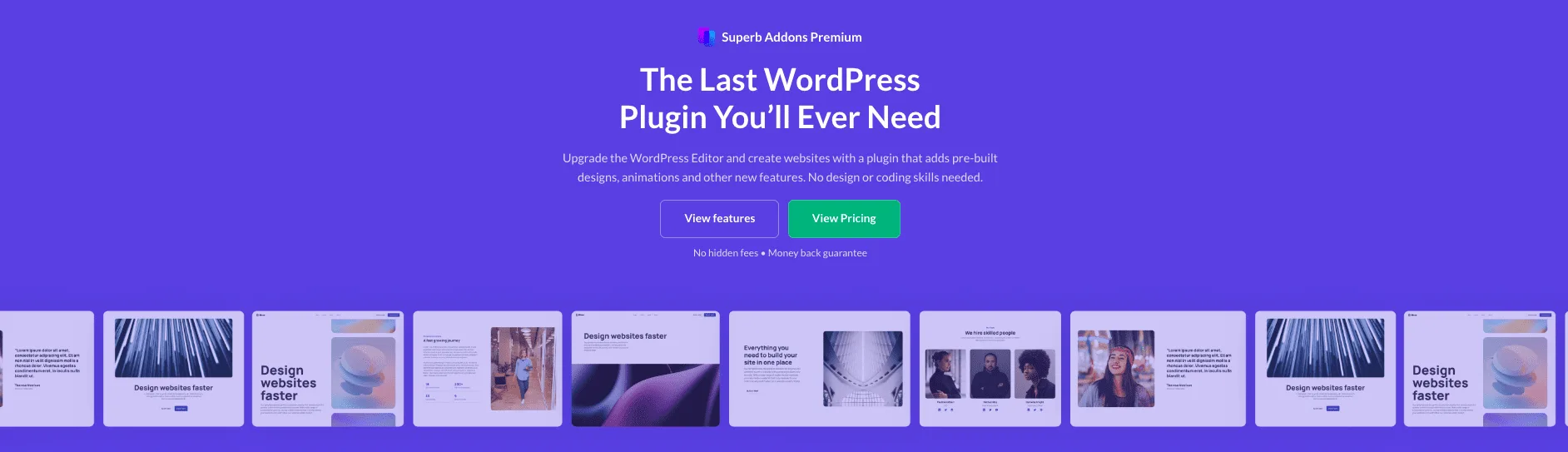
Superb Addons gives Gutenberg users more creative room without slowing sites down. The plugin stays light, with clean code and a focus on speed. Bloggers get sharper post layouts. Agencies with lots of client sites get faster publishing and stable pages that keep visitors engaged.
Heavy page builders add bulk and friction. Complex tools waste time. This toolkit skips extras and sticks to useful blocks like Table of Contents, Google Maps, and animated headings. Content stands out, while pages stay fast. Design help comes from pre-built patterns and a Theme Designer for global styles. Markup follows SEO best practices and respects accessibility standards.
The review examines how Superb Addons addresses common challenges. Assets load only when needed, which cuts load times and prevents bloat. Responsive controls stay consistent across blocks. Teams see smoother workflows, a better user experience, and measurable improvements in metrics such as time on page and click-through rates on calls to action.
On this page
- Blocks, patterns, and a Theme Designer without the bloat
- Key features that speed up publishing and lift conversions
- How to extend the WordPress Navigation block with Superb Addons
- Responsive block control to make any theme mobile friendly
- Free blocks for everyday needs without extra add‑ons
- Adding animations and custom CSS without slowing pages
- Compatibility with Elementor and Divi for hybrid workflows
- Lightweight performance, SEO benefits, and pricing basics
- Features and pricing overview of Superb Addons
Blocks, patterns, and a Theme Designer without the bloat
Superb Addons has a simple three-layer setup that makes page building feel easy. At the base are individual blocks for text, images, and buttons. On top sit patterns, which group blocks into ready-made sections like hero banners, feature areas, testimonials, pricing tables, and FAQs. The last layer is the Theme Designer, a tool that sets global styles – fonts, colors, spacing, container widths – so the site stays consistent.
Patterns are grouped by common site types to speed up your work. Blogs get post layouts and author bios. Business sites have service sections and team intros. Ecommerce sites offer product showcases. Local services get contact forms and maps. Portfolios feature galleries and case studies. Drop a pattern in with one click, then tweak the details.
The Theme Designer works like a central style hub. Set typography once – headings and body text – and those choices apply across blocks and patterns through design tokens. Colors update everywhere too, so buttons and links stay on-brand. Spacing rules keep margins and padding even, which prevents inconsistent layouts.
A key advantage: the blocks align with Gutenberg’s core controls. Users don’t face a steep learning curve or deal with unfamiliar interfaces when editing content. It feels native, just more capable.
Agencies managing multiple client sites can export and import Theme Designer presets. Share a brand setup and keep everything consistent without rebuilding each project from scratch.
Comparison content leans on tables more than most, and building SEO optimized WordPress tables is what gets them into search results.
Spectra, Otter Blocks and CoBlocks get weighed against it in our roundup of the best Gutenberg plugins.
Key features that speed up publishing and lift conversions
Speed and smooth page interactions matter when content needs to grab attention fast. Superb Addons packs focused features that keep workflows quick and visitors engaged, turning casual readers into loyal fans or customers without fuss.
The Table of Contents block saves time for creators and readers. It builds anchor links from headings, so people jump straight to what they want with smooth scroll. Sticky styles keep it visible down long posts, so no hunting for sections. The Google Maps block brings interactive maps into pages while staying light by lazy loading only when needed. Custom markers point out key spots, zoom levels adjust with a click, and styles switch between light or dark to match a site’s look.
Trust matters online, and the Rating and Review blocks help build it fast. Star icons catch eyes, and schema-ready fields boost SEO behind the scenes. Inline summaries let visitors scan reviews at a glance without digging through paragraphs. For FAQs or dense info, the Accordion block shines, with keyboard navigation for accessibility and deep linking so direct links to specific panels are easy to share.
Calls-to-action get careful treatment. This block pairs headlines, copy text, and buttons with smart spacing presets that make CTAs stand out. Click-through rates climb naturally because everything feels clear and inviting, not cluttered or pushy.
Fresh content stays front-and-center with Recent Posts With Images. It pulls featured images alongside categories and dates in neat grid or list layouts that fit any style.
Visual flair comes from Cover Image and Animated Heading blocks. Subtle motion effects and overlay controls draw focus without heavy scripts that slow pages. Enough attention-grabbing to work, without going overboard.
Sharing is handled by a separate plugin from the same team, which we look at in our review of Superb Social Media Share Buttons and Follow Buttons.
How to extend the WordPress Navigation block with Superb Addons
Superb Addons upgrades the native WordPress Navigation block without piling on extra plugins. It adds styling controls for hover effects, active link states, dropdown animations, and spacing. Menus feel polished and interactive, not flat or basic. On mobile, the menu turns into an off-canvas panel with slide or fade transitions. The toggle icon isn’t stuck in one spot, and its size and position adjust to fit the design.
Sticky navigation gets smarter. As the page scrolls, the header can shrink for a compact reading mode. A subtle shadow can separate it from the content below. Navigation stays accessible without getting in the way during long reads.
Submenus get attention too. Superb Addons lets teams fine-tune indicators and touch targets so tapping through nested links feels natural on phones. Fewer accidental taps, less frustration.
Color presets sync with the Theme Designer’s palette. Menus match brand colors automatically. No extra setup. Under the hood, most effects run on CSS for speed and efficiency. JavaScript handles toggles and accessibility features where needed.
It works with existing WordPress menus, so there’s no rebuild or theme swap. Current structures stay in place. Upgrades feel smooth and straightforward.
Responsive block control to make any theme mobile friendly
Responsive block control makes any WordPress theme look sharp on phones without hours of edits. More visitors browse on mobile now, so sites that don’t adapt lose people fast. Search engines pick up on that. Superb Addons offers tools creators use to fine-tune how content looks and works on different screens, improving usability and SEO together.
A key feature is per‑device visibility. Want a block only on desktop, or hidden on small screens? Click to toggle and keep layouts focused for each view. Typography scales by breakpoint too. Headlines stay big and bold on desktop, then step down on mobile without wrecking hierarchy or crowding tiny screens.
Complex grids get careful treatment. Containers resize fluidly, and columns stack neatly when space gets tight. No squished content or sideways scrolling. Margins and padding adjust per device, so buttons feel touchable and images don’t clip off edges. Visual balance holds up on any gadget.
Media query presets cover common breakpoints from 1200px to 480px, so responsive behavior feels predictable out of the box. Editors also get preview modes for desktop, tablet, and phone. Seeing the page before publish catches layout problems early and saves rework.
These controls help Core Web Vitals too. Fewer layout shifts from oversized elements moving after load means steadier pages. Menus feel solid, long posts scroll without jumps, and visitors stay longer. Search performance benefits from that stability.
Free blocks for everyday needs without extra add‑ons
Superb Addons packs useful free blocks for everyday site tasks, no paid add-ons needed. Table of Contents, Rating and Review, Google Maps, Accordion, About the Author, Recent Posts with Images, Cover Image, and Coupon Reveal work right away. They handle common jobs well, from helping readers jump through long posts with a TOC to adding interactive maps without dragging down performance.
Each block stays close to native Gutenberg controls, so there’s no new interface to learn. Editing stays familiar and fast, while offering more creative choices than core blocks alone.
Rating and Review include schema markup, not just star icons. Search engines read reviews more clearly, which can trigger rich snippets in results. This is useful for sites built on user feedback.
Coupon Reveal adds engagement without pop-ups. Discounts show after a delay or on click, with interaction tracking. The code stays light and performance stays sharp.
Personal details help build trust. The About the Author box automatically pulls the writer’s avatar, short bio, and social links. Posts feel more human, which encourages readers to stick around.
Recent Posts With Images does more than list articles. It supports category filters, so site owners can feature cornerstone guides or related stories where readers will notice them.
These blocks load assets only when used on a page, not across the whole site. The selective loading keeps pages lean, so sites stay fast while gaining richer features from this no-cost toolkit.
Adding animations and custom CSS without slowing pages
Animations add life to Gutenberg blocks with Superb Addons while keeping pages fast. They rely on CSS, not heavy scripts. Think fade-ins, slides, and zooms that trigger on scroll or after a delay. Each block lets users set duration, delay, and easing for precise timing. CSS-first keeps motion smooth and avoids jank.
Different screens call for different motion levels. Desktop and tablet can show richer effects, but mobile can stay subtle or skip motion to avoid crowding small screens. Accessibility comes first. Users with reduced-motion preferences see toned-down effects or none at all, automatically.
Power users get a custom CSS field at the block or page level. No child themes required. Drop in small tweaks right where they’re needed. It keeps styling flexible without adding maintenance work.
Animation queuing staggers effects so items don’t fire at once. CPU load stays low. Scrolling still feels responsive under pressure. Inline CSS stays tidy as well because repeated rules get consolidated to prevent HTML bloat.
Standout options include:
- Fade effects that reveal content
- Sliding motions from multiple directions
- Zoom in and out for emphasis
- Scroll-triggered reveals when blocks enter view
These choices bring punchy visuals with careful performance design. Sites look lively and stay quick.
Compatibility with Elementor and Divi for hybrid workflows
Superb Addons works with popular page builders like Elementor and Divi, so teams can keep legacy layouts while moving new work into Gutenberg. There’s no forced switch. Old pages stay put in their builders, and new pages roll out with Superb Addons blocks in Gutenberg. No downtime, no rushed rework.
Pre-built sections integrate seamlessly inside Gutenberg. Teams can replace heavy builder pages in stages with lean block layouts that load faster and are easier to maintain. No sudden overhaul – just steady progress.
Superb Addons isolates styles with CSS resets and scoped rules. It avoids clashes with Elementor or Divi classes and global styles. The front-end stays clean, and edits don’t trigger unexpected visual bugs.
Shared brand tokens in Theme Designer keep typography and colors aligned everywhere. Whether a page is built in a classic builder or with blocks in Gutenberg, it looks consistent to visitors. Branding feels cohesive, not pieced together.
Navigation, headers, and footers often stay theme or builder driven during migrations. Sites keep familiar structures while content areas shift to modern blocks powered by Superb Addons.
Common features – Table of Contents, ratings, maps, and more – live in one lightweight toolkit that works across editors. Fewer plugins, less dashboard clutter, and richer features in both Gutenberg posts and older builder pages.
Editors get flexibility. They can mix builder-made landing pages with newer posts using Superb Addons blocks until a full move makes sense. Workflows stay smooth, and sites evolve at a natural pace without losing momentum.
Lightweight performance, SEO benefits, and pricing basics
Pages stay light because only the styles and scripts for the blocks in use get loaded. Conditional assets cut HTTP requests, so pages start faster and feel snappier. LCP and TBT benefit, and jQuery and other bulky libraries stay out. Modern JavaScript modules and small CSS bundles keep file sizes low and interactions smooth.
Blocks rely on semantic HTML with ARIA to improve accessibility and help search engines parse structure. Interactive pieces look good and read well for assistive tech, which gives crawlers clearer context too. Maps and images load lazily, so heavy visuals don’t slow the first paint. Content shows up when visitors reach it, which lifts INP on long, media-heavy pages.
Rating and Review blocks ship with clean schema that aligns with Google’s structured data rules. This supports rich snippets and stable visibility without risking issues from messy markup.
Performance checks are easy with PageSpeed Insights or Lighthouse. Typical sites with a handful of blocks keep combined CSS and JS under about 100 KB, which is light compared to many plugins. Defaults aim for speed from the start, so no complex setup is needed unless deeper tuning makes sense.
Advanced setups work well with server caching and CDNs. Power users can squeeze extra speed with minimal friction.
Key SEO and performance tactics include:
- Conditional asset loading based on block usage
- ES module JavaScript in place of legacy dependencies
- Semantic HTML with ARIA for accessibility and SEO
- Lazy-loaded maps and images to trim initial payloads
- Clean schema markup that supports rich results
Features and pricing overview of Superb Addons
Superb Addons puts practical blocks, ready‑made patterns, and a Theme Designer in one lightweight plugin that fits naturally in Gutenberg. It helps site owners publish faster, gives visitors a smoother experience, and boosts conversions without adding bloat. The free version covers the basics well, good for blogs or simple business sites that want features like a Table of Contents or Google Maps.
Teams that want faster workflows can upgrade for advanced blocks, a larger pattern library, and full Theme Designer access for global styles that keep branding consistent across pages. Higher tiers add more animation options and stronger navigation controls, so menus feel polished and content sections look lively. Plans follow familiar licensing rules: expect annual fees for updates and support with site limits, plus refund windows of two to four weeks. Check the official product page for exact terms.
Testing on a staging site first makes sense. Users see changes in PageSpeed and Lighthouse before pushing updates live. Compatibility holds across current WordPress versions, supports Classic Widgets where needed, and cooperates with other builders in hybrid setups.
Getting started is quick. Install from the WordPress.org repository or visit the website to compare plans side by side. Keep an eye on the official docs to catch new features and updates as they land. Picking the right tier then becomes straightforward based on site size and goals, whether sticking with the free essentials or stepping up to pro tools that save time and polish each page.

Leave a Reply