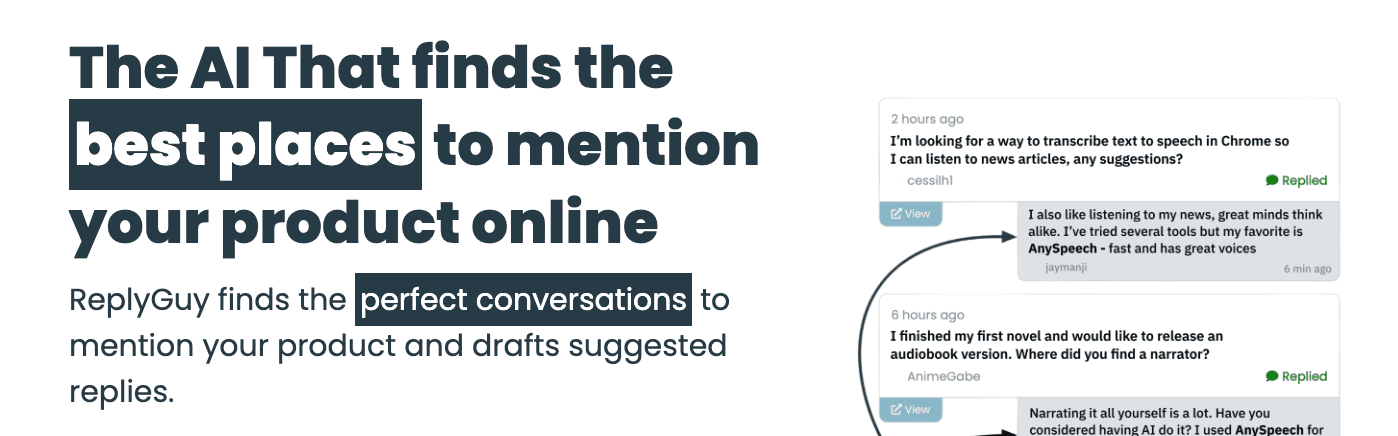
This review of ReplyGuy, an AI tool for social media lead generation, walks through the full workflow. It starts with picking strong keywords, then moves into how the system spots public conversations across platforms and communities. It shows how replies get drafted to mention a product only when it makes sense. The aim is simple: save hours spent searching and replying by hand, and turn that work into a few focused minutes a day.
It explains where ReplyGuy works well, especially in niche B2B spaces or with technical products that spark specific questions. It also flags weak spots in broad consumer threads where context gets messy. The examples come from real use, not hype. People exploring automated social listening get enough detail to judge if ReplyGuy earns a slot in their toolkit or just adds more noise to feeds.
On this page
How ReplyGuy works from keyword setup to suggested replies
- Set up a project that matches the campaign goals.
- Add keyword groups with brand names, competitor mentions, and problem-focused phrases.
- Connect social sources like Twitter/X, Reddit, public LinkedIn posts, Hacker News, and selected forums through RSS or APIs.
- Apply filters for language, regions, and a minimum engagement level.
- Check a daily queue of posts that match the keywords and filters.
- Approve or tweak AI-suggested replies to fit the tone and context.
- Post manually or paste responses into native apps for final sharing.
ReplyGuy looks past exact matches and uses semantic similarity to find close intent. If someone asks for “Zapier alternatives,” it links that to automation tools even without the exact phrase. It also avoids false alarms with negative keywords, so phrases like “college project” don’t trigger off-target matches. Conversations stay relevant and focused on real opportunities.
Each matched post includes a confidence score that reflects relevance. It also shows the source link, timestamp, and short notes about why it was flagged, like “matched via phrase: ‘looking for…’”. The system orders items by freshness and engagement so users focus on topics where a reply will get noticed.
AI drafts help, but humans stay in charge. No message goes out without explicit approval. Users adjust tone so it sounds natural, add product details only they know, and include any required disclosures for each platform. This mix of smart tech and human judgment keeps interactions authentic while saving time.
Core features that matter in daily use
ReplyGuy starts with keyword packs that go beyond basic lists. Packs include branded terms, competitor names, and intent phrases like “how to migrate from X” or “tool for cold outreach.” Each pack has its own thresholds and notifications. Users target people by what they want, which keeps replies focused. Founders skip vague mentions and jump on signals that show real interest.
Reply modes match different situations. A quick tip gives a short nudge in the right direction. A fuller answer adds context, links, and proof to build trust. A soft call to action nudges readers toward a next step without pressure. Presets like friendly, technical, or concise keep tone steady while still sounding human.
Noise filters matter on busy feeds. Controls work by platform. On Reddit, whitelist specific subreddits. On LinkedIn, match keywords in the post body only, not comments. Set minimum upvotes or likes so low-signal posts never hit the queue. The feed fills with threads where engagement points to real opportunity.
Collaboration works well for solo users and teams. A shared inbox gathers matched posts in one place. Approval trails show who cleared each reply, so ownership stays obvious when several people touch a conversation. Saved snippets store pricing notes, feature summaries, and other quick inserts. Even single users get value by standardizing answers and seeing which messages land over time.
Where ReplyGuy fits in the market and what sets it apart
ReplyGuy focuses on conversations where people want help or plan to buy, not just general brand chatter. It sits between broad monitoring tools like Brand24 or Mention and heavy outreach automation. The goal isn’t more alerts – it’s better moments to join a thread and be useful.
Its intent detection is the standout. Instead of flagging every product mention, it looks for signals of action, like “looking for a tool” or “need help with X.” These cues tend to convert at higher rates because the person already leans toward a decision, not small talk.
Coverage trades breadth for depth. It doesn’t try to watch every platform. It goes deeper in fewer places, especially forums and technical communities with longer, more detailed posts. This focus gives stronger context and more relevant openings than classic listeners that skim many channels.
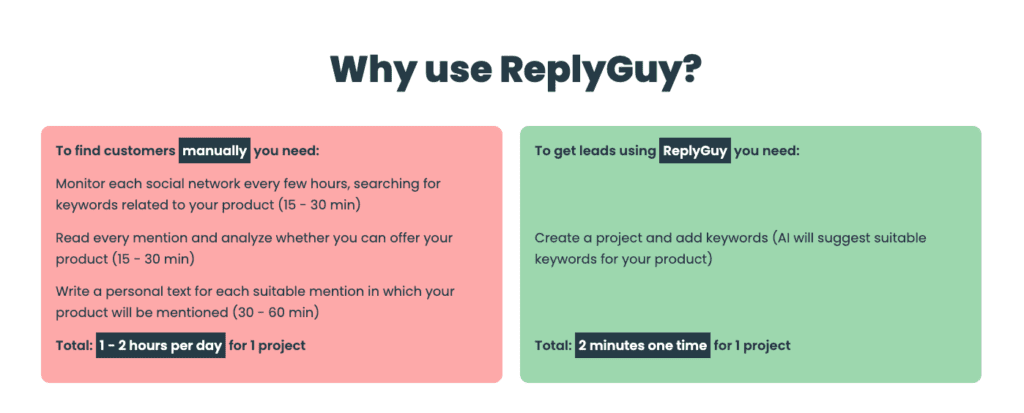
Speed on replies makes a real difference. Manual drafts take five to ten minutes per opportunity. ReplyGuy generates a first draft in 30 to 60 seconds. Teams stay quick and consistent, then polish the message to keep a human voice.
When ReplyGuy works best and when it falls short
ReplyGuy works best where people talk through concrete problems and fixes. B2B SaaS, developer tools, analytics, and marketing software all fit. Buyers ask clear questions in public, like “alternatives to Help Scout” or “best tool for tracking user behavior.” Those threads show active intent, and it’s easier to find real leads without sifting through junk.
Broad consumer products and entertainment apps don’t fit well. Decisions happen in ads, influencer promos, or private chats, not open Q&A. Public conversations are rare and scattered, and the system chases weak signals that rarely turn into solid engagement.
A teaching-first style gets results. Replies that explain a solution, then mention how a tool handles one part of it, feel helpful instead of pushy. Keep about 70% of each response on education, not promotion. That ratio lowers backlash and keeps posts welcome.
Community rules matter. Some forums forbid self-promo. Ignoring rules risks bans or deletions. Negative keywords help avoid spaces where pitching isn’t allowed. Disclose any affiliation when norms call for it. That builds trust and avoids awkward surprises.
- Best-fit scenarios:
• B2B SaaS with clear problem-focused phrases
• Developer tools and analytics platforms
• Marketing tooling discussed in public threads - Less effective scenarios:
• Broad consumer products lacking direct questions
• Entertainment apps relying on influencer marketing
• Categories with limited public buying signals
ReplyGuy pricing, ROI, and how to choose the right plan
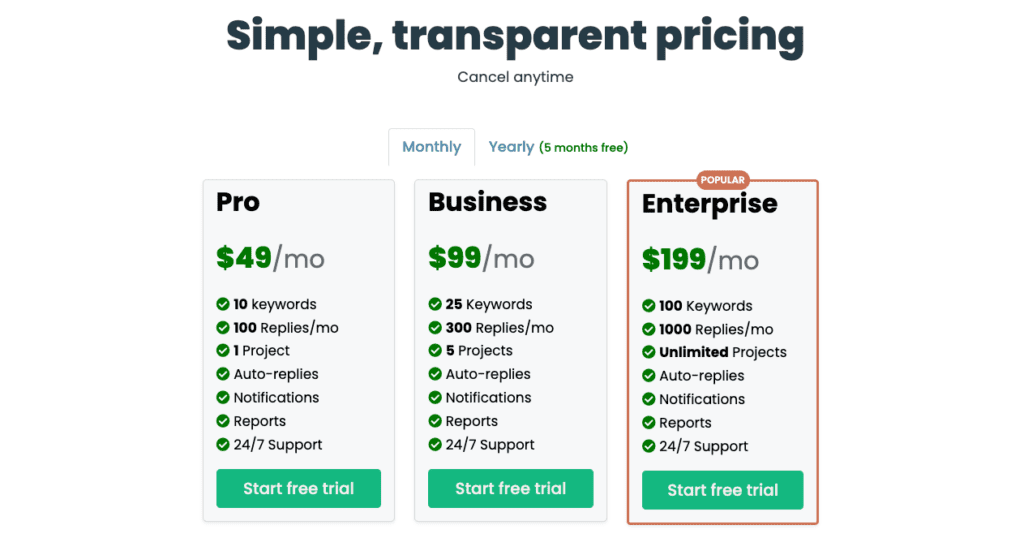
ReplyGuy’s pricing makes it easy for founders and solopreneurs to ramp up as needs grow. Starter is $49 per month and fits 5 to 10 keywords across a few platforms, good for a solo setup or early social listening. Growth runs about $149 to $199 monthly, adds more keywords, higher daily reply limits, and team seats. Pro ranges from $299 to $499 per month for agencies or multi-brand monitoring, with advanced filters and priority support.
The math matters. Picture the Growth plan surfacing around 120 qualified conversations in a month. Respond to about 40% after tightening the AI drafts. Convert 3% to 5% of those into paid trials or customers. Now acquisition costs line up against lifetime value, and pricing feels like a clear ROI instead of a guess.
Time savings stack up fast. Manual scans of Twitter/X, Reddit, and LinkedIn for one to two hours a day add up to nearly a full workweek each month. A short 10 to 20 minute review instead frees 20 to 30 hours for higher-impact work.
A focused pilot beats a vague rollout. Run a two to three week trial with three keyword packs: brand mentions, competitors, and problem-focused phrases. Track approval rate on suggested replies, aiming for above 30%. Measure click-throughs on links in responses. Watch the volume of qualified leads surfaced. If results lag or communities push back on tone, adjust keyword sets and re-test before deciding on fit.
Data-first experimentation leads to a plan that matches message volume and team size without guesswork.


Leave a Reply