
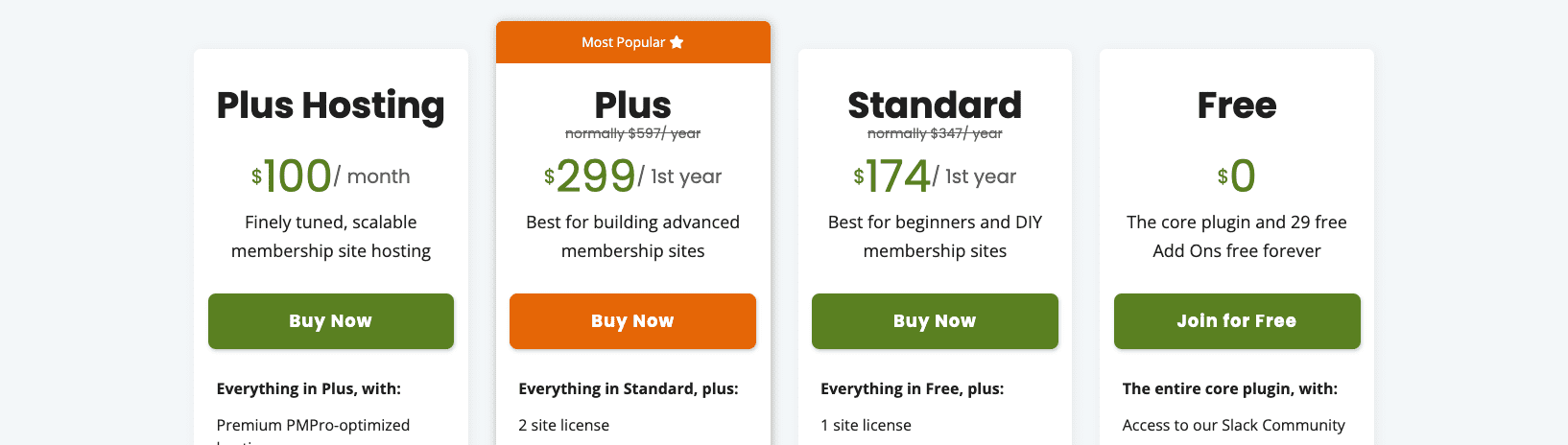
Plenty of sites tease secret promo codes, but with Paid Memberships Pro, it’s more straightforward. The company runs official deals, and no code is needed most of the time. Discounts appear on the pricing or checkout pages, so shoppers see live offers right away.
Skip third‑party coupon lists that go stale. Start on Paid Memberships Pro’s site. During seasonal sales, the lower price shows up as you move through checkout. Trust the price on their page instead of chasing codes that don’t work.
Where to find current discounts on the Paid Memberships Pro site
- Go to paidmembershipspro.com.
- Click the Pricing tab.
- Choose the plan of interest.
Look for clear signs of current discounts. A banner on the pricing page or a price with a strike-through usually means a live deal. If a promo code is needed, it shows on the banner and again at checkout above the order total.
Review the offer details before buying. Check the discount amount or percent, which plans qualify, and when the offer ends.
No banner, no strike-through prices, and no coupon field? Assume there’s no public discount code right now. Standard pricing applies, and the coupon box may not appear.
How to use discount codes in a WordPress checkout
During checkout on a WordPress site that uses Paid Memberships Pro, a Discount Code field appears when a valid code exists for the selected membership level. Enter the code in that box, then click Apply. The total updates right away to show the savings before payment.
Some codes only work with specific levels or billing cycles. If a code doesn’t meet those rules, the page shows an error and keeps the original price. It gives instant feedback on whether the code is valid.
For recurring memberships, many discounts reduce only the first payment, whether it’s a percentage off or a fixed amount. Some deals also change trial pricing. Check if the offer covers renewals or only the first charge.
A missing Discount Code field during checkout may mean the site owner disabled it for that plan. This doesn’t always mean there are no codes, just that codes aren’t offered for that product.
How to apply a discount code at checkout:
- Find the Discount Code box on the checkout page.
- Enter the promo code exactly as given.
- Click Apply and confirm the total updates.
- Proceed with payment once the price looks right.
How to create discount codes in the Paid Memberships Pro admin
Site owners manage discount codes in the WordPress Dashboard under Memberships, then Discount Codes. The page lists all existing codes and includes an Add New button for creating more. Each code supports start and end dates, limits on total uses, and controls for which membership levels it discounts.
When creating a new code, a few core settings matter. Enter the exact code members will type at checkout. Set the start and end dates for time-bound promotions like seasonal sales. Add a usage limit to cap total redemptions. Pick the membership levels that will receive the discount.
Billing settings refine pricing rules even further:
- Adjust the first payment separately from future charges
- Change recurring amounts by cycle length or frequency
- Set a trial price and duration
- Restrict discounts to specific billing cycles or frequencies
- Combine these options to shape complex promotions
Testing comes before launch. Use a staging site or a draft checkout page to try codes without touching live orders. A $0 sandbox level or Stripe test keys help verify totals and behavior across different scenarios before announcing new deals.
Advanced discount code options and smart ways to use them
Start at Paid Memberships Pro’s official pricing and checkout pages. Live promos often apply automatically, so you won’t need to hunt for coupon codes. Seeing the discount appear during the checkout process means fewer surprises at payment and a quicker decision.
PMPro gives site owners advanced discount code controls for smarter promos. You can target a deal at a specific membership level, or cap redemptions so only the first 100 buyers get it. Short flash sales with specific dates plus usage caps encourage quick action while keeping spending under control. You can set a discount to apply only to the first term of a recurring plan to protect ongoing revenue while giving newcomers a friendly entry price.
Why these options matter:
- Target discounts by membership level for tailored offers
- Control total redemptions with usage caps to manage costs
- Pair limited-time windows with redemption limits to drive urgency
- Apply discounts only on first payments or trials to protect long-term revenue
Review current pricing on PMPro’s site, then decide whether to grab an existing promo or create a custom discount code with these tools.
Leave a Reply