
I think Anytype is the strongest privacy-first, local-first option chasing Notion right now, especially for solo workers who want their data close and secure, but it isn’t a drop-in swap for every Notion workflow. I spent four weeks with it on a MacBook Pro with Apple Silicon, a Pixel Android phone, and an iPad. I built a personal CRM, set up a content calendar with relational databases, wrote project notes with nested blocks, and attached PDFs and images under 10 MB. This gave me a clear sense of how it handles daily work where privacy matters most.
Is Anytype a practical Notion alternative? I’d say yes for a lot of private, offline-heavy work. Offline reliability felt solid. Speed held up with over a thousand objects, including notes and tasks. Trade-offs exist. The learning curve takes time. Sync across devices has quirks. Collaboration feels less polished. Parts of Notion’s ecosystem don’t have matches here yet.
For people chasing privacy-first tools for knowledge work that run well online and off, Anytype looks like a strong option to try.
On this page
Core experience in Anytype with objects, notes, and databases
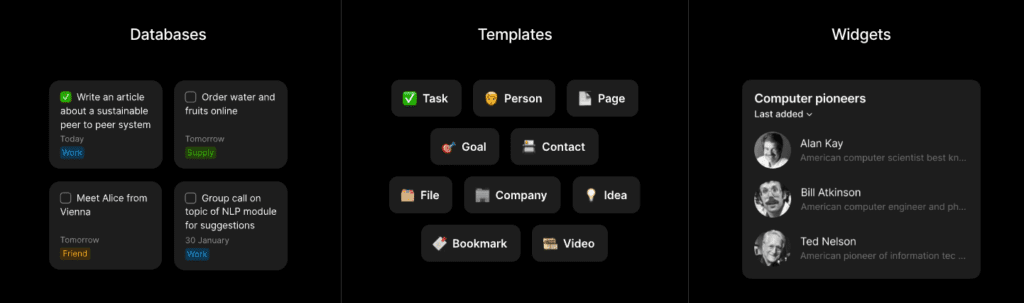
Anytype treats information like a network, not a pile of pages. It uses “objects” instead of plain notes – types like Person, Company, or Meeting. Each object links to others through relations, so connections form naturally without plugins or fiddly setups. The result is a web of data that actually reflects how work and life cross paths.
Collections sit on top of those objects. Picture a view that shows every meeting tied to specific people and companies. Filtering across several relations stayed fast, even past 1,200 objects. After desktop indexing finished, queries returned in under 300 milliseconds.
Writing happens in a block editor with practical tools. Headings break up sections. Lists nest cleanly. Callouts put a spotlight on key points. Toggles hide extra detail until it’s needed. Inline relations and backlinks keep context right where edits happen. On desktop, nested lists stayed crisp. Android stumbled with indentation after pasting from Gmail, but it didn’t derail the flow.
- Headings and lists render cleanly for easy scanning
- Callouts add visual emphasis without clutter
- Inline relations pull in connected data without extra steps
Search benefits from local indexing. After the first sync, desktop results pop up fast, roughly 80 – 120 ms across thousands of objects. Mobile starts slower on the first keystroke, then speeds up as results cache.
Attachments stay local and sync through Anytype’s network. Single files up to 100 MB uploaded fine in tests. Large drops – around 50 or more files at once – sometimes paused progress and needed an app restart before indexing completed.
Privacy sits at the core, and the linking model gives real structure without friction. Add the speed, and it feels like a strong choice for anyone who wants more than a traditional notes app – especially readers who value privacy in an Anytype review.
Privacy and offline use in Anytype compared with Notion
Anytype flips the usual cloud storage script by keeping data local first. Notion puts everything on its own servers and expects a steady connection for most work. Anytype stores notes and objects on the device, then syncs peer to peer through its network. No distant server farm in charge. Data ownership sits with the user, while Notion access leans on cloud infrastructure.
Privacy gets a stronger setup in Anytype with end-to-end encryption. Keys are created on user devices and never leave unencrypted. That blocks outside access, including from Anytype. Notion encrypts at rest and in transit, but skips full end-to-end encryption. Server-side features like search or AI become possible, though privacy is reduced.
Account recovery feels risky with Anytype. Lose the recovery phrase and synced content is gone. No password reset email. Notion follows the usual email and password path with two-factor authentication, so getting back in is straightforward after lockouts.
Offline use is a bright spot for Anytype among local-first tools. I spent a couple hours on a flight without Wi‑Fi, created new entries, edited old ones, and ran searches. Everything worked offline. Back online, sync merged changes without visible conflicts.
Sync still stumbles when two devices edit the same block at the same time. Edits don’t merge. Blocks duplicate, and cleanup takes manual effort. It’s fine for solo work across devices but rough for teams that expect real-time collaboration.
Anytype vs Notion for usability, collaboration, performance, and ecosystem
Getting started fast matters. Notion nails this with friendly onboarding and a huge template library that cuts setup time. For a solo founder racing to launch, that speed is a big win. Anytype asks for more prep work first, like defining object types and relations before the workspace feels ready. The payoff is stronger structure, though the learning curve is steeper. Replicating a CRM may take an hour or two.
Collaboration leans toward Notion’s mature toolkit. Real-time edits show up instantly for teammates, and tight permissions keep access in check. Comments and public pages help with feedback and sharing beyond the team. I’ve found Anytype fits solo users or tiny groups working asynchronously, not live collaboration. True co-editing didn’t hold up in tests.
- Notion supports instant sync across devices with rich commenting tools
- Anytype offers limited sharing options without real-time edits
- Best suited for founders who prioritize privacy over team workflows
Anytype shines offline. Local objects open in 150 to 250 milliseconds even with about 1,000 items, which helps when Wi‑Fi drops. Notion’s page load time depends on the network. Fast Wi‑Fi brings it to around 200 ms, while mobile data pushes it to roughly 600 ms or more. For immediate teammate updates, Notion wins because of cloud sync.
The ecosystem edge sits with Notion. Integrations cover Zapier, Slack, GitHub, and calendar sync, and its marketplace overflows with templates and AI helpers for content and tasks. Anytype is still early in this area. Fewer third‑party links and extensions mean less plug‑and‑play convenience for now.
On mobile, Notion feels polished for quick reading and light edits on phones or tablets. It suits founders who work on the go. Anytype’s mobile app functions, but heavy block moves or big tables feel clunky compared to desktop use.
Should you switch to Anytype? Practical pros and cons for founders
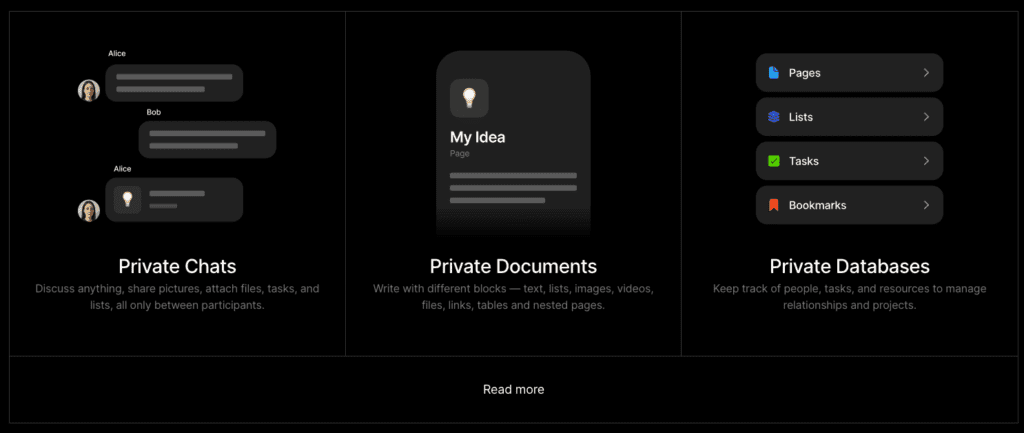
Privacy, offline-first work, and local control sit at the core of Anytype. For a solo founder, researcher, journalist, or consultant who travels a lot and needs a private knowledge base with end-to-end encryption, it deserves serious consideration. Teams that rely on real-time collaboration or deep integrations like calendars and issue trackers will still find Notion ahead.
Here’s a clear look at the trade-offs:
- Setup & Migration Time: Plan for about 4 – 8 hours to define key object types and relations, then move notes over. Simple CSV imports work well, but complex relational data needs manual cleanup.
- Privacy & Offline Strengths: Strong offline mode lets you work without Wi‑Fi. End-to-end encryption keeps data private, and fast local search helps you find information quickly.
- Collaboration & Integrations Gaps: Limited real-time co-editing makes teamwork challenging. Fewer embeds and third-party integrations reduce plug-and-play convenience for now.
- Mobile Experience Quirks: The mobile app works well for light edits, but heavy block moves or large tables feel clunky compared to desktop.
A low-risk way to test it: run Anytype alongside your current tools for a week. Pick one workflow – say a content calendar with meeting notes – and rebuild it in Anytype while keeping Notion open. Compare editing speed, see how syncing behaves across devices, and note any obstacles before committing to a full switch.
This trial reduces surprises. Real-world fit varies by priorities. It’s a strong privacy-first option with solid offline power, but it doesn’t yet replace everything Notion offers for integrations and team workflows.



Leave a Reply