Junia AI says it takes the stress out of daily content work by doing keyword research, drafting SEO articles, building internal links, and publishing to your CMS on a set schedule. For solo founders with too many tabs open, this means shipping new posts every day without burning out.
I wouldn’t expect rankings to jump overnight. Junia boosts output, but it doesn’t cast an SEO spell.
In this review, I’ll look at how smooth the setup feels, whether the drafts read as solid and relevant, how sturdy the internal links are, if the calendar and scheduling hold up, and how well it works with popular CMS platforms. I’ll also watch for real limits like niche difficulty and domain authority. No tool clears those hurdles for you.
Set up the content calendar and CMS integration in three steps
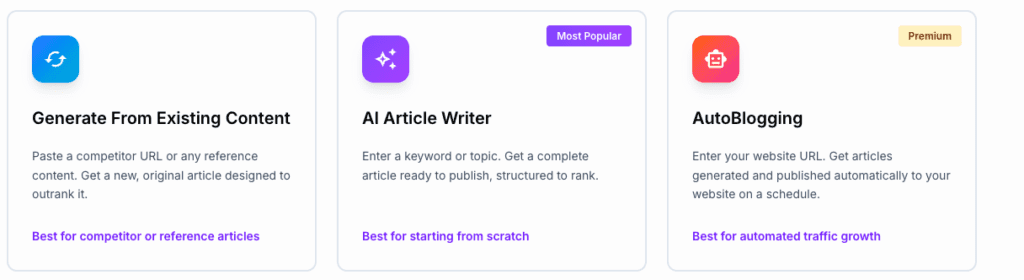
I’ve set up Junia AI to auto-publish, and the workflow makes sense. It’s a simple three-step pipeline. Connect the CMS, set brand rules, then let it build the calendar.
The CMS connection is painless. WordPress uses a plugin and API keys. Webflow needs the site ID and an API token. Shopify asks for the store URL and a private app token with write_blog_posts permissions. It sounds technical, but the setup guide walks through each screen, so it doesn’t feel heavy.
Next, define what the site covers and the tone. This shapes topics, voice, and small style choices. Junia then generates a 30-day content calendar with target keywords that fit the niche. It also sets a publish cadence based on how often new articles should go live.
Scheduling is flexible. Pick daily or weekly slots in the right time zone. If a draft needs review before it goes public, Junia holds it. Miss a slot, and it bumps the post to the next window, which keeps the feed consistent.
Governance tools help keep quality tight. Toggle review-required per post, set word count limits like 1,200 to 1,800, and auto-assign bylines and categories. Canonical URLs get set to avoid SEO issues. Image handling is tidy too, with ALT text pulled from the H1, so accessibility stays in place.
How autoblogging works with Junia AI, from keywords to internal links
I like how Junia AI starts autoblogging with a few seed topics and turns them into tight clusters. It sorts topics by search intent, whether someone wants information or is ready to buy. Each topic gets a difficulty score and traffic estimate. The result is a 30-day content calendar that feels planned with care, not thrown together.
Drafting works from the ground up. Junia sets clear outlines with H1, H2, and H3 headers. It also writes meta titles and descriptions for each post, so they stand out in search. There’s an option to add FAQ schema too, which helps grab rich results. Facts don’t drift off into space. Citations link to source URLs when needed, so the content stays honest without stuffing posts with external links. That keeps things from looking spammy.
Internal linking is where Junia goes hard. It scans the existing content library and upcoming drafts, then adds three to six contextual links per article. Anchor text gets mapped with care, so each link points readers to the next useful page. Older posts get fresh links in batches, which passes SEO strength to new pages and keeps the site connected.
Quality checks keep it tight. Duplication checks spot repeats across the site. Similarity limits stop intros from sounding like déjà vu. Entity coverage goals make sure core concepts appear across related posts, similar to what top-ranking pages do, but without robotic repetition.
What performance to expect and when manual editing still matters
I’ve seen Junia AI work best on sites with a tight topic and low-competition keywords. Fresh domains benefit from steady, daily posts. Search engines crawl more often, so momentum builds. Think slow, regular watering instead of dumping a bucket once in a while.
Big, brutal niches with heavyweight publishers are a different story. Junia won’t win those by itself. Volume won’t cut it. You need outreach for links, stronger internal hubs, and a clear structure that signals depth.
Editing still matters. Topics with strict facts – finance, health, legal – need a human to verify numbers and compliance language. Most drafts only need light cleanup. Adjust the tone, add a concrete example, trim fluff. Ten to twenty minutes per post usually works.
Results don’t show up overnight. New sites often see early signs in a month or two if crawling goes smoothly, with impressions and clicks starting to trickle in. Older domains index faster. Ranking gains rely more on links and consistent topical depth over time.
Junia AI vs ChatGPT for SEO blogging in 2026, and how to run a fair test
I see Junia AI and ChatGPT filling different jobs for SEO blogging. Junia handles the routine work – scheduling, auto-publishing to your CMS, and scaling internal links – without extra tinkering. It keeps posts moving and takes care of the SEO plumbing behind the scenes. ChatGPT works more like a flexible writing partner. It turns prompts into drafts fast, but it won’t push to your CMS or refresh internal links unless custom scripts or add-ons get involved. Expect more app switching and manual uploads.
Time adds up fast. Briefing, uploading, linking, and scheduling often take hours. Junia trims several hours per post – often 3 to 5 hours of operational work – compared to piecing together ChatGPT with schedulers or plugins. Editorial quality still matters. Automation won’t fix weak drafts or sloppy edits.
A focused pilot helps settle the question. Pick one topical silo with 10 to 20 posts in Junia’s calendar. Turn on review mode during week one to fine-tune drafts before they go live. Switch reviews off for weeks two through four and see how autopublishing runs on its own. Track indexation speed, average keyword positions, internal link counts per post, and publishing consistency across those 30 days. Then compare against a current ChatGPT-driven setup, including editing time, traffic gains, and rankings.
Here’s a quick checklist for the pilot:
- Map one content cluster (10 – 20 posts) inside Junia AI.
- Enable draft review during week one, disable it afterward.
- Monitor SEO performance and editing effort alongside the usual workflow.
This kind of test shows where automation with Junia fits and where a manual ChatGPT stack still wins. It highlights real trade-offs – time saved, links placed, rankings moved – not guesses.
Keep the editorial bar high the whole way. Volume without substance won’t help. Aim for outcomes that matter, like stronger rankings and steady organic growth, not just more posts.

Leave a Reply