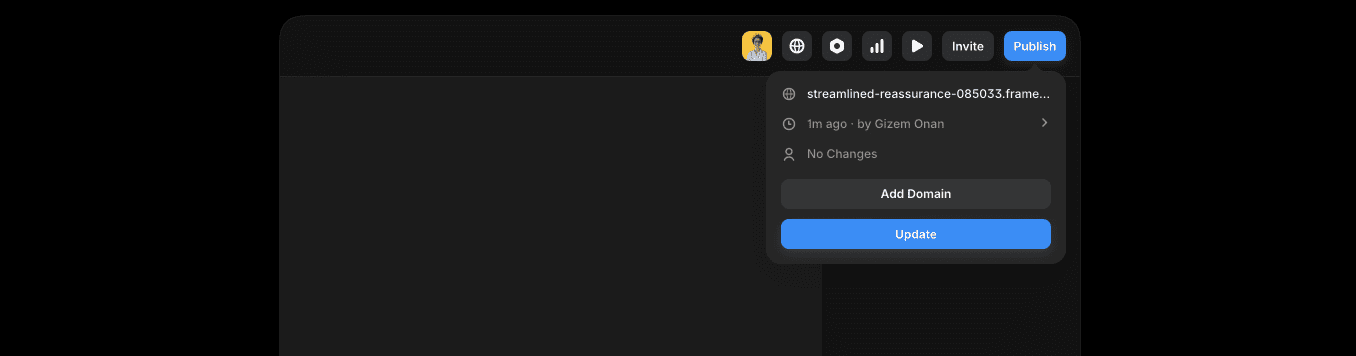
Many people assume Framer gives a free custom domain like yourname.com, but it doesn’t. The free plan publishes to a subdomain that ends in .framer.website, for example yoursite.framer.website. Hosting and publishing cost nothing, which suits quick prototypes, MVPs, and personal projects where speed matters more than a branded URL.
A custom domain isn’t included and has to be purchased from a registrar such as Namecheap or Google Domains. Prices usually land around $9 to $15 per year, depending on sales and the extension. A framer.website address also signals to visitors that the site sits on Framer’s platform, not under an independent domain.
There’s no free custom domain from Framer. Any “free domain” promos seen online usually come from other providers with limits or conditions. For many cases, the free Framer subdomain still does the job when branding sits lower on the priority list.
What changes when you use a subdomain instead of a custom domain
A Framer subdomain like yoursite.framer.website sits on Framer’s domain, not the business’s. That limits what happens behind the scenes with DNS. Without that control, branded email addresses like hello@yourdomain.com aren’t possible, since those rely on owning the root domain.
A custom domain changes the picture. Full DNS access means A, AAAA, CNAME, TXT, and MX records are on the table. That enables email through services like Google Workspace or Fastmail, supports site verification in tools like Search Console, and adds security with SPF and DKIM to cut down on spoofing.
SEO can work on a subdomain or a custom domain, and pages still rank. Owning the domain builds long-term value because backlinks point to the brand’s address. If the site moves to a new platform later, the earned authority moves with it.
Trust matters. Custom domains look cleaner on invoices, resumes, ads, and app store listings. They signal a real, established business. Ad networks and payment processors also tend to prefer verified domains under the owner’s control over generic subdomains.
A Framer subdomain fits quick tests and short projects. A custom domain improves branding, email professionalism, and long-term search strength.
When a free Framer subdomain is enough and when to upgrade
For quick tests or short promos, staying on Framer’s free subdomain makes sense. Publish right away, no domain shopping or DNS setup. Speed wins when it’s a design test or an MVP.
Serious efforts need a custom domain. Paid ads, lead forms, payments, partner reviews – trust matters there. A branded URL signals legitimacy and helps conversions. SSL on a personal domain also reassures visitors about security.
Costs are straightforward. A .com usually runs about $12 per year, plus a Framer plan that allows custom domains. DNS setup ranges from a few minutes with registrar experience to about an hour for first-timers.
Upgrading brings useful extras. Branded email like hello@yourdomain.com looks professional. Domain-level verification improves analytics accuracy. Site moves down the road get easier since authority lives with the domain, not a Framer subdomain.
How to connect a custom domain to Framer step by step
- Open the Framer project, go to Site Settings, and open Domains. Click Add Domain and enter example.com. Framer will show DNS records to add: a CNAME for www and A or ALIAS/ANAME records for the root domain (the version without www). These records tell browsers where the site lives.
- Log in to the domain registrar, the company where the domain was purchased. Open DNS management. Add a CNAME so www.yourdomain.com points to the target Framer provides. Add A or ANAME/ALIAS records for yourdomain.com (no www), based on what the registrar supports. Save. Note the TTL, often 300 seconds to one hour. A lower TTL spreads updates faster across networks.
- In Framer, turn on automatic redirects. Visitors who enter either www.yourdomain.com or yourdomain.com will land on a single version. Search engines avoid duplicate pages when a canonical version is set.
- Give DNS time to update. Propagation varies and may take hours. Check status in the Framer dashboard, or use tools like whatsmydns.net to confirm DNS updates worldwide and that SSL has been issued.
How to add a third‑party domain or subdomain without breaking DNS
Adding a subdomain like studio.example.com to Framer takes a few steps. First, add the subdomain in Framer’s Domains section. Next, go to the domain registrar’s DNS settings and create a CNAME record. Point studio to the target Framer provides. The main site, example.com, stays where it is. No need to move hosting just to use a Framer subdomain.
DNS edits need care. Leave email records alone – MX, SPF, DKIM, and DMARC. These protect deliverability and trust. Deleting or changing them breaks mail. Only adjust A or ALIAS for the root, and CNAME records that route traffic to Framer.
Some registrars don’t allow ANAME or ALIAS on the root domain (example.com). In that case, use URL forwarding. Forward example.com to www.example.com, then point www to Framer with a CNAME. This keeps routing stable and avoids dead ends for visitors.
Lower TTL before changes. Set it to about 300 seconds so updates propagate faster. After the site resolves through Framer and everything checks out, raise TTL to around one hour for efficient caching and easier future updates.
Free custom domain alternatives and a practical next step
Framer’s free framer.website subdomain gets a site live fast, but it lacks the trust and control of a real custom domain. If a branded address matters for credibility, email, or long-term SEO, buying a domain and pairing it with a Framer paid plan is the smarter path.
Some site builders include a first‑year domain with paid plans. It looks like a bargain upfront, but renewal hits at standard rates after that first year, so budget for the ongoing cost.
Another option is a low‑cost registrar like Cloudflare Registrar. Pricing sits close to wholesale, plus small fees, usually around $9 to $12 per year. No aggressive upsells, just the basics – good if cost control and ownership matter.
If zero budget is firm, stay on framer.website while testing ideas. It keeps setup light during early validation when branding isn’t a priority. When traction arrives – ads, partnerships, client work, or professional email – move to a custom domain.
Owning a domain early helps during platform changes later. Links and recognition stay tied to the same URL, which protects search equity as tools and hosts change over time.
Pick based on what the project needs right now and what it will need soon. Start fast on the free subdomain if speed comes first. Shift to a custom domain when growth and brand trust become more important.
Evaluate the goals, set a simple budget, and make the switch when it supports results.

Leave a Reply