
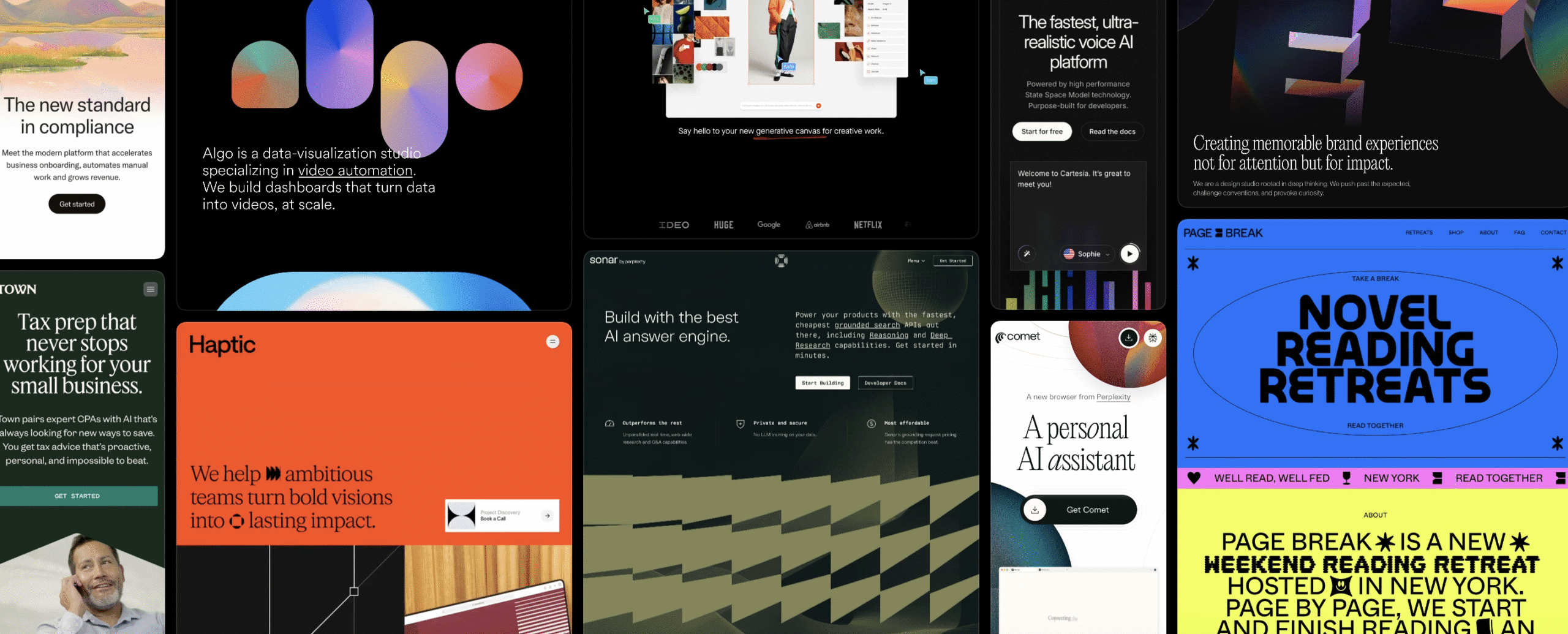
Framer doesn’t try to be an all-in-one app builder or run complex backend logic. It centers on visuals through a canvas-style editor, familiar to designers who live in Figma. Layouts can reach pixel-perfect quality. Non-designers may face a learning curve at first. It includes a basic CMS for collections and dynamic pages, but it won’t handle intricate editorial workflows or deep content operations.
Hosting is handled for performance with image optimization and edge caching, so pages load fast without extra setup. Ecommerce is another story. Native features stay thin. Most serious stores rely on third-party integrations or embeds, which can make checkout and tracking more complicated.
If a team’s edge comes from sleek design and refined interactions, Framer earns its keep. If the job demands heavy content management or strong ecommerce out of the box, expect friction.
Who should use Framer for websites
Framer fits teams where design drives the story. Creative agencies shaping bold campaigns, SaaS startups shipping sharp landing pages fast, and premium DTC brands that sweat every pixel get the most from it. Product marketing teams use it to show features with interactive demos that pull people in without slowing down dev work.
Framer shines with motion and components. Animations live inside a timeline-style editor, so scroll effects and hero moments feel alive. Reusable components and clear design tokens speed production. Sites don’t just look custom, they behave that way.
Real touches show up across the page: sections reveal on scroll, buttons react with small cues, product shots invite clicks. These details take hours in old-school builders, but here, they’re natural.
Collaboration improves because designers stay in a familiar canvas, close to Figma. Handoffs go smoother. No long back-and-forth over spacing or timing. After setup, marketers without code skills update copy or swap images without breaking layouts.
Why these teams stick with Framer:
- Fast prototyping with reusable parts and flexible design tokens
- Built-in animation tools for rich micro-interactions
- Interactive demos that lift product storytelling
- Familiar interface lowers friction between designers and marketers
- Engaging visuals support higher conversion rates, which helps justify platform costs
If richer motion helps drop bounce rates, and a 10 – 20% signup lift feels worth the spend, Framer stops being just a tool. It becomes a strategic edge.
When to avoid using Framer
Framer works best for light sites. Heavy content or complex commerce exposes its limits.
A busy blog with thousands of posts, many authors, and deep archives needs more than basic search and filters. Framer’s CMS offers simple tools, so organization breaks down as the site grows. It’s like running a huge library with a small card catalog – mess piles up.
Editorial teams expect real workflows. Draft stages, task assignments, and rich content relationships matter. Framer feels closer to a sketchpad than a newsroom system. Pagination and taxonomy pages often need workarounds, which adds steps every time new content goes live. Maintenance adds up fast next to platforms built for high-volume publishing.
Commerce brings more strain. Multi-currency catalogs, customer accounts, and advanced promos need native features. Framer leans on embeds from third parties, so checkout can feel clunky. Sales tracking and tax setup turn into a chore when several tools must be stitched together.
Large docs sites also run into walls. Versioned content, deep nested navigation, and instant search are standard in specialized doc platforms or headless CMS stacks with static site generators. Framer doesn’t ship those features out of the box.
Use a simple rule: if the plan includes thousands of articles, dozens of contributors, or custom checkout logic tied to strict business rules, pick a solid content or commerce platform first. Then layer design on top.
- Limited CMS features slow large editorial workflows
- Extra setup for pagination, archives, and taxonomy management
- Complex ecommerce needs outpace embedded tools
- Docs needs like versioning and instant search aren’t available natively
Framer pricing and plans explained for real budgets
Framer pricing makes more sense when grouped by what it covers. First, a monthly site plan pays for hosting and core features. Then per-seat editor fees apply to each person who edits designs or content. These rise with team size. Premium templates add another line item, and some plugins or integrations charge based on what gets connected.
Take a small startup that’s growing. One site, two editors, a custom domain, plus a premium template now and then. Add occasional developer help for tricky fixes. Monthly costs often land in the low hundreds. Not cheap, but reasonable if design quality supports growth.
Alternatives shift the math. Webflow’s mid-tier plan with two seats often costs less when heavy content management matters. Large blogs run smoother and hit fewer surprise upgrades. Custom React or Next.js builds need more upfront developer budget, yet ongoing platform fees stay lower since subscription rent goes away.
Bandwidth limits and CMS item caps deserve attention. Exceeding either forces a plan bump during busy periods or growth spikes. Teams have been caught off guard.
Smart budgets reserve 10-20% of the initial build cost for steady improvements. New sections, seasonal promos, speed boosts. These updates keep visitors engaged and lift conversions.
Is Framer good for designers day to day
Designers coming from Figma slip into Framer fast. The canvas feels familiar, components behave as expected, and constraints snap items into place. The learning curve feels smaller, so layout work starts right away without rethinking basics. Newcomers, or people used to stricter page builders, face a bump. The open canvas rewards spatial awareness, not fixed blocks, so it’s easy to misalign elements or break layouts without some guidance.
Motion is a real strength. Scroll-based reveals, parallax, and layered effects stack without code. Picture product images fading in while headlines slide at the right moment – Framer’s timeline makes that flow possible. Complex sequences still call for animation sense. Timing, easing, and hierarchy matter. Without that, effects feel jerky or too loud.
Content editors get a safe zone for routine changes. Swapping images or updating copy rarely affects structure. Bigger moves – adding sections or refining responsive behavior – ask for someone comfortable with the canvas model. Design awareness keeps pages clean across screen sizes.
Performance needs care. Big animations, heavy images, and multiple Lottie files slow initial loads. Lazy loading helps assets appear only when needed. Compressed images cut weight. Sensible limits on effects support an LCP near 2.5 seconds, which keeps the experience snappy.
A strong design system prevents style drift. Set tokens for color and type, define spacing, and stick to them. Reusable components then become trusted building blocks, not one-off gambles. The result: consistent pages and fewer headaches as the project grows.
Framer vs alternatives for non-technical teams
Choosing between Framer and other platforms starts with what actually drives a team’s results. If revenue depends on sharp brand visuals and smooth motion, and designers know their way around Framer’s canvas, it’s a strong pick. It excels at experiences that feel alive and push conversions through clear, focused storytelling.
Sites built around heavy editorial needs, thousands of articles, or complex commerce – like multi-currency checkout and customer accounts – fit better on platforms made for scale. Those systems handle content operations and ecommerce depth without piling on workarounds that slow teams down.
A practical next step is a pilot. Take one high-impact page, such as a funnel or launch page, and rebuild it in Framer. Run an A/B test for a few weeks. Track LCP, CLS, and conversion rates. Use those results to judge whether richer interactions cover platform costs within a 3-6 month CAC payback window.
Many teams split the stack. Framer covers top-of-funnel marketing pages where design has the most impact. Blogs or docs live on a CMS tuned for volume and editorial flow. Link the systems and keep the experience consistent without forcing tradeoffs.
Keep risk low by storing content in portable formats like markdown or CSV exports when possible. Write clear docs for components to make future migrations smoother if needs shift later.
Quick matching guide:
- Content-first marketing: Webflow or Squarespace
- Commerce-first stores: Shopify
- Custom scale with developer control: Next.js + headless CMS stacks
- Brand-led motion experiences: Framer
Test before a full commitment. Small experiments reveal which tool supports the story and the numbers.
Leave a Reply