

A small startup lost track of key sales meetings, and the cause wasn’t a hacker smashing firewalls. A shared calendar invite spread too far, exposing links to private video calls and wrecking their pipeline. Calendar invites now double as a quiet attack path. Phishing links hide inside normal-looking events and slip into busy schedules.
People see calendars as simple reminders for appointments and birthdays. They do more. Calendars show who talks to whom, where meetings happen, and often leak project names in event titles. Many big calendar apps send this data to their servers to power “smart” features like suggested times and quick replies. Convenience feels nice until personal details float around with weak protection.
Proton Calendar claims a different approach. It keeps events end-to-end encrypted and protected under Swiss privacy laws. Service providers don’t get to peek. Zero-access encryption locks down event names, descriptions, and participants.
This Proton Calendar review looks at real-world use across Mac and Windows browsers, plus iOS and Android, over a full week. The team imported 5,000 events from Google Calendar via ICS files and used it during normal workdays. The goal: test privacy without turning scheduling into a puzzle. Security matters most here, though usability still counts, since strong protection means little if people avoid the tool.
The scoring covers safety, features, and sync across devices. It focuses on whether Proton Calendar protects details, keeps events consistent on every platform, and stays practical in daily use.
What Proton Calendar’s security and privacy cover
Proton Calendar protects event details with end-to-end encryption. Event titles, descriptions, locations, and participant lists are encrypted so only the intended reader can see them. Start and end times and the time zone stay visible so reminders work and free/busy status shows up.
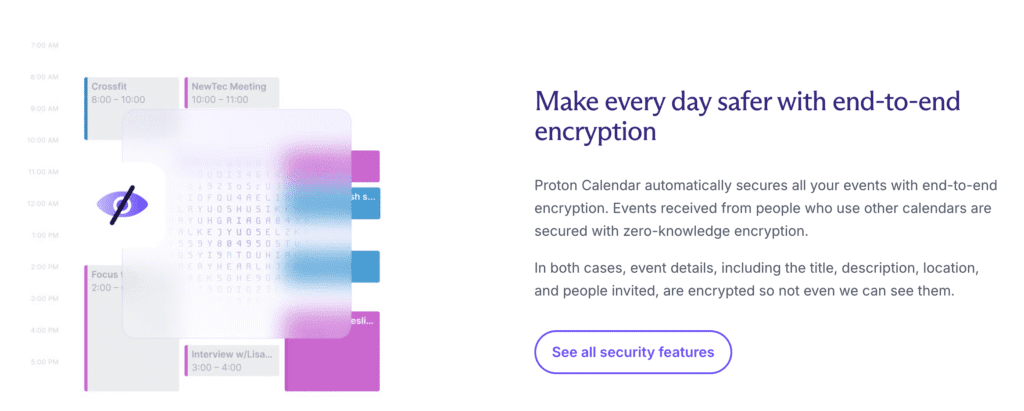
Zero-access encryption sits at the core. Proton’s servers store only ciphertext, so calendar entries look like nonsense without the key. Employees can’t read event contents. Limited metadata like timestamps helps with sync across devices, but it doesn’t expose meeting details.
Here’s the setup in practice:
- Each calendar uses a unique encryption key.
- Keys are protected by the account password, and that password never leaves the device.
- Sharing with other Proton users keeps invites encrypted between accounts. Invites to non‑Proton recipients go out by regular email without encryption.
Encryption and decryption happen on the user’s device. The phone or computer locks data before it’s sent anywhere and unlocks it locally when needed.
Proton operates in Switzerland under strict privacy laws such as the FADP and follows GDPR. Courts can’t compel Proton to hand over readable content because Proton doesn’t hold decryption keys. Data centers use strong physical safeguards, adding a real-world layer of protection to the digital ones.
Proton Calendar features and benefits you use every day
Smooth scheduling isn’t the only draw here. Proton Calendar packs familiar tools with a few smart touches that save time and protect privacy. People can split life into separate calendars – Work, family, projects – And assign colors for quick scanning. Custom recurring rules cover weekly standups, biweekly syncs, or odd schedules without extra steps. Quick add feels natural: type “Lunch with Sarah next Tuesday at noon,” and the event drops in place. Moving plans around is simple with drag and drop on the timeline.
- Multiple calendars supported
- Color-coding for easy differentiation
- Recurring events with customizable patterns
- Natural-language quick add for speedy entry
- Drag-and-drop editing
- Availability view showing free/busy slots
- RSVP tracking keeps tabs on who’s coming
Alerts arrive wherever they’re needed. Email, push on mobile, and desktop pop-ups all support snooze, so the reminder shows up again at a better moment. Mobile apps allow different notification rules per calendar. Work events stay quiet at night, while personal reminders still appear.
Sharing stays flexible without losing control. View-only or edit access can go to other Proton users, which makes collaboration direct and safe from accidental edits. Public read-only links help share schedules outside Proton when convenience matters more than secrecy, since those links show unencrypted details by design.
Privacy shows up in the small choices too. Reminder emails send limited metadata to reduce exposure outside Proton’s systems. When both sides use Proton, invite emails get end-to-end encryption, keeping event content private inside that circle.
Spotty internet doesn’t stall planning. The web app shows cached encrypted events offline, decrypted locally on the device. Edits queue and sync once back online. ICS exports wait until the connection returns.
These Proton Calendar features and benefits add up to a planner that stays organized, respects time, and guards sensitive details.
Proton Calendar cross-device compatibility and limits
Proton Calendar stays in sync across web browsers and the mobile apps on iOS and Android. There’s no native desktop app yet, so people use a browser or the phone app to manage events. Proton skips CalDAV to protect end-to-end encryption. Standard plug-ins to Apple Calendar or Outlook don’t work, since those paths would break privacy.
The setup works best with the rest of Proton’s services. One login reaches Mail, Drive, Pass, and VPN, along with the calendar. When both parties use Proton Mail, invites arrive with end-to-end encryption, so event details remain private. Mobile notifications decrypt on the device. After a reboot, the device needs to be unlocked once so alerts can read the local encrypted cache without sending keys elsewhere.
Shared mailbox support ties the workflow together. Accept an invite in Proton Mail, and the event drops into Proton Calendar with encryption intact. Attach files from Proton Drive to an event, and those files stay protected with the same permissions and encryption. The result is a private workspace that keeps scheduling convenient and secure while maintaining Proton Calendar cross-device compatibility.
Proton Calendar pricing plans and how it compares to Google
Proton Calendar sits inside Proton’s wider bundle, not as a single app sold on its own. The free plan, Proton Free, covers basic needs for casual use. Single calendar, standard reminders, simple setup. Extra features like multiple calendars and priority support live behind paid tiers, including Mail Plus, Proton Unlimited, and the Family plan. Those plans also include Proton Mail, Drive for secure cloud storage, VPN, and the Pass password manager, all tied to the encrypted calendar.
Pricing paints a clearer picture. Proton Unlimited costs about what one or two streaming services cost each month, and it folds several privacy tools into one bill. Google Calendar stays free for personal use with its core features. Companies that move to Google Workspace pay per user every month, which climbs fast as headcount grows and plan tiers rise. People weighing Proton Calendar pricing plans against Workspace should factor bundle value versus per-seat costs.
On features, Google pushes ahead with AI suggestions for meeting times based on Gmail context, built-in room and resource booking, and native Meet links inside events. Proton focuses on security. Event details get end-to-end encryption, and data isn’t mined for ads or profiling. Schedules stay private by default.
Real-world fit varies. Teams rooted in Outlook or Google services may hit friction, since Proton lacks CalDAV or Exchange support and tight ties to third-party tools. Privacy-first users already on Proton Mail often see a smooth path. One login, one ecosystem, less exposure of sensitive schedules.
Quick comparison:
- Google Calendar: AI helpers, wide integrations, free for consumers, strong business tooling, weaker privacy.
- Proton Calendar: Zero-access encryption for event content, privacy-first bundle, limited plug-ins, no advanced resource booking.
Is Proton Calendar worth it? For people who value privacy over smart scheduling tricks, yes. It keeps meetings locked down and pairs well with Proton’s other services. For teams that need deep app integrations and heavy automation, Google Calendar remains the easier fit. Proton Calendar vs Google Calendar comes down to trade-offs: security and bundle value versus AI features and enterprise integrations.
How to migrate to Proton Calendar and test it safely
Testing Proton Calendar doesn’t need a full leap. Give it a week, keep your normal routine, and avoid losing appointments. Moving from Google Calendar is straightforward, and it shows how privacy fits into daily planning before any commitment.
Open Google Calendar, go to Settings, then Import & export. Pick Export. A .zip file downloads with each calendar as its own .ics file. Unzip it so each calendar is separate. This keeps names and colors consistent during import.
Now switch to the Proton Calendar web app. Go to Settings, then Import, and choose each .ics file one at a time. Importing per calendar preserves their look instead of merging everything. Watch recurring events, especially patterns like “last weekday monthly.” Some complex rules might shift during import. Click through future dates in those series to spot issues early.
Shared calendars won’t carry over. Re-create shares inside Proton Calendar for other Proton users so invites stay end-to-end encrypted. For people outside Proton, create read-only public links, or keep a parallel Google Calendar for sharing while settling in.
On iOS or Android, install the Proton Calendar app and sign in with the current account. Turn on notifications and background refresh in system settings so reminders fire after restarts. Open the app once after a reboot to unlock keys locally.
Leave the original Google calendars as they are during the trial week. No deletions. If juggling two systems gets awkward, pause Proton and nothing in Google is lost. Want to keep changes made during testing? Export those events from Proton as .ics files for later.
This approach shows how to migrate to Proton Calendar with low risk, compares what personal info sits in the old setup, and keeps everyday planning steady under Proton’s encryption.
Leave a Reply