

If you’re a founder on a tight budget with small projects in mind, Hostinger hits the mark. It suits an MVP, a simple landing page, or a modest blog under six figures in monthly traffic. The price-to-feature mix works well for that stage.
If you’re aiming for heavy traffic or a polished premium brand with advanced features, it may fall short. Shared hosting on Hostinger can slow down under load, and limits show up fast.
You want low upfront costs, solid uptime, responsive support, and straightforward controls so you can launch fast. That’s the sweet spot for Hostinger. It balances cost and reliability in a way that makes sense for early-stage builders who value speed and simplicity. It’s a smart pick when you’re weighing Hostinger price vs value for founders.
What Hostinger pricing for startups actually costs
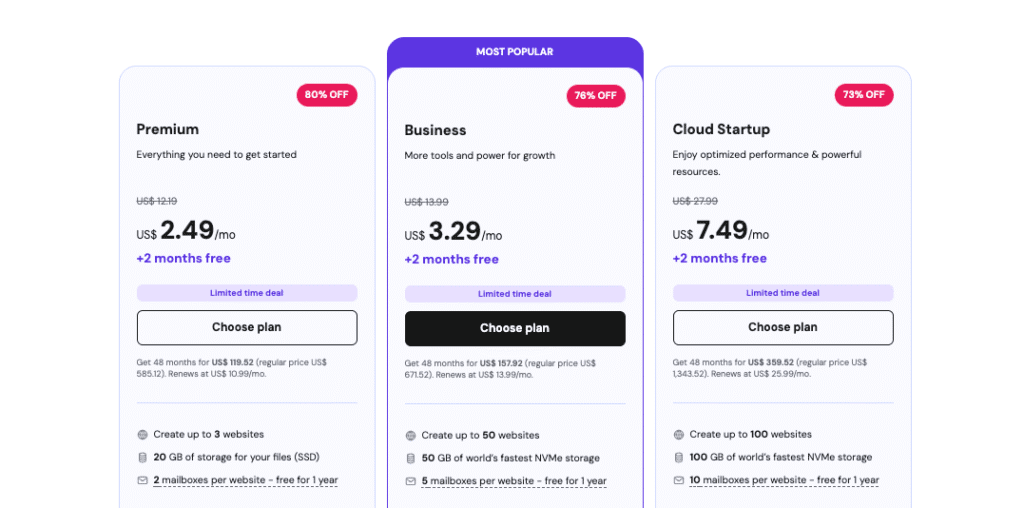
Hostinger pricing for startups looks cheap at first, but you should check what changes after the intro term. Premium Shared starts at $2.49 per month, then renews near $5. Business Shared opens around $3.29 monthly and climbs on renewal. Cloud Startup launches at $7.49 before going up later.
Over a 36‑month term, factor in more than the sticker price. Add domain costs, which are often free on longer plans. Look at backup frequency, since cheaper tiers include weekly backups and higher tiers switch to daily. Check for a built‑in CDN, email accounts, and how those limits match what you need.
Here’s what helps trim costs:
- Free domain on select long‑term plans
- SSL included on all tiers
- Weekly or daily backups based on plan
- CDN access on supported plans
- Email accounts included, with counts set by tier
Storage and bandwidth sit under Fair Use, so expect limits.
Prepaying 12, 24, or 48 months lowers the monthly rate. Good discount up front. Growth can force an early renewal if you upgrade mid‑term, so plan for that.
Watch for extras in year one that raise total spend:
- Dedicated IP for certain security needs or email reputation
- CPU and RAM boosts if traffic spikes cause slowdowns
- Extra storage for large media libraries
- Malware cleanup if threats slip past defenses
- Priority support to speed fixes during launch windows
Price for resources against rivals, and the picture is clear. Hostinger aims at budget‑minded startups with strong value per dollar and per gigabyte. SiteGround and Bluehost often start higher, with more baked‑in comforts. Cloudways charges more as usage scales, and it’s less simple to predict. Hostinger lands as a lean, capable pick for early‑stage teams focused on cost control.
Hostinger performance and page speed tests you can run
Want a fast way to check Hostinger performance and page speed tests for your site? Spin up a fresh WordPress install with a lightweight theme. Pick something simple that won’t slow things down. Turn caching on. Test with the CDN enabled, then run the same tests with it off to see the difference. Create about 10 pages, then measure from three regions with WebPageTest or Lighthouse. These tools give clear data on load speed and visual stability.
For small businesses, these targets show strong performance on Hostinger when tuned well. Largest Contentful Paint, the point when the main content appears, should stay under 2.5 seconds worldwide when the CDN is on. Time To First Byte, the server response time, should stay under 800 milliseconds near your server region and under 3 seconds in distant regions.
Shared hosting on Hostinger keeps costs low, but it has limits. Your site runs on the same hardware as other sites, so heavy neighbors may hog resources. Each account has caps on CPU, RAM, and concurrent processes. Traffic spikes trigger limits, and speeds slow as resource controls kick in.
Cloud Startup plans reduce that risk with isolated resources and faster PHP workers, so scripts finish quicker. Concurrency limits are higher than on shared tiers. It still won’t rival a tuned VPS for raw speed, but it delivers reliable performance for sites that are growing.
Ready to push your setup harder? Founders often follow this checklist:
- Run k6 or Loader.io to simulate 50 – 200 users at the same time for about five minutes.
- Track error rates, aim near zero. Watch p95 response time, the wait for most visitors. Look for CPU throttling signals.
Move to Cloud Startup or higher if errors rise or response times stall under load.
Hostinger uptime guarantee and real results explained
Hostinger lists a 99.9% uptime guarantee. It looks solid, but if they miss it, you get service credits on your account, not cash. Downtime gets compensated with hosting time. Most hosts work this way, so set expectations before counting on fast payouts for outages.
Run your own checks to see real performance. Use UptimeRobot or Better Stack, set 1-minute intervals, and watch from several regions. You’ll see whether the SLA holds in day-to-day use, not just on a status page.
For small marketing sites or blogs with modest traffic, under five minutes of weekly downtime is usually fine. It won’t wreck conversions or brand trust. Selling paid products or running a checkout? Push for under 0.01% monthly downtime. Anything higher risks lost sales and annoyed customers. At that point, move from shared hosting to isolated resources.
Maintenance windows matter too. Shared hosts run kernel updates and reboots that cause brief drops in availability, often seconds to a few minutes. These routine jobs don’t qualify for credits and exist to keep servers secure and stable.
Cut the impact of short outages. Subscribe to Hostinger’s status alerts by RSS or email to get early heads-up. Turn on CDN features like an “Always Online” fallback to serve cached pages during small blips. Your key pages stay visible if the origin goes down for a bit.
Hostinger support quality and response times for founders
Support runs 24/7 through live chat and email. Phone support isn’t included. Live chat during normal hours usually gets a first reply in a few minutes. Email takes longer during busy times when queues pile up. This setup suits tight schedules because you get answers without sitting on hold.
For everyday jobs like DNS changes, SSL setup, site migrations, or WordPress fixes, the team does well. Most issues get resolved fast. Deep performance tuning or custom server changes beyond shared plan limits won’t go far though. Advanced work often needs a higher-tier plan or specialized hosting.
To save time with support:
- Keep your domain name and exact plan ready.
- Describe the specific error or problem.
- List recent changes made before the issue started.
- Share URLs where the issue appears.
- Attach HAR files or screenshots to reduce back-and-forth and speed up troubleshooting.
If a case drags on, like performance slowdowns or malware, ask for a senior agent with deeper expertise. Keep ticket IDs noted so progress is easy to track. Routine fixes often finish in hours. Abuse or security investigations take longer due to extra checks.
Busy founders benefit from personal runbooks with backup and restore steps, plugin and theme versions, and rollback plans. Midnight emergencies feel less chaotic when the exact steps are documented and ready.
Is Hostinger good for WordPress founders and daily workflow
Wondering, “Is Hostinger good for WordPress founders?” hPanel makes a strong case. It feels simple and friendly, even if you’re not deep into server work. You get a 1‑click WordPress installer, staging to test changes before launch, automatic updates for core and plugins, and a clean file manager that isn’t buried in menus.
cPanel has history and lots of integrations, but it often feels like a maze. hPanel keeps common tasks near the surface. Names differ, and you won’t go hunting for things like cron jobs across hidden sections. Most tasks take a couple of clicks instead of bouncing between tabs. Founders who want to focus on the site, not the server, will move faster here.
WordPress helpers are built in. The auto‑installer is quick, managed caching (on eligible plans) speeds up pages without extra work, and object caching adds another boost where available. Staging push/pull runs smoothly. Cloning isn’t unlimited, usually one staging site per account, so plan larger redesigns with that limit in mind.
Setup from signup to live can go fast. Register or transfer the domain with Hostinger, and you’ll often see a site online within about 30 minutes after install. Pointing an external domain depends on DNS propagation, which ranges from around an hour up to a day.
Security comes standard in hPanel. Free SSL activates in minutes. Two‑factor authentication protects accounts beyond passwords. IP blocklists help keep out unwanted traffic. Malware scans look for infected files. Automatic backup scheduling keeps recent copies on hand. All of it sits in the same straightforward dashboard.
Short answer to “Is Hostinger good for WordPress founders?” Yes, if you want a lightweight control panel, fast setup, and WordPress‑focused tools without extra clutter.
Hostinger features for scaling a business and when to move
Shared hosting on Hostinger sets hard limits that trip up growing sites. Watch CPU seconds and entry processes. These metrics spike when resources get tight. Frequent 503 or 508 errors signal the plan is too small.
Upgrade steps usually go Shared to Business, then to Cloud Startup as growth continues. If concurrency sits in the hundreds or you need deeper stack control, look past Hostinger to VPS or a managed cloud.
Content-heavy sites with smart caching do well on Premium and Business. Tens of thousands of visits a month is realistic. Sudden spikes from launches or ads still push these plans over the edge.
Before upgrading, tune the setup:
- Enable full-page caching to speed up delivery
- Optimize images for faster loads
- Turn on the CDN to spread server demand
- Remove heavy plugins that slow requests
- Test p95 response times under expected load
Upgrade only after these fixes.
Founders should avoid Hostinger for high-traffic or premium brand sites where isolation and steady performance headroom matter. When scaling gets serious, move to platforms built for heavier workloads. It reduces risk and keeps performance predictable.
For anyone weighing Hostinger features for scaling a business, the core takeaway is simple. Use shared tiers for early traction, monitor limits closely, optimize hard, then switch to VPS or managed cloud once concurrency and error rates rise.
Hostinger alternatives for early-stage companies and next steps
Starting a small project or MVP on a tight budget? Hostinger’s Premium or Business plans keep costs low and setup simple. Namecheap EasyWP and Bluehost sit in the same price range. Each has trade-offs, so check features and limits before you commit.
Need stronger performance and faster help for WordPress? SiteGround or WPX is a smart jump. Prices go up, but you get better tools and responsive support when issues hit. WPX includes a CDN from day one, which helps with load times.
Looking at pay-as-you-go flexibility? Cloudways runs on AWS or DigitalOcean. You get isolated resources and vertical scaling. Expect monthly costs to rise as traffic grows.
High traffic and full control in mind? A self-managed VPS on Hetzner, Linode, or DigitalOcean with RunCloud or Ploi gives deep control. It also asks for time spent on server admin.
Hostinger stays a solid launchpad for quick setup and low cost with modest traffic. Plan ahead though. Growth past those limits calls for platforms built for heavier workloads, and the switch pays off.
Share your current traffic and growth goals for tailored picks. Hostinger alternatives for early-stage companies should match your roadmap, not just the sticker price. Aim for the experience you want visitors to have and the pace you want to grow.
Leave a Reply