
Hunting for a real Framer promo code in 2026? They’re rare. Most deals floating around look old or come from third-party sites that promise big discounts and don’t deliver. Framer’s own promos show up once in a while through their channels, like newsletters or social posts, but not often and not loud.
I went looking anyway. I checked framer.com/pricing, then walked through checkout for Personal, Pro, and Business to see if there’s a promo code box. I searched the site for “coupon,” “promo code,” and “discount,” plus student and education terms. I also dug through @framer posts on X/Twitter from the last year, and browsed Reddit communities like r/Framer and r/web_design.
This isn’t recycled claims. I verified details and saved screenshots. Here’s the bottom line: skip flashy coupon pages with no proof or dates. They’re likely bogus. Use codes that work at checkout on Framer’s official site, or wait for a verified offer from Framer’s own channels.
What Framer officially offers instead of coupons
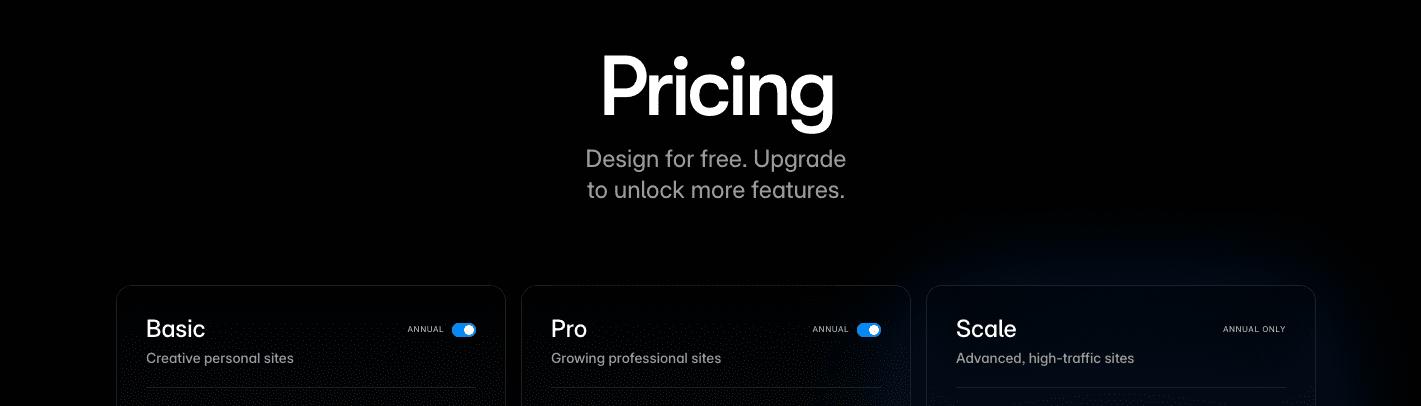
Framer’s pricing makes sense at a glance, but the details matter once a project grows. The Personal plan fits a single site with a custom domain and moderate traffic. It’s a lean setup for simple work or a first launch, but it only includes one editor seat, so real collaboration isn’t part of this tier.
Pro is where teams start to get room. Multiple sites, higher traffic limits, and more editor seats let people work together without friction. Advanced analytics kick in, so it’s easier to see what visitors do and what to fix next. Localization and password-protected pages show up here too, which helps when a project expands to new regions or needs private sections.
For organizations with tighter requirements, Business adds security and control. Single sign-on, SLAs, and priority support reduce risk and keep things moving. Traffic caps rise again, and there’s space for a larger editor group without overlap or access headaches.
Here’s what separates the tiers:
- Allowed sites: 1 on Personal, multiple on Pro and Business
- Custom domains: included across all plans
- Traffic: modest on Personal, higher on Pro, highest on Business
- Editor seats: 1 on Personal, several on Pro, many on Business
- Advanced analytics: starts at Pro
- Security features like SSO: Business only
Pricing as listed on framer.com/pricing in June 2024 shows clear savings with annual billing. Pro sits at $20 per month on monthly billing and drops to about $16 per month on annual, roughly a 20% discount. Other tiers follow the same pattern, so yearly plans make sense if the roadmap is stable.
Editor seats affect total cost. Extra seats usually add fees beyond the base plan, and promos for the main plan don’t always cover those add-ons unless the offer says so. Teams that expand should plan for that spend.
Some features unlock only on higher tiers. Localization and password protection don’t come with Personal and start at Pro. Any paid add-ons outside standard bundles show public pricing, which keeps budgeting straightforward.
Legitimate ways to lower Framer costs without a code
Saving on Framer doesn’t always require a coupon. There are practical ways to lower costs without chasing promo codes.
- Annual Billing Savings: Paying yearly instead of monthly cuts the price. The Pro plan is about $20 per month on monthly billing, and roughly $16 per month on annual billing. That’s about 20% off over a year. A solo Pro user pays around $240 on monthly, but annual works out to about $192. That’s close to $50 saved for committing upfront. For small teams with two editor seats, multiply the discount since each seat adds to the total.
- Education Discounts: Students and educators sometimes get special access or free tiers through verified programs like the GitHub Student Developer Pack or Framer’s education options. Check https://framer.com/education for current rules and how to verify. Proof usually means a student ID or school email.
- Startup & Partner Programs + Template Deals: There are no public startup credits or official partner perks from Framer right now, but design communities and accelerator cohorts sometimes share tool bonuses during launches or events. Keep an eye out. Templates from marketplaces can also reduce project spend. A solid template shortens build time by 20% to 80%, depending on price versus custom hours. This doesn’t reduce subscription fees, but it does stretch the budget elsewhere.
How Framer promos usually work when they appear
Promo codes from Framer usually come with clear limits. I’ve seen them apply to only the first bill, either the first month or the first year, and often just for certain plans like Pro annual. At checkout, it might say “Promo applies to your initial payment only; renewal will be at standard rates.” That line sets expectations before the next charge hits.
Most deals target new customers. If someone’s already subscribed and tries to switch plans or add seats mid-term, a new discount rarely stacks. I’ve noticed messages like “Promo codes cannot be applied during an active subscription period,” which means waiting until the current term ends.
Editor seats and add-ons get tricky. Discounts tend to hit only the base plan price. Extra seats, extra domains, advanced analytics, localization – those usually raise the total without any discount unless the offer spells it out. I test this by adding seats in checkout and watching the total. If the discount number doesn’t move, the extras aren’t covered.
Upgrading from the free plan is straightforward. Go to Workspace → Billing → Upgrade, then look for the “Add promo code” field. A tooltip sometimes appears: “Enter valid promo codes here; applicable only on eligible paid plans.” That confirms free users can apply codes when moving to paid, but not every promo will fit every case.
Knowing these patterns prevents billing surprises. First bill gets the discount, new users qualify most often, base plan pricing is what’s usually covered, and upgrades from free allow codes within the offer’s rules.
Bottom line checklist to verify a real Framer deal
I’d start with a quick gut check before paying. Run through this list to see if any Framer deal is real:
- Go to framer.com/pricing and begin checkout.
- Check for a promo code box. If it’s missing, there’s probably no public discount.
- Enter the code and see if the total actually changes.
- Read renewal terms. Many promotions only apply to the first payment.
- If the code fails or terms feel vague, back out before you confirm.
I’ve seen Framer share very few broad promo codes. Their posts and newsletters showed only a handful, tied to events or first-time users. None widely available lately, so waiting around for constant discounts won’t pay off.
Already a customer and curious about stacking a fresh code on an active plan? Framer’s billing usually rejects coupons on current subscriptions and upgrades. Better move: switch from monthly to annual for the built-in 20% savings, or ask support about proration when changing plans.
No valid coupon today? Pick the smallest plan that fits your work. Go annual if you expect steady use. That saves more than chasing unreliable codes. Paid templates are worth a look too. They shave real time off a project without touching subscription costs.
Share confirmed offers when you see them. It helps others skip fake coupon sites and spend smarter.
Leave a Reply