
Founders often judge website builders by one thing: the monthly price, but that misses most of the bill. Real cost includes the domain, hosting quirks, paid add-ons like forms or memberships, and the hours a founder spends setting it all up. Experts call this the Total Cost of Ownership, or TCO. A plan that looks cheap at signup can end up expensive over time.
Framer stands out for sleek design and speed, and it’s easy to jump in fast. Many founders still overpay for simple projects like MVP landing pages or basic portfolios. Extra features don’t add value if they sit unused, and extra setup time hurts more. Hours slip away that should go into the business.
Look at costs over 6 to 12 months. Monthly fees are only the start. Add one-time template purchases, annual discounts, bandwidth charges, and setup time. Numbers shift once everything lands on the same timeline. A side-by-side view then shows which tools fit each use case and budget with fewer surprises later.
Framer vs Webflow pricing comparison and when each makes financial sense
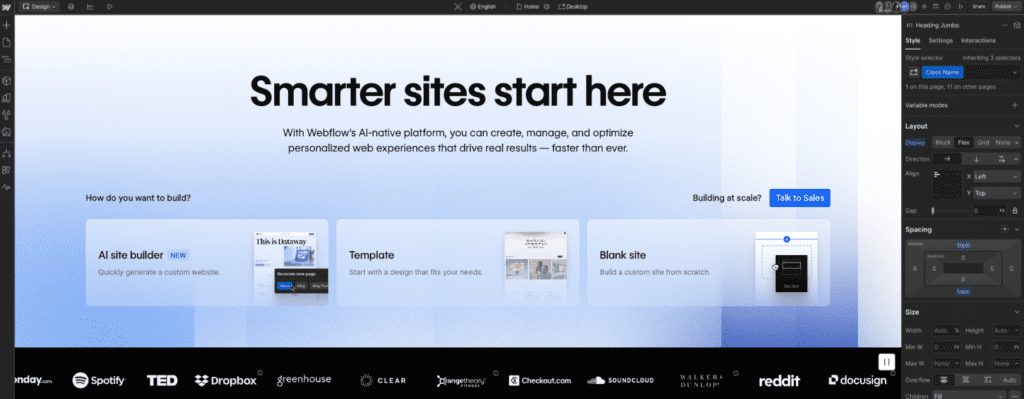
Pricing tells a story about where each tool shines. Webflow’s entry-level Site or Basic plans fit straightforward marketing pages. Teams that publish lots of content – blogs, docs, product lists – tend to move to CMS plans with item caps, like 2,000 CMS items, which shapes how content grows. Framer’s paid site plans include hosting and animations from day one, so polished landing pages come together fast. Bigger teams or advanced analytics push costs up on both sides as needs expand.
Switching platforms isn’t a quick cancel-and-restart move. Rebuilding interactions and styles by hand takes real time. Expect roughly 10 to 20 hours for a modest 5 to 8 page site. That work often costs more than a few months of subscription savings.
- Webflow’s Basic/Site plan fits simple sites, while CMS plans set caps that influence growth.
- Framer bundles hosting and animation upfront, with collaboration and analytics increasing costs on higher tiers.
- Extra features and scale raise pricing on both platforms beyond basics.
- Migration requires manual recreation of design elements and interactions.
- Time ranges from 10 to 20 hours based on site complexity.
- The effort may outweigh savings from a lower monthly plan elsewhere.
Founders who need multi-page sites with granular SEO controls and lots of dynamic content tend to get long-term savings from Webflow’s structured CMS. Speed-focused teams shipping animated, single-purpose landing pages benefit from Framer’s bundled setup, which trims setup time and opportunity cost.
Cheap website builders for bootstrapped founders using Carrd and Typedream
Cash is tight, the idea needs a test, and a landing page has to go live fast. In that moment, Carrd and Typedream make sense. Both aim for simple builds and low costs, without a maze of extras.
- Carrd’s Pro plans run a few tens of dollars a year. Custom domains and basic forms work through services like Formspree or Email Octopus. A clean 1-3 page MVP often stays under $50 a year before domain fees.
- Typedream brings a drag-and-drop feel with link-in-bio blocks and built-in forms. Monthly tiers set limits though. Features like custom domains and password protection sit on higher plans, which matters for closed betas.
- Both tools ship lightweight pages, with Lighthouse scores often above 90. Pages load fast, and there’s no need to bolt on performance plugins.
- Scaling runs into limits. Light CMS or blog features, fewer SEO controls like advanced sitemaps or structured data, and simple layouts that don’t fit complex interactions.
These picks suit bootstrapped solo founders who want to validate fast and keep spend low. They’re solid for lean launches. Growth brings new needs, so a rebuild later is likely.
Budget no-code website tools for startups with WordPress as a workhorse
Launching a self-hosted WordPress site feels like squeezing value from every dollar without giving up control. Entry-level shared hosting for small sites runs about $3 to $10 per month, then renews higher after the first term. Add around $12 per year for a domain. SSL through Let’s Encrypt usually comes free, so secure traffic costs nothing extra. Premium themes with a clean design run roughly $30 to $100 as a one-time buy.
- Essential plugins for forms, SEO, caching, and security range from free to about $200 per year depending on the brand, with options like WP Rocket or Akismet.
- Smooth operations need updates and backups. Time adds up unless a managed plan handles it, which raises the bill.
- Plugins sometimes conflict or a PHP update breaks features, so maintenance stays on the to-do list.
WordPress gives full control over content structure for complex blogs, multilingual sites, and custom post types without ongoing software fees. That power shifts responsibility to the site owner, who handles plugin conflicts and server updates instead of a hosted platform.
Speed depends on smart choices. Lightweight themes such as GeneratePress or the Block theme, paired with caching and a CDN, help pages load fast and meet Core Web Vitals. Too many heavy plugins bloat pages and slow everything down. Keep the stack tight to save money and avoid headaches.
Choose the right fit by scenario and know when Framer is worth the price
Testing an idea fast with a lean MVP landing page? Carrd or Typedream stretch a small budget. Costs sit close to domain fees, with simple forms and email capture to get live in hours. Speed and price win here. Expect a rebuild later if traction comes and feature needs grow.
A portfolio or personal site benefits from polish and solid SEO without draining cash. Webflow’s Basic plan or a lightweight WordPress install hit a clean balance. There’s some upfront setup, then strong control over design and content. Solo builders get a sharp look that stays affordable over time.
Early-stage SaaS marketing sites call for a CMS, gated content, and edits by non-technical teammates. Webflow CMS or WordPress with a page builder trims long-term costs versus bouncing between plans on simpler tools. Watch editor seats and item limits, since those shape how well the site scales.
Need launch buzz with slick motion and a bold first impression? Framer fits Product Hunt debuts and single-page campaigns where animation does the talking. The higher subscription can pay for itself in saved setup time and a tighter user experience during the first few weeks.
Before traffic pushes past 10,000 monthly visitors or the sitemap crosses 50 pages, pause and review limits like bandwidth caps, CMS ceilings, editor seats, and form quotas. Migrations later often take 10 to 20 hours to rebuild designs by hand. Worth it only when the current stack blocks growth.
Map the next two milestones, like email capture or a steady publishing cadence, then choose the cheapest builder that hits those goals without hacks. Commit for three months. Reevaluate after that window to avoid expensive churn while keeping room to shift as needs change.
Leave a Reply