
WordPress feels overwhelming at first, and picking a page builder makes it harder. Elementor and Divi stand out, so the real question is which one fits beginners.
This guide focuses on Elementor vs Divi for beginners with plain advice, not hype. It compares speed, setup, design options, and total cost, including templates, AI features, and support. Tools like Breakdance and Gutenberg matter in the market, but the goal here is a clean head-to-head so newcomers can choose based on budget, hosting needs, and skill level.
What is Elementor and how it works
Elementor is a WordPress page builder plugin that answers a simple question: what is Elementor and how it works? It lets users design pages on-screen with a visual editor instead of clicking through WordPress settings. The free version covers basics like headings, images, and buttons, so simple pages go live fast. Elementor Pro adds site-wide tools such as header and footer design, forms, WooCommerce widgets for stores, and dynamic content that changes based on visitor context.
The front-end editor is the draw. Users drag sections and columns into place, drop in widgets, and see changes in real time. Designs adapt per device with separate controls for desktop, tablet, and phone. No guessing how layouts behave on smaller screens.
Pro unlocks Theme Builder, which designs templates for entire site parts, including single posts, archives, and search pages. Display conditions decide where a template appears, like specific categories or user roles. One template, many places, consistent design.
Custom fields fit in neatly. With integrations such as Advanced Custom Fields, field values flow into templates, so large sets of similar pages publish faster and stay accurate.
Templates speed up projects. The library offers blocks and full-page kits, plus global style imports to keep typography and colors consistent across the site.
what is Elementor and how it works in real use comes down to extendable tools. Third-party add-ons add niche widgets and effects. New AI helpers inside the editor generate text or code without switching tabs, which keeps momentum while building.
What is Divi and how it works
Divi is a paid visual builder from Elegant Themes with a clean look and strong tools. It’s sold as a subscription or a lifetime license. It comes as the Divi Theme or the Divi Builder plugin, which works with other WordPress themes. No free tier.
Here’s what is Divi and how it works in practice. Pages are built with sections, rows, and modules that stack on the front end. Each module has detailed controls for design, including filters that adjust color and texture, blend modes that layer elements, transforms that rotate or skew, and scroll effects that animate pieces while a visitor moves down the page.
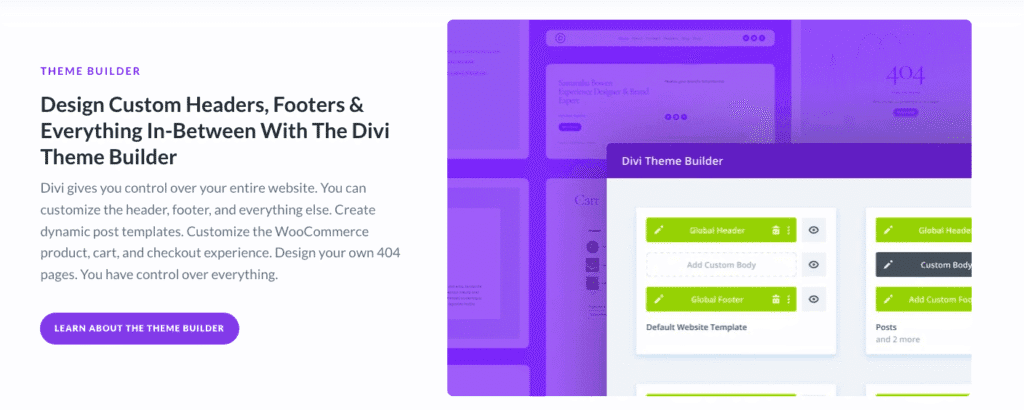
Divi’s Theme Builder applies the same system to the whole site. Creators design headers, footers, single post templates, and archive pages, then set rules for where each one appears, similar to display conditions in other builders. This keeps styling consistent across the site without repeating the same setup on every page.
Global presets and the style system help keep branding tight. Designers define base tokens like fonts, color palettes, and spacing, then reuse them as presets inside modules. Update a preset once, and every linked module updates across the site.
Divi speeds up production with a large library of layout packs organized by niche, from blogs to online stores. Copying styles between modules or across pages is quick. Divi Cloud stores favorite layouts, sections, and assets online, so they’re available on any site owned by the same account.
Divi AI is an optional add-on inside the editor. It generates copy, images, and custom CSS directly in the page builder, which helps teams move faster while building complex pages.
Elementor vs Divi performance comparison on a fresh site
Tests for an Elementor vs Divi performance comparison start on equal ground. Same server stack, like LiteSpeed or NGINX with PHP 8.2+, and WordPress 6.6+. Fresh installs get matching landing pages, built with similar widgets and modules, so neither builder walks in with an edge.
Speed gets judged by FCP, LCP, and TBT. Page weight and request counts matter too, measured with Lighthouse in Chrome and WebPageTest. These metrics show how fast content appears and how long the browser stalls while scripts and styles load.
Extra CSS and JavaScript slow things down. Each widget or module often adds its own files. Icon packs add bulk, especially with multiple sets on one page. Motion effects need scripts, which adds delay. Third‑party add‑ons stack even more overhead unless pruned.
Elementor ships with “Experiments” to slim output. Optimized DOM, improved CSS loading, less redundant code. Divi’s Performance panel answers with dynamic CSS, critical CSS, jQuery deferral, and module-level toggles so only required assets load.
Hosting sways results more than many expect. Shared hosting without caching pushes LCP beyond 2.5 seconds on simple pages for both builders. Add full-page caching and a CDN, and LCP often lands under 1.8 seconds. The builder matters, but the server and cache layer matter more.
For smoother results:
- Convert images to WebP to reduce file sizes.
- Reduce motion effects, since they add scripts.
- Skip stacking multiple add‑on packs that multiply requests.
Re-test after enabling these tweaks. Scores improve across FCP, LCP, TBT, with smaller payloads and fewer requests on both Elementor and Divi.
Elementor vs Divi ease of use for a first build
Elementor vs Divi ease of use often comes down to how each builder feels the first time someone opens it. Elementor puts tools in a left sidebar with inline editing on the right, so changes appear next to the controls. It feels like a familiar app where clicks match what shows on the page. Divi relies on floating panels and modal windows, which adds more on-screen movement and windows to manage. Some users enjoy the flexibility after a bit of time, while others spend more effort finding the right settings through overlapping menus.
Cost plays into ease of entry. Elementor offers a free version, so new users can test layouts, learn the workflow, and see what fits before paying. Divi requires a license up front. For budgets that need to stay tight or for casual testing, this paywall slows early exploration.
In day-to-day building, small shortcuts matter. Elementor’s right‑click menu speeds up copying styles and saving elements for reuse, so work doesn’t stall while digging through settings. The Navigator panel shows a clean outline of the page, which helps move between sections without losing track in deep layouts. Divi’s wireframe mode removes visual styling to show a pure block structure, which suits big-picture layout work. Quick Actions also help jump between modules and tools fast on larger pages.
Responsive control differs in feel. Elementor places device controls inside each setting, so changes for desktop, tablet, and mobile live where the user adjusts them. Divi adds fluid responsiveness with clamp-based font sizing, which keeps text scaling steady across screen sizes.
Recovery options lower stress. Elementor tracks detailed revisions, including changes on specific widgets, so rolling back one element is possible without undoing an entire section. Divi offers cloud backups and JSON export/import, which makes it easy to store layouts offsite or move designs between projects.
Accessibility needs care from the author in both tools. Default widgets output semantic HTML, but proper alt text, labels, and keyboard considerations still depend on the person building the page. Automation only goes so far, so good results require deliberate setup.
Elementor vs Divi styling options and design systems
Elementor vs Divi styling options come down to how each builder handles global control, effects, and layout structure. Elementor groups colors, fonts, and buttons in Global Styles and Site Settings, so one change updates the whole site. Divi uses Global Presets with Theme Options, letting teams set defaults per module and define site-wide tokens for typography and color. Both keep branding consistent, but Elementor favors one central panel while Divi spreads style control between presets and theme settings.
Divi includes transform tools for rotate, skew, and scale right in the builder. Scroll effects create movement as visitors move down the page. Filters and blend modes apply color and image treatments without extra plugins. Elementor offers motion effects like fade and slide, plus mouse tracking interactions that follow cursor movement. The Pro plan adds custom CSS support, which expands what’s possible and ties advanced effects together.
Custom CSS access works well in both. Elementor Pro lets editors add CSS per widget, which is useful for small, targeted tweaks. Divi provides CSS fields in every module with clear selectors, so changes stay organized and don’t rely on external files.
Their layout systems take different paths. Elementor shifted to nested containers with Flexbox, which gives more control for responsive design and reduces the need for extra structure. Divi keeps sections, rows, and columns, and it adds modern flex options and sizing controls under the hood. The interface feels familiar, but the responsiveness is stronger than it used to be.
Keeping styles consistent across large sites relies on design tokens in both tools. Divi’s presets act like branded building blocks, so repeated modules keep the same colors and fonts across pages. Elementor’s Global Styles lock core variables at the root and push updates everywhere those styles apply. One change updates the entire site and reduces design drift.
Icon and font loading affects speed. Extra icon sets increase requests and slow pages. Both include popular sets like Font Awesome and suggest enabling only what’s needed. Hosting fonts locally instead of depending on external CDNs lowers server calls and speeds first render while keeping text sharp.
Elementor vs Divi theme builder and WooCommerce integration
Theme building in Elementor and Divi covers the whole site, not just single pages. Headers, footers, single posts or products, archives, search results, even 404 pages all fall inside their scope. Templates don’t apply everywhere by default. Display conditions target taxonomies like product categories, custom post types such as portfolios or events, and user roles, including logged-in customers or guests. Precision like this makes sites feel tailored without rebuilding every page by hand.

For WooCommerce, both tools ship with e-commerce widgets or modules. Elementor Pro includes product title, price, and add-to-cart elements, plus full cart and checkout templates edited visually inside the theme builder. The path from browsing to purchase stays consistent because these parts live inside the same system. Divi offers Woo modules as well, with product grids and design controls for cart and checkout. It handles visual changes well, though deeper checkout field rearrangement often needs extra plugins or custom CSS.
Checkout customization shows the gap in flexibility. Elementor supports step-by-step layouts and aligned fields directly in its Cart and Checkout templates through the editor. Divi styles those areas but doesn’t natively reorder fields or handle complex layout changes with the same control, which pushes work outside the builder for fine-tuning.
Both builders bring in dynamic content through ACF or Meta Box. Stores scale better with this approach, like auto-populating product specs so category pages stay consistent and still reflect item-level details without manual edits.
WooCommerce updates sometimes change template behavior under the hood. Builders lag at times after a major release, so staging environments matter before live updates on production stores. Pinning WooCommerce versions until confirming stability helps avoid surprises.
Expect added CSS and JavaScript weight compared to a lean custom theme. Keep product loops light, avoid heavy scripts across many items, and use lazy-loaded galleries. These simple steps trim bloat on mobile and during category browsing.
Elementor vs Divi theme builder comparison often comes down to WooCommerce flow and checkout control. Elementor vs Divi WooCommerce integration also hinges on how well each handles dynamic fields and layout changes inside templates. After optimizations, check mobile Largest Contentful Paint to confirm shoppers get quick interactions even with rich visuals on store pages.
Elementor features and pros and cons for beginners
Elementor gives beginners room to explore with a free version, so they can learn the editor and build simple pages before paying. Large template kits help with fast starts, from full-page layouts to block patterns. Containers based on Flexbox keep layouts lean compared to older section-and-column structures that add extra markup.
Pro adds Theme Builder for visual control of headers, footers, archives, and dynamic templates across a site. Built-in AI inside the editor drafts text, suggests CSS, and writes small code snippets without switching tools. Loop Builder creates custom archive loops for portfolios and listings with a visual workflow. A big third‑party ecosystem adds specialized widgets and extensions for niche needs.
Some key features sit behind Pro, including forms and full theme building. Extra add-ons introduce more scripts and styles, which slows sites if left unchecked. Past major releases sometimes shipped breaking changes, so staging and version control matter before updates go live.
Paid plans include ticket support with response times tied to subscription tier and queue load. A wide knowledge base and countless community tutorials cover common problems and “how‑to” tasks.
This setup fits freelancers who need quick prototypes and flexible layouts without an immediate purchase. It also helps content teams spin up landing pages with fast styling, while newcomers get a clear path to grow from free tools into premium features.
Moving designs between sites works with Site Kit import and export. Migrations stay tidy with fewer shortcodes left behind compared with many classic WordPress builders.
Divi pricing vs Elementor pricing and how to choose
Divi pricing vs Elementor pricing comes down to site count and how long the plan needs to last. Elementor Pro charges annual fees per site with tiers like Personal, Plus, and Expert based on usage. Divi offers a yearly plan or a one-time lifetime license for unlimited sites, which suits freelancers and agencies who manage many clients.
Elementor includes a free version for basic projects and learning. It covers simple pages and helps test the workflow before paying. Divi doesn’t have a free tier, so a license is required from day one.
Both tools support WooCommerce, but the packaging differs. Elementor Pro includes WooCommerce widgets within its plans. Divi includes WooCommerce modules in the main license. Extra add-ons, especially for checkout or subscriptions, may raise costs for either setup.
Ecosystems matter too. Elementor works with many paid extensions like Crocoblock, which unlock niche features but add to long-term spend. Divi leans on built-in effects and presets for common needs, with occasional plugin buys when specific gaps appear.
For long-term, multi-site work, Divi’s lifetime license often becomes cheaper after two to three years compared to Elementor’s recurring fees. For one site with limited add-ons, Elementor’s single-site annual pricing usually stays lower.
Before paying, do a quick test plan:
- Build identical demo pages in both on staging
- Run Lighthouse checks for Largest Contentful Paint (LCP) and Total Blocking Time (TBT)
- Spend 30 minutes in each editor to judge comfort
- Write a short list of must-have features
Make the call based on measured performance, workflow fit, and total cost of ownership. For current pricing and trials, check each company’s website, since plans change over time.
Leave a Reply