
Founders make a lot of calls every day. A small set of dependable templates saves time and cuts guesswork. A short, vetted list turns launch work from stressful to doable. This review highlights three Framer templates that have proven themselves with real users and thoughtful design.
Orbai, Mindly AI, and Grovia stand out for practical reasons: strong visual systems with balanced type scales and clear color tokens, page structures that cover home, feature, pricing, and blog, deep customization inside Framer, and clear fit for their intended audiences, from AI agencies to AI education to SaaS and business sites. Each template shows traction in the marketplace with steady, positive buyer feedback focused on execution over hype.
Price matters as part of value. Higher prices often bring extra polish, smoother animations, and more ready-to-use CMS collections. Lower-priced picks ship with fewer flows yet still enable fast setups suited to focused launches. The key question is what the buyer gets for the money.
Marketplace ratings tell only part of the story, since reviews trend sparse or uneven. This assessment goes further: demos get checked in detail, layer structures get reviewed, and update cadence gets tracked. The aim is practical guidance on where each template helps first during customization, and where it may fall short based on specific needs. The goal is simple: help someone ship a site that converts without wrestling with a blank canvas.
The Highest Rated Templates of All Time
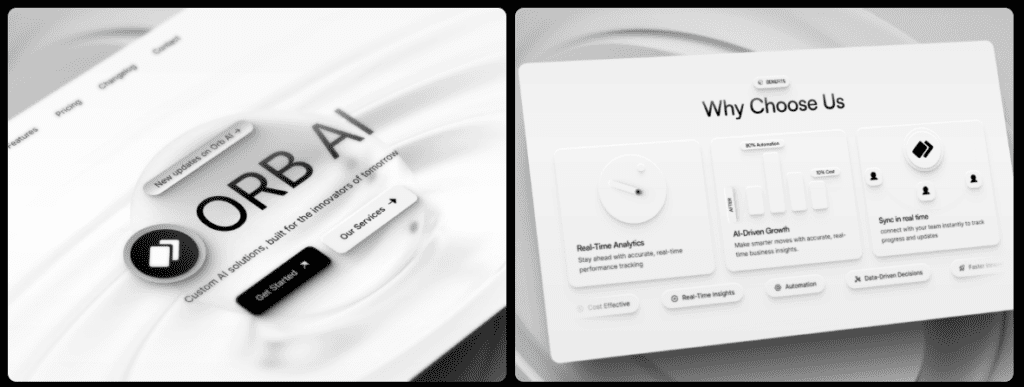
Orbai gives AI and machine learning agencies a clean, purpose-built site to showcase services and case studies without fuss. It guides visitors from a strong hero section to service details, proof points, and a clear call to action. Agencies get space to display real work and move prospects toward a decision.
The visual style mixes bold monospace with crisp grotesk type for a modern tech look that fits AI brands. Dark mode adds depth, and gradient accents add color without glare. An 8px spacing grid keeps layouts tidy, and the responsive type scale holds up even on screens under 360 pixels.
It ships with the pages agencies expect: Home, Services, CMS-powered Case Studies for quick updates, About, a CMS-backed Blog for steady publishing, Pricing with clear breakdowns, and Contact sections with embedded Calendly or Typeform. Booking tools reduce friction, so visitors can schedule calls or submit forms on the spot instead of jumping to other apps.
Under the hood, Framer components do the heavy lifting. Sections come as reusable blocks: hero banners, marquee logo strips for clients or partners, animated metric counters to demonstrate credibility, and FAQ blocks that cover common questions. Each component supports props for fast tweaks to theme colors or icons without deep layer edits. Global styles control typography and color across the entire site, so brands can refresh the look in under half an hour.
Conversion features stay focused. Motion-led value propositions draw attention without pulling eyes away from the next step. Social proof sliders rotate client logos or testimonials to build trust. Service cards break offers into easy-to-scan chunks. The case study CMS goes beyond visuals with SEO in mind, using schema-ready article structures that link back to related services to strengthen context for search engines.
Mindly AI for AI agencies that need credibility, clear structure, and fast booking
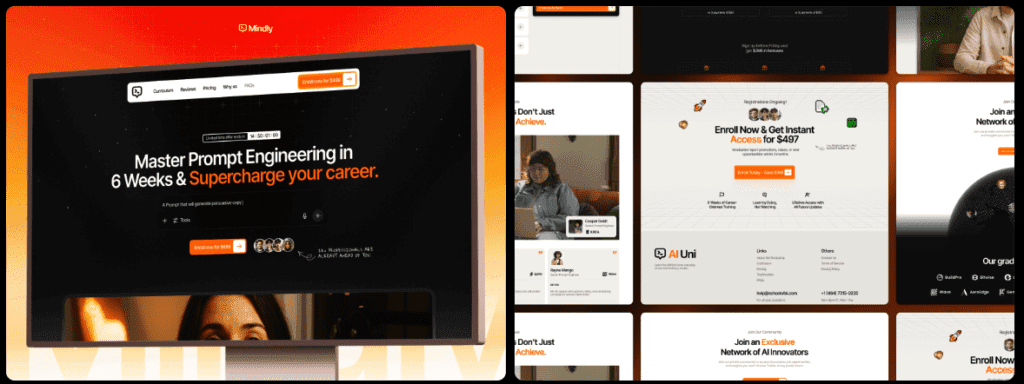
Mindly AI suits solo course creators and academies selling AI and large language model curricula. It highlights one product or one cohort at a time, avoiding bulky catalogs that slow visitors down. This tight focus supports a clearer funnel and stronger conversions.
Clarity leads the design. The hero area shows key outcomes above the fold, so learners see value right away. A short video teaser adds interest without clutter. A curriculum timeline maps the journey in a simple sequence. High-contrast type and roomy line spacing make long lessons readable on small phones, where most buyers browse.
Sales content hits the points people look for:
- Instructor bio with proof of expertise
- Cohort dates in plain view
- Pricing tiers with one-time or cohort-based options
- Bonus modules to add value
- Student testimonials for trust
- FAQ with direct answers
Checkout buttons slot into tools like Gumroad, Stripe-hosted links, or Lemon Squeezy embeds. Setup stays quick.
Framer components handle state changes behind the scenes. Module blocks flip between locked and unlocked views based on access. Pricing cards adapt to the payment plan. Countdown timers build urgency before enrollment closes. Testimonials and blog posts pull from CMS collections, keeping social proof current and drawing search traffic to the course page.
Fewer pages than a typical agency or SaaS kit keep the bundle small, which boosts load speed and cuts distractions. Speed matters here. This template works as a focused launch tool for course creators who want to ship fast and stay clear on what they’re selling.
Grovia for focused course launches with a clean, conversion‑ready flow
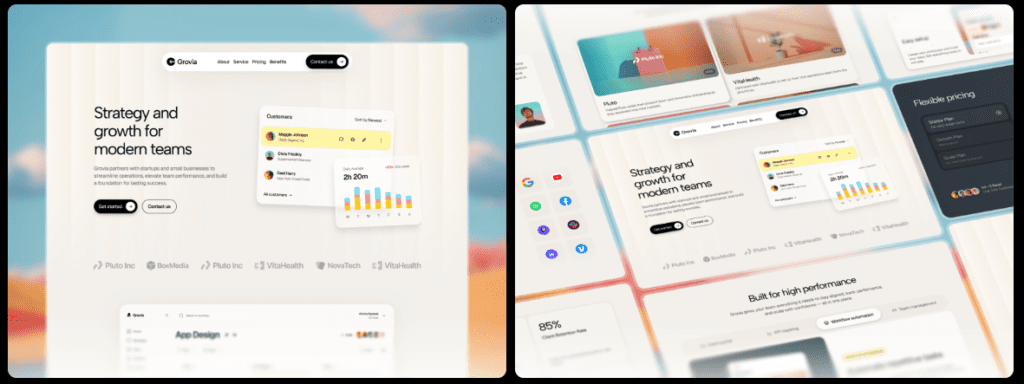
Grovia serves B2B SaaS, developer tools, and SMB software teams that want a clean site to show features, explain benefits, and walk visitors through pricing. It suits teams highlighting a roadmap or updates, while keeping paths to support and careers short and obvious.
The structure covers what most SaaS sites need. Home sets the context. Features map to jobs-to-be-done. Integrations pull from CMS collections. Use Cases show practical applications. Pricing includes tiered tables with sticky anchors. Changelog and Blog run on the CMS. Careers lists open roles. Support and Contact close the loop.
Design relies on tokens for color, spacing, and radii, with smooth light and dark modes. Icons and illustration slots align to an 8-point grid. New pages stay consistent without extra work. The rhythm feels steady, and the system scales.
Its Framer component library includes modular blocks: feature grids shifting from one to three columns, tabbed panels for layered detail, testimonial carousels for social proof, and integration cards with quick overrides for icons, copy, and layout. Marketers adjust sections fast without digging through messy layers.
Conversion gets focused treatment. Calls to action sit in the nav, in heroes, mid-page, and in the footer. Sticky pricing anchors stay in view while users scroll. Product videos sit neatly next to Intercom chat or a status link without breaking layouts or slowing pages. Grovia blends clear marketing stories with practical conversion tools built for SaaS growth.
Grovia for SaaS teams that need scalable pages and a deep component library
Choosing a premium Framer template for a business site comes down to the story on the page and how visitors move through it. Agencies often pick Orbai because case studies sit front and center, and real results do the heavy lifting there. Course creators go with Mindly AI for a single focused offer or cohort, which keeps funnels short and clear. SaaS teams tend to choose Grovia for complex feature menus and layered pricing that still feel easy to scan.
Brand basics like colors, fonts, and logos swap in fast. Most folks wrap that in 30 to 90 minutes across these templates. Deeper edits take longer. New sections, sharper calls-to-action, or extra CMS collections push work into the 2 – 6 hour range, depending on skill with Framer components. Templates shave off a lot of setup time compared to a blank build, but custom touches still take effort if the goal is a tailored site.
Each template expects different inputs. Orbai benefits from a small set of strong case studies with clear metrics – client stories with numbers that prove impact. Mindly AI calls for a crisp curriculum outline, learner outcomes, and instructor credentials to build trust in the course. Grovia needs full feature explanations, pricing tiers with logic that makes sense, and integration copy so visitors see how tools connect.
SEO favors structure. Grovia and Orbai ship with CMS-powered blogs or case study hubs that keep new content coming, which search engines value. Mindly AI leans on a single-page core with blog support. Fast to launch, though it won’t capture many long-tail keywords unless expanded.
Pricing runs $59 – $79 per template. That’s far less than a designer or developer engagement, which often starts around $1,500 and climbs into several thousand for similar scope. The real decision weighs upfront spend against launch speed and the built-in polish – animations, interactions, and layout patterns that make the site feel finished on day one.
How to choose among Orbai, Mindly AI, and Grovia based on fit and effort
Picking a Framer template isn’t just about looks or price. It needs to fit the plan with no surprises after checkout. A quick compatibility check avoids headaches and shortens the path to launch.
- Open every demo on desktop and on a phone. Tap through each page and interaction. Check breakpoints around 320 – 360 pixels. Try it on a mid-range phone and feel the scroll. If it stutters or lags, expect trouble.
- Look in the Framer preview for clear layer names, tidy components with variants, and global styles for colors and fonts. Color and type tokens make rebrands fast, not a hunt through cluttered layers.
- List the CMS collections needed – blog, case studies, integrations, testimonials – and confirm the template supports them or adds them without breaking navigation or SEO. Verify tools like Calendly, Typeform, Stripe embeds, analytics trackers, or chat widgets drop in cleanly without shifting layouts or slowing pages. Check update history, too. Steady releases and responsive authors signal fewer bumps as Framer changes.
Pick the one that trims custom work, hits today’s goals, and still leaves room to expand when new ideas show up. Curated Framer templates with pricing and features listed help a lot – match their strengths to the real requirements right now.
Leave a Reply