
Picture this. You launch your MVP, users start signing up, and you’re pumped. Then you check your email and see a $1,200 bill from OpenAI. One founder watched their costs blow up overnight even though they thought they’d planned everything out.
But here’s what happened next. They made four changes – tracking token use, cutting down prompts, caching results, and batching requests. Their bill dropped almost in half within a week. The product still worked the same, users didn’t notice anything different.
You don’t need to rebuild everything or learn complicated workarounds. These are things you can do right now that’ll show up as real numbers on your dashboard. Plus, you’ll actually know how to reduce token cost with OpenAI instead of just hoping your bill stays manageable.
On this page
OpenAI token cost explained for founders
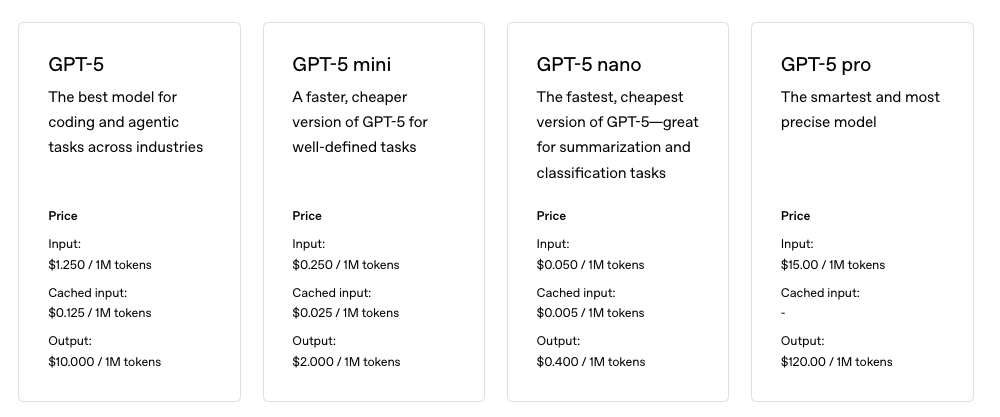
OpenAI’s pricing looks simple until you actually start using it. Each model charges per 1,000 tokens, but the rates vary a lot. GPT-4o-mini costs way less than GPT-4o. And here’s something that catches people off guard: output tokens usually cost more than input ones. You need to track both if you don’t want surprise bills.
Tokens add up in places you might not think about. System prompts run in the background on every call. Function schemas and tool definitions count toward your total. Arguments you pass during API requests get tokenized too. JSON outputs can get huge and eat through your budget fast. Even embeddings have size costs depending on dimensions. Retry logic is another killer because it resends the full context each time.
You can make this easier by turning on detailed reporting in your SDKs. Enable logprobs or token-level usage fields. Each call will return input_tokens and output_tokens as actual numbers. Save those to a database so you can analyze them later.
Once you’re collecting that data, go to OpenAI’s dashboard under Usage, then Daily breakdown. Export your daily usage and group it by model type, endpoint, and any keys tied to specific features. This shows you which parts of your app cost the most.
Before you send requests to OpenAI, run quick checks with tokenizer libraries. Tiktoken works well for o-series models. You can estimate prompt sizes locally and catch bloated inputs before they hit the API. Set hard caps on token limits too, so runaway costs don’t slip through.
Ways to reduce token cost in ChatGPT API
You lose money on tokens without realizing it. Context filtering helps with this. Run something cheap first, maybe BM25 or a basic embedding model, and let it pull out the 3 to 5 chunks that matter most. Set a hard limit of around 1,200 tokens total and ignore the rest. You’re not feeding the model a bunch of stuff it doesn’t need.
Prompt dieting means cutting the unnecessary parts. Don’t include “Hello” or “Thank you” because those words cost tokens. System messages should be one or two rules, that’s it. If you keep copying the same instructions everywhere, turn them into a short template that stays under 120 tokens. Few-shot examples can go too. Schemas work better and don’t take up as much space.
Model routing saves you money by sending tasks to the right place. Classification or basic data extraction doesn’t need GPT-4o. Use a cheaper model for those. Set up a confidence gate so the cheaper model handles what it can, and only bump uncertain requests up to the expensive one.
Function specs eat tokens because their JSON descriptions count as input. Shorten the descriptions and delete parameters you don’t use. Replace wordy instructions with enums. They’re smaller and still clear.
Embeddings are useful but their size adds up fast. Smaller embedding models work fine most of the time. Cap how many retrieved tokens you send back into your prompt. You don’t want 10K tokens going in when 1K does the job.
Be mindful of hidden tokens in openai prompts since they show up in places you might not expect. Count your tokens to lower openai costs instead of guessing. There are ways to reduce token cost in chatgpt api that don’t hurt your app’s performance, you just need to know where the waste happens.
Limit input and output tokens to save on OpenAI
Controlling your output size is one of the better ways to limit input and output tokens to save on OpenAI costs. Set max_output_tokens based on what you actually need for each task. Summaries might need 256 tokens if they’re covering more ground. Labels work fine with 64 tokens since you’re just tagging things. Yes/no answers with booleans? You can get away with 16. Enforce these caps on the server side so clients can’t accidentally push past limits and run up your bill.
Switching from free-form text to strict JSON schemas can cut down token use quite a bit. Ask for pure JSON outputs with well-defined schemas. You’ll get smaller payloads and faster parsing on your end. No rambling prose cluttering up your logs either. Before you process anything, validate outputs against a JSON schema library to keep things tight.
Temperature settings matter more than people think for cost control. Set temperature=0 with top_p=1 and the model becomes deterministic. It sticks to expected answers without wandering into long-winded or repetitive territory. That means fewer retries since predictable outputs don’t need as many fixes, and you avoid chatty responses that eat tokens for no reason. Save higher temperature for when you actually need creativity.
Break down expected output into specific fields instead of requesting single long essays. Something like {answer_short, three_bullets, score_0_1} works well. Models stay concise and focused right where you need them to be. answer_short gives you a brief summary or direct response. three_bullets distills key points into simple bullets. score_0_1 provides a numeric confidence or relevance rating. This gets you structured info that plugs directly into apps without much post-processing, and models produce shorter text in the process.
Stop sequences work as brakes on runaway generations. Define stop tokens like “nnEND” and the API knows exactly where to cut off output early. Otherwise it keeps going until it hits max tokens, which costs more and creates a mess. If length penalties are supported, combine them with stop sequences to push the model away from pointless filler. Every token should count toward value instead of fluff.
Learning how to control OpenAI API costs and tokens comes down to constraining outputs through practical rules. Don’t just hope usage stays low on its own. These chatgpt token cost tips for api users give you actual control over what you’re spending.
Use caching and batching to cut OpenAI calls
You’ve seen why trimming inputs and outputs helps, and why tracking tokens matters. Smart moves cut costs without wrecking your app. Here’s a checklist you can start using this week.
First, get detailed token tracking into your logs and dashboards. Every request should show input and output tokens so you know what’s happening.
Set monthly budgets for each feature and daily caps per user. Surprise bills hurt, and this stops them before they start.
For prompts you run over and over, deterministic caching works well. Hash the model plus prompt data together, then keep cached results for 7 to 30 days. Repetitive tasks get way cheaper this way.
Batch your requests when you can. Embeddings and similar calls work better in groups of 32 to 256. Run them during off-peak hours and you’ll cut down overhead.
You need retry limits with exponential backoff and jitter. Retries multiply token use fast, so log them separately and watch for retry rates climbing over 3%.
Make Monday mornings your cost review time. Export usage reports, find the expensive routes, then ship one optimization each week based on what you found. Doesn’t need to be fancy, just consistent.
Track your cost savings where the team can see them. Link changes to dollar impact in changelogs or PRs right in your repo. When everyone sees progress, it sticks.
Be mindful of the cost right from the start instead of fixing problems later. Use caching and batching to reduce OpenAI calls while keeping spending predictable. These quick wins turn into habits that protect your budget when you scale.
We put together a cost playbook PR template you can drop into any repo. Makes it easier for your whole team to own these practices together.



Leave a Reply