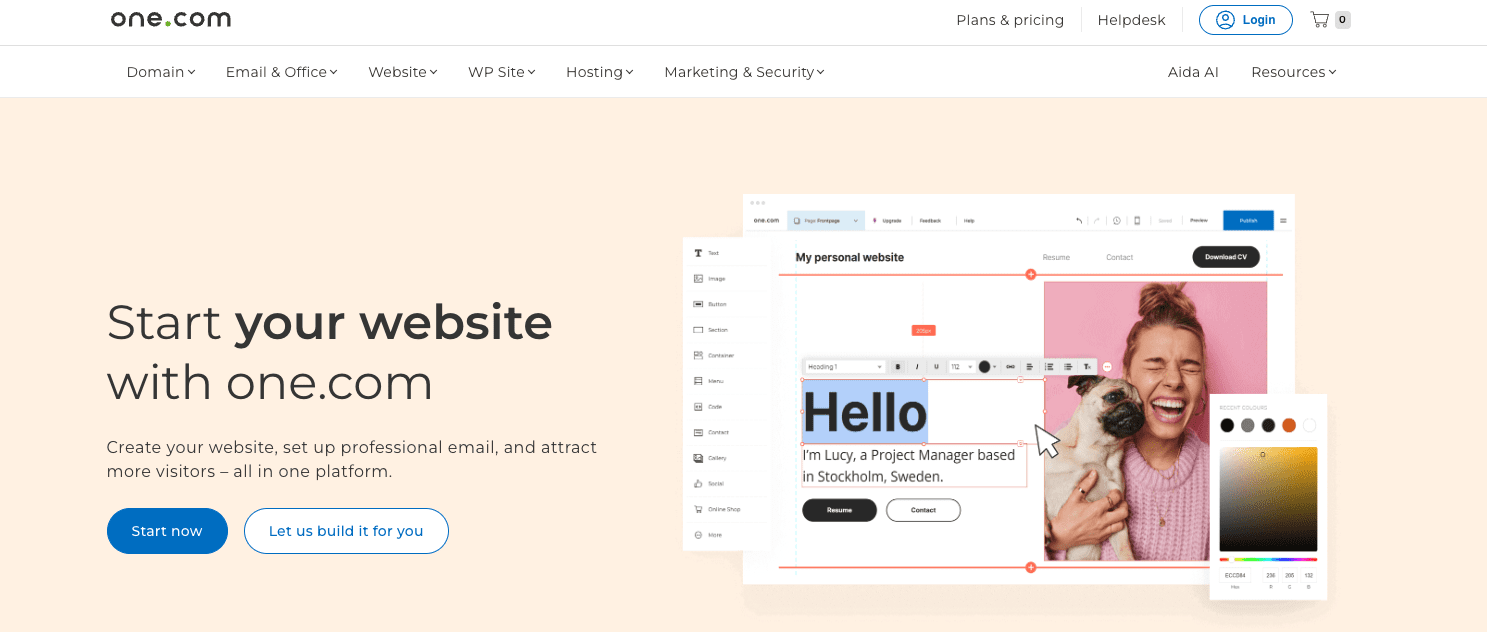
Starting a website can feel like jumping into the deep end, especially with so many hosting options out there. one.com makes it easier – built for beginners who want straightforward tools without fuss. This one.com review explains why it’s a solid choice for those just getting started.
one.com keeps things simple but still offers useful features. Setup is quick, pricing clear, and its user-friendly dashboard doesn’t demand tech skills. If you’re launching your first blog, business site, or portfolio, it helps you get online fast.
What sets this apart is how it balances simplicity with enough power to handle typical early websites. Plans include plenty of storage and bandwidth, plus extras like free email accounts and SSL certificates that prevent future headaches.
For solo founders and small teams who want reliable hosting without complicated tech talk, one.com hits the mark. This honest look at their features should help you decide if it fits as you build your online space.
On this page
- What Makes One.com a Top Choice for Beginners
- Key One.com Features for Easy Website Hosting
- Simple and Affordable Website Hosting Plans
- How to Set Up One.com Step by Step
- Performance and Reliability of One.com Hosting
- Support and Help Beginners Get with One.com
- One.com Pros and Cons Every Beginner Should Know
- Theme Design and Website Management Tools on One.com
- Frequently asked questions
What Makes One.com a Top Choice for Beginners
One.com stands out as the best hosting for beginners by keeping things simple and affordable, which is crucial when just starting. It cuts through all the tech jargon and offers tools that get sites live fast without confusing users. This way, new site owners can focus on creating content instead of wrestling with complicated settings.
Pricing is straightforward here too. Unlike many hosts that sneak in hidden fees or push pricey upsells, One.com lays out costs clearly from day one. That honesty helps founders manage budgets without surprises.
The dashboard feels friendly even if you’ve never handled hosting before. Tools like drag-and-drop builders, easy email setup, and simple domain management reduce hassle. Many other hosts overwhelm beginners with complex panels meant more for pros, but One.com welcomes you in with open arms.
All these pieces come together into a smooth experience where people feel confident building their online space without getting tangled in tech troubles. That’s why founders searching for reliable and no-nonsense web solutions keep it top of mind as the best hosting for beginners.
Key One.com Features for Easy Website Hosting
One.com features focus on making website hosting simple, especially for beginners who want to avoid headaches. The setup flows smoothly, thanks to tools that speed up launches. Their drag-and-drop builder lets anyone create and customize pages without needing coding skills or extra help.
Managing a site feels less scary with a clean dashboard that keeps everything together – from domain management to email setup. No wasting time flipping through confusing menus.
Security happens quietly behind the scenes with free SSL certificates included in every plan. Visitors immediately know your site’s safe without any effort from you. Regular automatic backups keep your content safe if anything goes sideways.
One.com also gives users staging sites where they can test changes before going live. This stops mistakes from reaching the main page and brings peace of mind when trying out new designs or updates.
A variety of templates and customization choices within their builder offer enough design flexibility for most beginners, without overwhelming options.
Key one.com features make website hosting smooth: – Intuitive drag-and-drop builder speeds up design work – Centralized dashboard handles site and email tasks easily – Free SSL certificates secure visitor info instantly – Automatic backups protect your data regularly – Staging environments let you test safely before launching
Together, these features make one.com perfect for founders chasing easy website hosting without losing control or wasting time.
Simple and Affordable Website Hosting Plans
One.com offers website hosting plans that fit different needs without breaking your budget. The basic plan covers essentials – enough storage for your content and images, plus a free domain for the first year. It works well if you’re launching a personal blog or a small business site without heavy traffic.
Their mid-tier plan adds more space and lets you create extra email accounts, great when your project grows or you have a small team handling communication. It also gives a slight boost in performance, which helps keep visitors happy as your audience expands.
At the top level is a plan designed for users needing more resources like daily backups and priority support. This suits sites with steady traffic or those expecting quick growth, offering added reliability and peace of mind.
All these options count as affordable website hosting because they avoid overwhelming beginners with costly extras while providing solid service where it matters most. Choosing mostly comes down to how much storage and email access you need along with expected traffic.
For founders figuring out what fits best, focusing on current demands and future growth keeps choices straightforward without paying for features not yet needed.
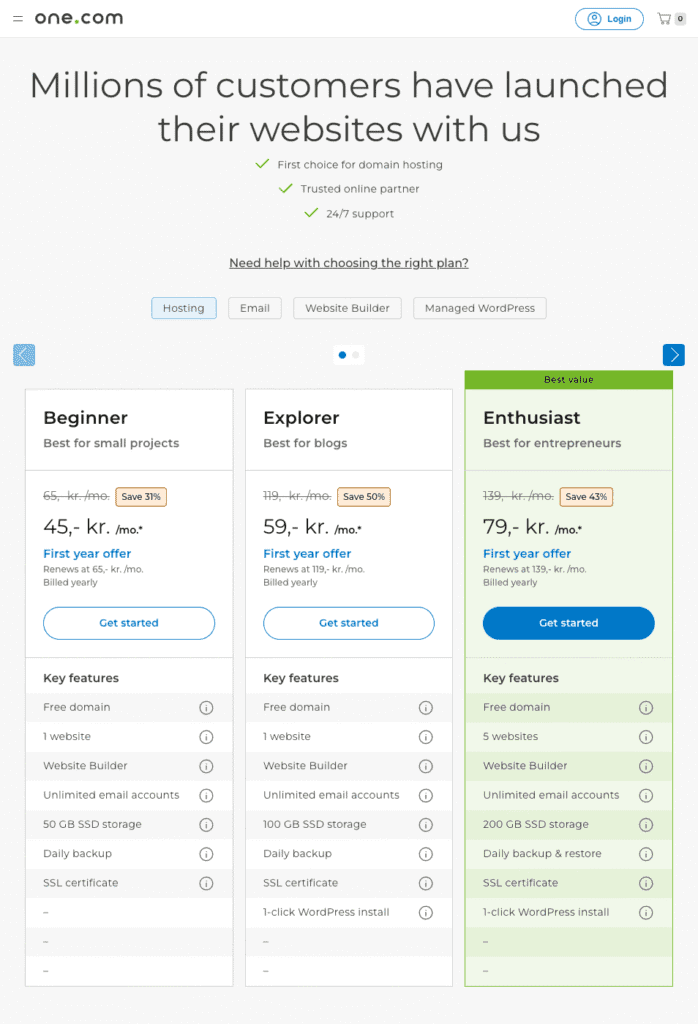
Comparing Costs for Affordable Website Hosting
One.com offers clear, straightforward pricing with no hidden fees or confusing add-ons. This approach makes it easier for founders to pick plans that fit their budget while getting everything they actually need. Instead of pushing expensive extras like many others, one.com focuses on the essentials – a smart move if you’re after affordable website hosting.
The Basic plan comes with a low monthly fee and suits starters running blogs or small sites. It includes enough storage and one email account to keep things simple.
Their Mid-Level plan charges moderately but adds more storage for bigger files and emails, plus multiple email accounts. It’s great when your site starts growing.
For those who need serious power, the Advanced plan has ample storage, daily backups, unlimited emails with priority support, and better speed along with uptime reliability.
How to Set Up One.com Step by Step
1. Start by heading to One.com and creating an account with your email and a password.
2.Choose a website hosting plan that fits what you need now but leaves room for growth later.
3. Register a new domain or connect one you already own to your hosting.
4. Use the control panel to install WordPress or their drag-and-drop builder for simple design work.
5. Customize your site using templates, add pages, and upload content that tells your story.
6. Set up email accounts linked to your domain if you want professional communication.
7. Activate free SSL certificates so visitors see the secure lock icon while browsing.
8. Preview your site on different devices before going live to catch any fixes early on.
9. Publish when everything looks right with just one click.
Extra: Keep backups enabled as part of starter web hosting tips. It protects all the effort you’ve put in.
For beginners launching their first website, taking things slow helps. Regularly save changes, test links often, and reach out to One.com’s support when stuck – this keeps frustration low while confidence grows.
Performance and Reliability of One.com Hosting
For beginners, performance shapes how visitors experience a site right from the start. Slow loading pages or unexpected downtime drive away potential readers or customers before they even get started. That’s why any one.com review has to focus on speed and uptime.
One.com servers deliver solid speeds that keep sites running smoothly. While not the market’s fastest, their response times meet what most new websites need without causing frustration. This balance fits solo founders who want dependable service but don’t yet need high-powered hosting meant for huge traffic volumes.
Uptime reliability is crucial when launching your first website. One.com’s promise of around 99.9% uptime means your site stays live nearly all the time with very few interruptions. Newcomers juggling multiple tasks gain real peace of mind knowing their online presence won’t drop unexpectedly.
Handling sudden traffic spikes can be tough for entry-level hosts since unexpected surges often slow down servers or cause crashes. One.com keeps things stable through moderate bursts without errors or lagging badly.
Overall stability matters just as much as raw speed because steady access builds trust with visitors and search engines alike. From this view, one.com stands out among beginner-friendly options by offering reliable infrastructure that supports steady growth instead of leaving users stuck during critical moments.
This mix of decent server speed, strong uptime guarantees, and durability under pressure makes one.com a practical choice for those stepping into web hosting – delivering an experience secure enough to focus on content building rather than babysitting tech issues.

Support and Help Beginners Get with One.com
One.com offers support that feels personal and straightforward, exactly what beginners need when learning the ropes. Their customer service team is available through chat, phone, or email – covering different preferences. Chat responses usually come within minutes during business hours, while emails often get answered by the next day. Phone support adds comfort for moments when typing just won’t cut it.
The real strength lies in how approachable their help staff are. They avoid jargon and speak in clear terms that new site owners can understand easily. Troubleshooting feels less intimidating – more like talking to someone who knows the struggles instead of dealing with a robotic system.
Beyond direct contact, one.com has a well-organized knowledge base packed with step-by-step tutorials made for first-timers. Visual guides cover everything from setting up emails to connecting your domain without overwhelming you. These resources let users handle small issues on their own while building confidence.
For example, a founder launching a portfolio site had trouble linking their custom domain properly. After reaching out via live chat late afternoon, they connected quickly to an agent who patiently guided them through each step until it was fixed – all without rushing or complicating things.
This mix of hands-on support and clear self-help tools makes one.com stand out as especially beginner-friendly – a safety net encouraging founders to keep experimenting without fear of getting stuck.
One.com Pros and Cons Every Beginner Should Know
For new site owners, One.com offers a straightforward hosting experience with clear strengths and some limitations. Its simple interface helps founders get online quickly without fussing over tricky technical details, making it perfect for those who want to focus on their content instead of learning complex systems.
One.com keeps pricing transparent and fair – no hidden fees or surprise charges – which makes planning your budget easier. Free SSL certificates and automatic backups add solid value without turning the setup into an overwhelming chore.
This clean simplicity means you might hit limits if your website grows beyond basic needs. The drag-and-drop builder works great at first but can feel confining when you need extra customization or advanced features. While One.com handles moderate traffic nicely, it’s not built for heavyweight scaling required by bigger projects or fast-growing businesses.
The platform trims back many backend controls to stay friendly for beginners but that comes at the cost of deeper customization usually expected down the road.
Founders prioritizing ease and clarity – like solo entrepreneurs launching blogs or small portfolios – tend to find lots to like here. If rapid growth is in sight, though, One.com might reveal its boundaries sooner than hoped.
These one.com pros and cons show it trades flexibility for accessibility. Anyone valuing fast setup with reliable basics – and willing to accept simpler tools – is likely to find a solid foundation with One.com.
Theme Design and Website Management Tools on One.com
One.com offers tools that make managing a website manageable for beginners. You can easily monitor disk space from the dashboard, eliminating surprise limits when adding images or content.
Backups usually happen automatically, giving founders peace of mind. Restoring previous versions is straightforward – no technical headaches involved. The staging environment lets you test changes before going live, so experimenting with designs feels safe.
Email account management tied to your domain is simple too. One.com makes creating and organizing professional email addresses easy – a helpful feature for small business owners wanting a clean online image without complex setups.
Setting up e-commerce works through integrations like WooCommerce within WordPress or compatible site builders. These handle important tasks like payments and inventory with clear instructions geared for first-timers.
Managing daily website operations feels less overwhelming thanks to these user-friendly features. Whether customizing themes or handling routine maintenance such as backups and emails, One.com’s design helps founders focus on growing their brand instead of struggling with tech stuff.
Frequently asked questions
Is One.com actually the best cheap web hosting for a small site?
For a personal blog or a small business site without heavy traffic, it works well. The basic plan covers enough storage for content and images plus a free domain for the first year, and it stays cheap by skipping extras. Limits appear later, since the platform trims backend controls.


Leave a Reply