A good template shapes how a photographer’s site looks and works. This guide reviews six Framer options built for real portfolios: Photolab (free), Astrid (free), Phrame ($29), Lumen (free), Tessa Morgan ($89), and Focra ($59). Each template gets judged on image presentation, gallery structure, typography, Framer customization controls, performance, and fit for either showcasing work or attracting clients.
These criteria matter because photos need clean space, galleries guide viewers through a story, and type choices signal skill and taste. Strong customization keeps brand details consistent across pages. Speed matters when pages carry high‑res visuals. Picking a template that matches the goal – portfolio-first or client‑focused – shapes the number of inquiries.
Pricing reflects current listings. Cost signals features and time saved, not a moral score. This isn’t a Framer 101, it’s aimed at photographers who already know the tool and want site templates that look sharp and deliver results.
On this page
- How we tested these six Framer photography templates
- Photolab review, a clean grid for fast, lean portfolios
- Astrid overview with an editorial look for case studies
- Phrame at $29 balances portfolio needs with simple inquiries
- Lumen is a free, bright, mobile‑first choice for portfolios
- Tessa Morgan at $89 offers a premium editorial system with client pages
- Focra at $59 delivers bold visuals and a clear inquiry path
- Which template fits your style and goals for 2026?
How we tested these six Framer photography templates
Six Framer photography portfolio templates were tested with the same demo setup: 24 images in different orientations and file sizes, each compressed to about 200 – 300 KB. This revealed how each template dealt with cropping quirks, aspect ratios, and grid layouts without giving one style an edge.
Screens ranged from a wide 1440px desktop to a 768px tablet and a 390px phone. Layout shifts were a focus. Galleries shouldn’t jump or squish when the viewport changes. Tap targets on small screens got close attention too. Navigation through photos needs to feel natural instead of like searching for tiny buttons.
Performance got a full review through Lighthouse on fresh publishes of each template. Scores covered Performance, Accessibility, Best Practices, and SEO, plus key metrics like Largest Contentful Paint (LCP) and Total Blocking Time (TBT). The results showed real-world speed and smoothness.
Typography was reviewed as well. Default font stacks for headings and body text went under the microscope along with sizes and line heights. Swapping fonts with Framer’s styles and tokens showed how flexible each design was for brand updates without diving into code.
Customization checks looked at what parts were editable as components versus locked sections. Templates with CMS collections for projects earned credit because they make portfolio management easier. Click counts to change colors, spacing, or rearrange content exposed which designs stayed user-friendly versus those that needed more technical skill.
Features aimed at client acquisition were weighed against pure presentation tools. Some templates included services lists, pricing tables, contact forms, or booking call-to-actions to turn visitors into leads. Others focused on project pages and gallery layouts built to showcase work rather than sell directly.
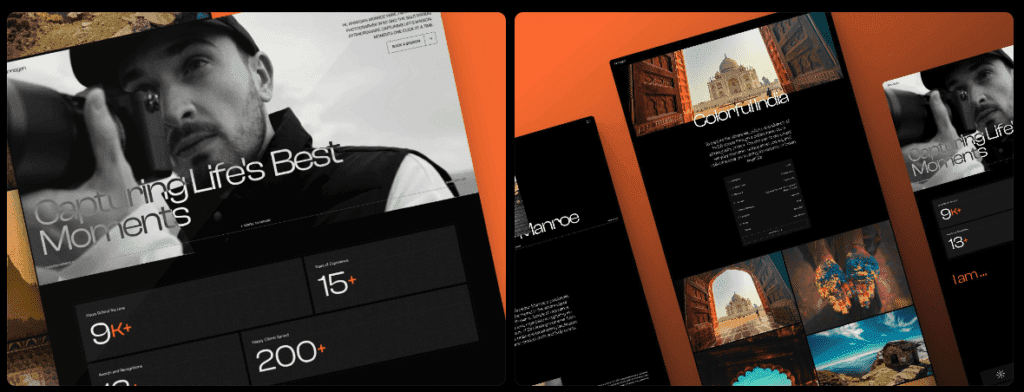
We ran the same test across a neighbouring category where booking matters just as much, in our ranking of the best Framer wedding templates.
Photolab review, a clean grid for fast, lean portfolios
Photolab is a free Framer template, which makes it appealing for new photographers or anyone who wants a lean portfolio. It ships with fewer prebuilt sections than paid templates. Less to set up, less to wade through. If simplicity and speed matter, it fits.
Images look good because the template doesn’t fight them. An edge-to-edge masonry grid keeps each photo’s native portrait or landscape shape, so no odd crops. Hover states stay subtle and don’t pull attention away from the work. A lightbox modal comes enabled, so visitors open a single shot and view it larger without friction.
Galleries keep a clear structure. Clean grids, straightforward project pages, and no layered galleries or multiple carousel types cluttering the flow. Photographers who want the photos to lead the story get that here.
Typography uses a neutral sans-serif like Inter with body text near 18 px and line height around 28 – 32 px. Text stays readable and quiet, which lets images take priority. Global styles make swapping fonts fast, so matching a brand only takes a quick update.
Customization covers the basics well. Color tokens and spacing scales update across hero sections, grids, about pages, and contact forms because those parts ship as simple components. There’s no CMS built in, so projects live as static pages. Growing portfolios that need frequent updates may want dynamic collections, and this template doesn’t include that.
Performance holds up. A slim code bundle and minimal motion keep pages light. With compressed images, mobile Lighthouse tests often show Largest Contentful Paint under roughly 2.2 seconds. Fast loads beat flashy effects when visitors just want to see the work.
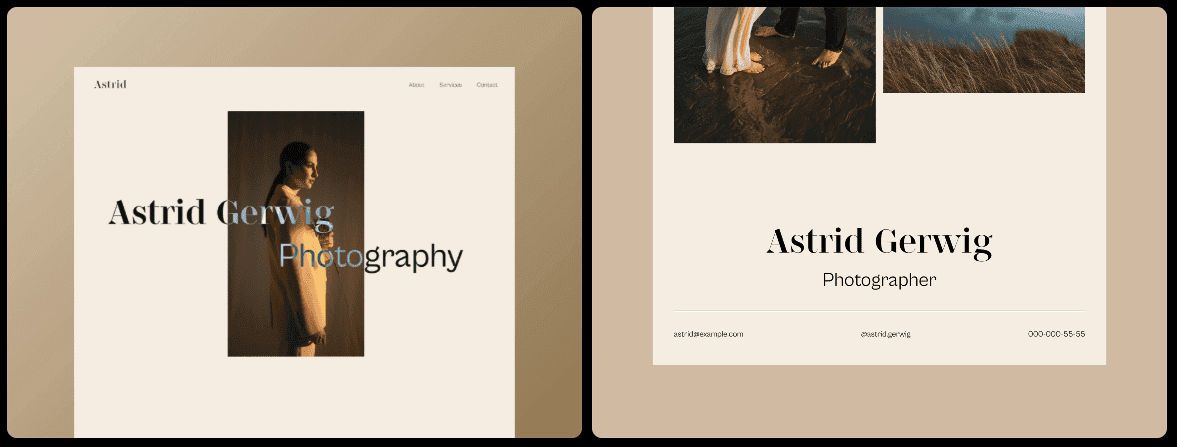
Astrid overview with an editorial look for case studies
Astrid is free, and it’s not a blank slate. The editorial look gives it personality, so photographers aiming for a neutral or minimalist feel might want to dial it back. It’s built for storytelling with style, which suits anyone who wants a site with a clear point of view.
Images get room to breathe. Large hero shots sit with generous margins, and full-bleed sections let photos run edge to edge when needed. Subtle scroll reveals add movement without going heavy on effects. These can be turned off for speed.
The gallery setup goes beyond simple grids. Astrid supports story-style case studies where captions, credits, gear lists, and behind-the-scenes images fit in naturally. It suits documentary and fine art work where context matters as much as the images.
Typography reads like a magazine. Serif headlines bring character, and clean sans-serif body text keeps longer reads comfortable. The mix adds an editorial polish that frames projects as considered narratives rather than quick snapshots.
Customization runs deep. Style tokens adjust type scales and spacing across pages, and section variants include pull quotes and caption blocks for richer project notes without manual layout work.
Performance holds up with light animations that enhance the experience without adding bulk. On mobile, Largest Contentful Paint often lands around 2.4 to 2.8 seconds, mostly from big hero images. Pre-sizing and lazy loading help. Accessibility checks pass for contrast, so text stays readable across devices.
Phrame at $29 balances portfolio needs with simple inquiries
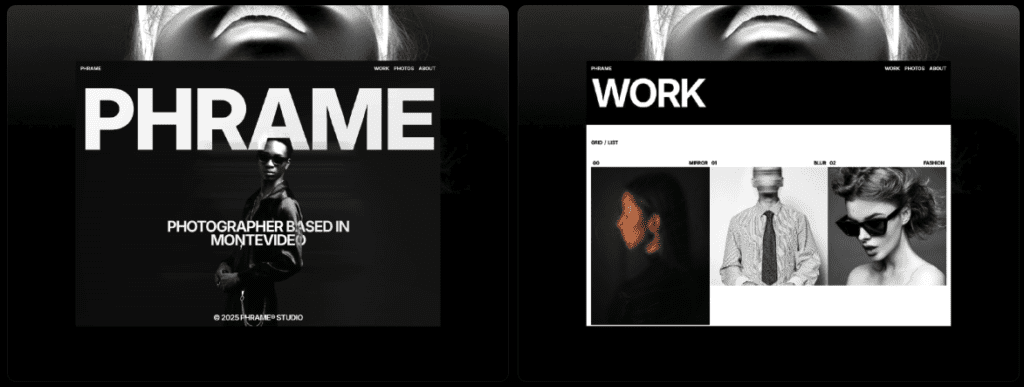
Phrame costs $29 and gives photographers a polished portfolio with simple client features for a fair price. It goes beyond image galleries with contact forms, service sections, and testimonial blocks that help turn visitors into leads.
Images get careful treatment. Cover shots can sit next to grid thumbnails, and original aspect ratios stay intact to prevent awkward crops. A lightbox is optional and supports keyboard navigation for deeper viewing on desktop or laptop.
Three gallery layouts cover the basics well: classic grids, masonry with varied vertical spacing, and a slider with mobile swipes and desktop arrows. Projects support tags for quick sorting, simple and tidy.
Typography uses a geometric sans serif for a clean, minimal feel. The visual hierarchy stays clear, so headings and body text read in a natural flow. Global font swaps won’t break the layout, so brand updates stay easy.
Customization is flexible without excess settings. Component props allow entire sections like testimonials or service lists to be switched on or off without reworking pages. There’s no advanced CMS for dynamic content, but duplicating project pages is straightforward for expanding portfolios.
Performance holds up well. Third‑party scripts stay light, which helps desktop Lighthouse scores land above 90 when images are compressed. On long pages with sliders, deferring those scripts reduces Total Blocking Time and keeps load times fast as galleries expand.
Lumen is a free, bright, mobile‑first choice for portfolios
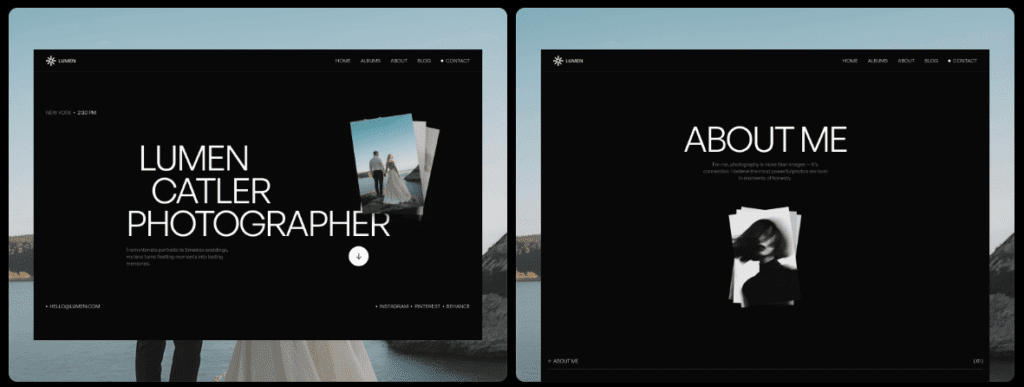
Lumen is a free Framer photography template built for mobile first. It doesn’t ship with many prebuilt pages, but the core layout feels tuned for phones and tablets. Photographers who want quick setup without desktop tweaks may find it a good fit.
Images sit on bright white backgrounds with generous space. The layout feels light, so each photo gets attention instead of crowding. Optional drop shadows add a touch of depth, and switching them off speeds things up. Pages look flatter but load faster.
Galleries use a clean, consistent grid with clear gutters. On small screens, images stack in a tidy column and tap targets stay finger-friendly. Categories work through linked pages instead of filters, which keeps navigation simple and easy to follow.
Typography uses a humanist sans-serif that reads well at small sizes. Wider letter spacing helps captions and headings stay legible on tiny displays. Anyone who prefers a tighter look can trim spacing in the style settings for a sharper tone.
Site-wide controls include color tokens and spacing sliders for quick palette and layout tweaks. Headers and footers ship as simple components, so edits don’t require code or digging through menus. Lumen doesn’t include sections for services or pricing out of the box, so client-focused pages need manual setup.
Performance stays light with minimal motion. Older phones scroll without stutter. On typical setups, mobile Largest Contentful Paint lands around 2.1 – 2.5 seconds when hero images stay under 300 KB, which balances image quality with speed.
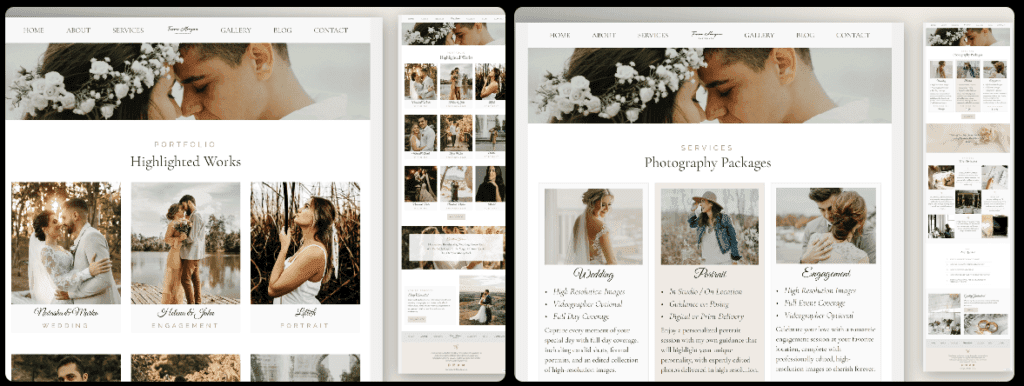
Tessa Morgan at $89 offers a premium editorial system with client pages
Tessa Morgan costs $89, the highest price here, and earns it. It’s made for photographers who need more than a simple portfolio. Multiple project layouts, built-in services, and inquiry flows make it a fit for detailed case studies that also bring in clients.
Image presentation feels deliberate and flexible. Mix full-bleed shots that grab attention with captioned photos that add context without clutter. A sticky sidebar keeps project details and credits in view as the page scrolls, which helps on long pages where readers might lose track of information. Typography sets a steady rhythm, so dense sections still read smoothly.
Galleries go further than standard grids. Curated story sequences guide visitors through a project in a set order. Clean grids help sort lots of work. Carousels add interactive browsing. The homepage hero can auto-rotate featured projects, so returning visitors see fresh work.
Typography uses a serif-and-sans pairing for an editorial feel. The type scale comes tuned, so headings and body text stay balanced across devices. Font swaps are possible, but heading sizes might shift and throw off layout flow.
Customization stands out with CMS-style collections inside Framer. Projects run dynamically instead of living on a pile of static pages. Reusable sections cover pricing tables, FAQs, and testimonials, all controlled with global tokens for color and spacing. This suits photographers publishing serious case studies or service pages who want a consistent look without constant manual updates.
It asks more from hosting because layouts are richer and visuals are heavier. Use strong image compression and lazy load anything below the fold to keep first paint fast. Dial back animations on mobile to cut Total Blocking Time, so scrolling stays smooth on slower connections.
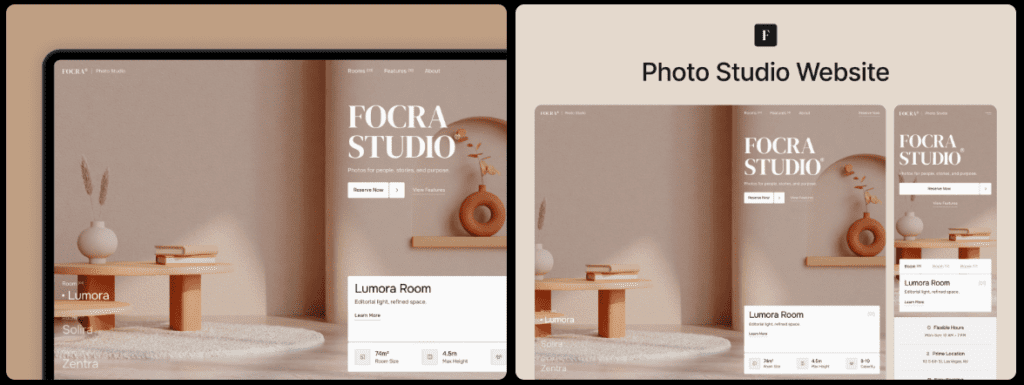
Focra at $59 delivers bold visuals and a clear inquiry path
Focra sits in the mid-tier at $59 and gives photographers bold visuals with tools that turn visitors into clients. The template isn’t only about looks – it includes conversion-focused elements that encourage inquiries without feeling pushy.
Hero images take over the screen with high contrast that makes photos pop. Overlay text stays readable thanks to smart color contrast, so captions and headlines don’t get lost. On phones, the lightbox supports pinch‑zoom, so viewers zoom into details without hassle.
Galleries switch between full-width blocks and masonry, which creates a lively rhythm and keeps attention on the work. Category pages sort projects by weddings, portraits, and commercial shoots. People find the right work fast instead of digging through a single long feed.
Typography uses bold grotesk headings that cut through the vivid imagery. Body text stays quiet, so photos lead. Prefer a softer look? Reduce weight and loosen letter spacing to calm the tone while keeping clarity.
Customization goes beyond color swaps. Focra includes services pages, package cards, and a contact form with required fields to capture leads. The header adds a clear call-to-action button for booking or questions. Component variants make it quick to try different home layouts until one fits the brand.
Large hero visuals need care to stay fast. Use WebP or AVIF to shrink file sizes, and cap hero widths at 1920 pixels to avoid bloat. Preload the main hero image to improve Largest Contentful Paint on desktop. Lazy load the rest so scrolling stays smooth as images appear.
Which template fits your style and goals for 2026?
- Portfolio-only, speed-first: Photolab or Lumen. Both use minimal scripts and fast grids, so images load quickly and stay front and center. Best suited for editorial or fine art work where photos tell the story.
- High-impact marketing for bookings: Focra. Bold visuals with clear calls to action. Genre landing pages help wedding or portrait photographers turn visitors into inquiries quickly.
- Editorial storytelling with long captions: Astrid or Tessa Morgan. Strong typography and layouts built for case studies. Pick Tessa Morgan if you need services and pricing pages alongside the story.
- Balanced portfolio plus inquiries: Phrame. Clean galleries, simple service sections, and contact forms. Good for generalists ready to start booking clients with minimal setup.
- Price trade-offs: Free options like Photolab, Astrid, and Lumen save money but require more manual assembly. Mid-tier Phrame ($29) and Focra ($59) shorten build time. Premium Tessa Morgan ($89) includes the most prebuilt components for detailed case studies and client services.
Photographers should narrow the shortlist to two templates – one built to showcase pure photos, another designed to attract leads. Run a quick test: duplicate a project page, add 12 – 24 real images, then audit with Lighthouse. Aim for mobile Largest Contentful Paint under 2.5 seconds. Share the live link with a trusted peer to see if it reads clearly, loads fast, and encourages visitors to get in touch.

Leave a Reply