After testing a lot of Framer templates in real projects, a tight shortlist stood out for founders, designers, and small teams who need to launch fast and still convert. Looks matter, sure, but real-world usability matters more. Faster edits, smoother performance, and pages that push visitors to act.
Each template went through a full build from import to publish. The timer started at import and stopped at go-live. Every sticking point got noted. Conversion design led the scoring. Clear hero sections, bold CTAs, social proof that earns trust, and pricing tables that help people choose. Flexibility pulled weight too. Swapping layouts, shifting components, and reusing sections needed to feel effortless. Performance stayed in the mix as well. Tests ran on throttled 4G with Chrome Lighthouse plus real-device flows on an iPhone 13 and a mid-range Android.
Support and price finished the rubric because ongoing help and fair value decide outcomes for solo founders and lean teams. Sane defaults and solid prebuilt sections reduce decisions and save hours.
Here’s the bottom line. The top five Framer creative templates for high-converting sites in this 2026 update shook out like this: Sombra in first place, Startex just behind, FocusFlow in third, with Orbai and Fabrica closing the list. Read on for what pushed these ahead.
On this page
- Why Sombra ranks first for the fastest path to a conversion‑ready site
- Startex for SaaS with scalable navigation and pricing that grows with you
- FocusFlow for personal brands and agencies with clean type and quick setup
- Orbai and Fabrica when you need motion storytelling or a modular system
- How to choose the right Framer template for your team and timeline
Why Sombra ranks first for the fastest path to a conversion‑ready site
Sombra gets a site live fast. Import the template, and in a little over two hours there’s a sharp, on-brand landing page. Built-in tokens and global styles do the heavy lifting, so no custom code or messy overrides. Founders and small teams spend time on copy and visuals, not technical fixes.
Conversion features come ready to go. The hero section uses a bold call-to-action with contrast that meets WCAG AA, so it’s easy to see and click. A testimonial carousel pairs logos with headshots to put real people behind the quotes, which builds trust fast. Pricing blocks include monthly and annual toggles wired to Framer interactions, so switching views feels instant and clear.
Flexibility stays front and center. Sombra includes over 40 section variants covering heroes, feature highlights, FAQs, and case studies. A component library lets teams adjust colors, layout density, and media placement through simple props instead of manual edits. This trims setup time while keeping room for brand voice.
Mobile performance holds up. Lighthouse scores land around 90 to 95 on default marketing pages, which shows solid speed and responsiveness. Swap demo images for compressed WebP files at 1200 pixels wide, and largest contentful paint drops under 2.5 seconds, even on throttled 4G.
The dark, high-contrast style is opinionated and won’t fit every brand. Playful teams may spend extra time tweaking colors or layouts to soften the look. The blog template is basic and works for announcements, but it’s thin for a fuller content hub with many articles.
Startex for SaaS with scalable navigation and pricing that grows with you
Startex helps SaaS companies make sense of complex sites with a clear structure that doesn’t get in the way. The nested navigation groups product details, solutions, and resources into tidy menus. It goes far beyond a single landing page, so larger sites can guide visitors across features, pages, and docs without confusion.
Pricing works well too. The comparison table uses feature rows to show what each tier includes, tooltips to explain terms, and badges to spotlight popular plans. Switching between flat-rate and usage-based pricing is painless because only the text changes, and the layout stays steady no matter how the copy shifts.
Updates stay visible. A monthly changelog tracks tweaks and fixes alongside Framer releases, which makes it easy for teams to see what improved. Short Loom videos walk through setup and customization so non-designers don’t get stuck on technical steps.
Migration from a simpler CMS or Notion feels straightforward. Startex ships with structured blog and changelog collections, plus logical categories and tags. There’s no need to rebuild content organization from scratch when moving over.
Performance needs a little care. Heavier scroll animations add weight. To reach 90+ Lighthouse scores on lower-end Android phones, two effects were disabled during tests. It’s an extra step, but it keeps the site snappy while keeping the look intact.
FocusFlow for personal brands and agencies with clean type and quick setup
FocusFlow suits personal brands and agencies that want a sleek portfolio live fast. Spin up a full site with case studies and a contact funnel in about 90 minutes. Duplicate the case study layout, swap images and client quotes, and publish.
The typography system removes guesswork. It follows an 8pt spacing rhythm and a clear type scale, with long‑form blocks tuned for readability. You won’t have to guess at line heights or squint at dense text.
Lead capture works without friction. The contact page ships with Framer Forms, so it collects leads without extra setup. Drop a Calendly embed into the template’s modal, and calls get scheduled in place, without jumps or layout shifts.
Images get careful treatment. Galleries use native lazy‑loading and aspect‑ratio boxes, so high‑res work samples load without content shifts. Pages feel stable and polished.
This template suits solo designers, consultants, and boutique agencies that want a clean credentials site with sharp looks and straightforward navigation. It isn’t meant for sprawling SaaS sites. It nails the essentials creatives need: speed, style, and simplicity.
Orbai and Fabrica when you need motion storytelling or a modular system
Orbai stands out for its timeline and scrollytelling sections, which bring stories to life without overloading devices. Animations include reduced‑motion fallbacks, and tests kept CPU usage under 60% on mid‑range phones during scroll. Users get smooth motion without the lag or jank heavier effects cause. Orbai leans hard on Lottie animations, though, and teams often need lighter JSON exports or swaps to native Framer animations to keep older phones smooth. Skip that work and the experience stumbles.
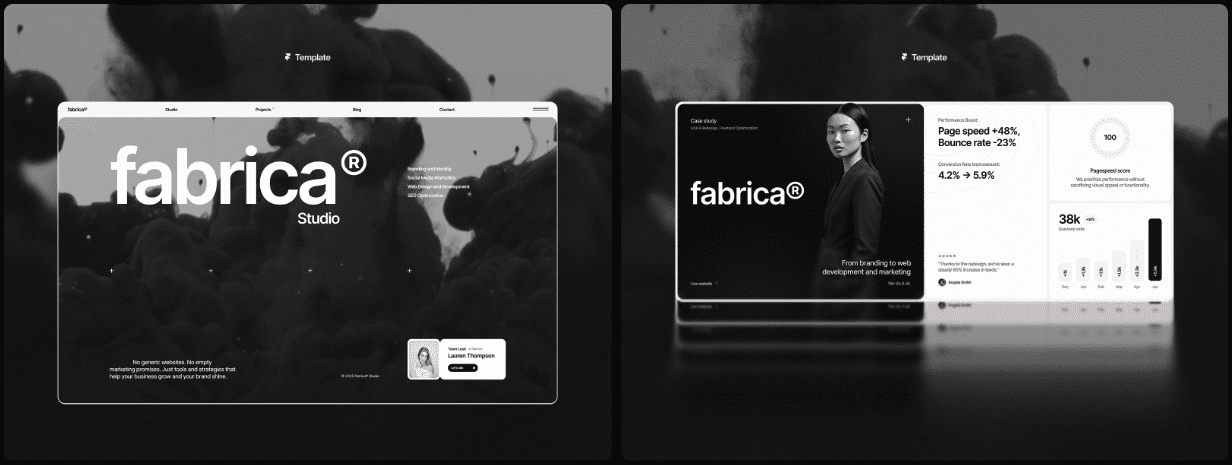
Fabrica takes another path with a modular grid built for quick iteration. Swappable cards, icon sets, and utility classes make weekly homepage refreshes feel like swapping puzzle pieces. Startups get flexibility without rebuilding from scratch every time they adjust copy or layout. The default style is very minimal and risks fading into the background. Strong brand direction – custom illustrations or photography – gives it personality and helps it stand out.
Both templates include license terms that let founders launch unlimited sites under one brand. Companies with multiple microsites keep consistent quality across them all.
Teams that need something plainer than motion storytelling across those microsites will find closer fits among the best Framer templates for business websites.
Artists and performers need the stage to do the talking, which is the brief behind the best Framer entertainment templates.
How to choose the right Framer template for your team and timeline
Choosing a Framer template comes down to your launch timeline and how much your team can handle. A conversion-focused SaaS site on a tight clock points to Sombra. Deep navigation and detailed pricing needs steer toward Startex. Sleek portfolios for personal brands or boutique agencies fit FocusFlow. Motion-heavy storytelling leans on Orbai, though it needs some animation chops. Frequent homepage tweaks benefit from Fabrica’s modular layout and quick edits.
Prep the homepage copy before design work. Use the problem-agitate-solution framework and drop that text into hero and feature sections first. Compress hero images under 1.2 MB, cap widths at 1600 pixels, and respect reduced-motion preferences for accessibility. Then test speed, layout stability, and any visual shifts after major changes.
Document brand tokens in one Framer page. Include color variables, text styles, and component variants so future edits don’t break layouts.
Use a tight 48-hour launch rhythm. Day one covers importing the template, setting colors and fonts, and building core pages like home, pricing, or contact. Day two handles mobile polish, performance checks, and content proofing, then publishing with basic analytics in place.
This turns template choice into a straightforward plan tied to actual needs. Pick a style, import it into Framer, and start checking off launch goals.

Leave a Reply