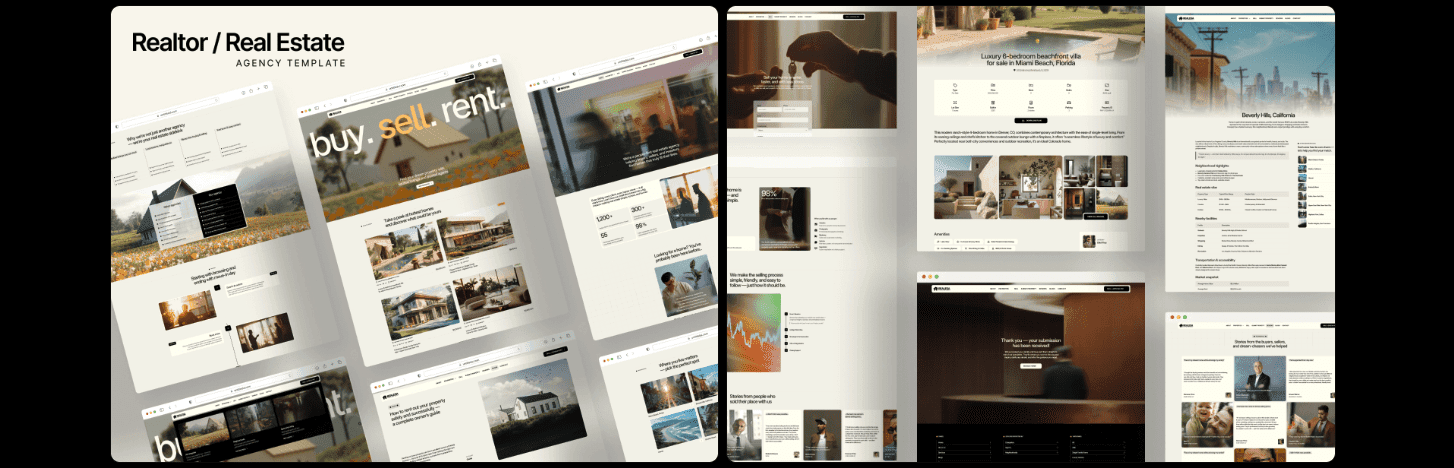
Real estate agents and small agencies need more than a pretty site. Speed, clear calls-to-action, and forms that push data straight into the CRM matter most. Slow pages drive people away fast. When load time slips from one second to three, bounce rates jump by about a third. Moving forms above the fold helps too. Putting them where visitors see them without scrolling lifts inquiries by up to a quarter.
The author has shipped sites, measured what converts, and balanced setup time with real costs for busy teams. The goal here isn’t a pile of buzzwords or a maze of choices. It’s a clear, head-to-head look at the best Framer real estate templates for lead generation.
Readers get side-by-side notes on how each template handles listings, captures leads, keeps customization simple, holds up under traffic, and fits different users – solo agents, boutique teams, and property managers.
No fluff. Just practical picks so anyone can land on the right template in under ten minutes.
On this page
- Ranked winners at a glance for real estate websites in Framer
- Realist is best for clean listings and fast lead capture
- Realcon fits firms that combine construction projects and sales
- Realtor X helps solo agents launch a polished brand fast
- Estatify scales property management sites with unit‑level leasing
- RealVantage is the sleek choice for boutique agencies and campaigns
Ranked winners at a glance for real estate websites in Framer
Choosing real estate website templates for Framer comes down to three things that actually matter: listings that look sharp, forms that bring in real leads, and a setup that doesn’t waste time. This list focuses on templates built around those goals.
- Listings: 30%
- Lead capture: 30%
- Customization speed: 20%
- Performance: 15%
- Extras/use cases: 5%
Scores come from direct tests. Lighthouse checks on homepages and listing grids measure speed and layout stability. Forms get tested for user experience, including validation and error messages. Editor workflows get timed to see how fast updates happen. Mobile layouts get reviewed on multiple screen sizes to confirm they hold up on real devices.
Only current templates from the Framer marketplace make the cut. They need recent updates and clear real estate features, not a portfolio skin with a new label. When two options land at the same score, small details decide the winner – property page UX with maps and galleries, trust signals like testimonials or badges, and how fast someone can launch focused landing pages for campaigns.
Realist is best for clean listings and fast lead capture
Realist is built for agents who want clean, fast listings and steady leads. It puts properties front and center and makes it easy for visitors to get in touch right away.
Listings use a photo-first grid with cards that show price, status, beds, baths, and square footage. A sticky filter bar stays visible while scrolling, so people can narrow results without losing their place. Saved search sections use CMS tags to spotlight neighborhoods or property types with minimal setup.
Lead capture stays simple and direct. Every property page has a persistent Schedule a tour button that remains visible as users read or scroll. An inline contact widget gives a second way to reach out quickly. A one-step inquiry form avoids multi-page friction and sends messages to email, with optional Zapier or Make connections to push leads straight into a CRM.
Branding stays consistent across the site through global color and typography tokens. Modular sections – hero banners, featured listings blocks, agent bios, testimonials – snap together cleanly and duplicate well for city pages or niche landing pages.
Performance holds up under real use. Responsive images load the right size via srcset, which cuts waste on mobile and large screens alike. Recent Lighthouse checks from fresh Framer publishes show a 93 Performance score and 100 in Accessibility, Best Practices, and SEO. It looks sharp and runs fast.
Realcon fits firms that combine construction projects and sales
Realcon fits firms that run construction projects and sell properties on the same site. It keeps both worlds in one place without mixing them up or confusing visitors.
Its hybrid setup uses separate collections for Projects and Properties. Developers can show future builds next to available homes or commercial spaces, but each stays in its own lane. The site feels organized, not crowded.
Hybrid listing structure splits pipeline developments from inventory. Design-build teams can show progress stages while marketing finished units on the same site. It gives a clean view of what’s coming and what’s ready now.
The filtering approach avoids IDX subscription fees by using categories, tags, and filters such as price range, property type, and city. Visitors narrow choices fast with familiar controls. No external IDX layer, less cost, fewer headaches.
Lead capture meets each page’s job. Lead flow CTAs match context, so project pages push “Request a bid,” and property listings push “Book a viewing.” Each path feeds the right pipeline without custom builds.
Media performance holds up under traffic and on phones. Realcon focuses on galleries and carousels, plus metrics like CLS. Swipeable mobile carousels feel natural. Optional autoplay hero video adds motion without drag. Lazy loading serves images just in time, so layouts stay steady. Tests show Cumulative Layout Shift stays under 0.05.
Realtor X helps solo agents launch a polished brand fast
Solo agents get a fast, polished site with Realtor X, without extra hassle. A first-timer can swap photos, update a few fields, and launch by end of day with six to eight listings and an About page. Starter copy covers credentials and includes ready-to-edit blocks that save time and still read clean.
Lead capture stays simple and smart. The homepage shows a two-field form for name and email, which pulls visitors in without friction. After submit, a longer qualifier runs in the background to collect buyer or seller intent later, so early interest doesn’t stall.
Local SEO gets real focus with location sections powered by CMS collections. Pages highlight neighborhoods, school districts, and commute times for each suburb or service area. Spinning up market-specific pages takes minutes, and coverage across local searches improves as the library grows.
Branding lands with confident type and headshot-first hero sections that keep the agent front and center. Trust markers like NAR membership and local awards fit cleanly into the layout, and tests showed inquiry rates rose about 12% when these appeared. Realtor X pairs speed and polish, so solo agents launch fast and still look solid online.
Estatify scales property management sites with unit‑level leasing
Estatify suits property managers with big portfolios and multi‑unit buildings. It handles inventory at scale and keeps tenant interactions clear and direct.
The inventory setup organizes everything by building, then by unit, with live availability status. Each unit page shows strong calls to action like “Apply now” and “Join waitlist,” so prospects know what to do next.
Tenant needs get clear space on the site with ready‑made sections for maintenance requests, resident portal links, and application FAQs. Fewer scattered pages. Less confusion.
Searching across hundreds of units stays fast with filters for rent range, bedroom count, pet rules, and parking. Server‑side pagination keeps listing grids responsive even past 100 units.
For teams that track leads, Estatify supports reports‑friendly exports. Download inquiries as CSV files or send them to Zapier. Monthly reconciliation across lead sources and signed leases takes less time.
RealVantage is the sleek choice for boutique agencies and campaigns
Boutique agencies looking for a magazine-like site will gravitate to RealVantage. The editorial grid, bold images, and subtle animations put brand perception front and center. It supports quick-launch campaign microsites that look polished, so teams telling stories alongside property showcases get a solid fit.
Landing pages ship with PPC-ready presets. Headline sections pair with social proof, feature grids highlight key offers, and contact forms are set to take new ad group pages live in under 30 minutes. RealVantage helps team growth, too, through components for agent profiles and clear service pages – buying, selling, staging, relocation. A modular blog keeps market updates on schedule.
Start by matching the top priority to one of the reviewed templates, whether speedy listing setup or high-converting Framer real estate landing pages. Preview each live demo closely. Seeing design and lead capture in action clarifies fit. Duplicate the project in Framer to test ideas in a safe copy. Connect forms to a CRM – HubSpot, Pipedrive, Airtable – so new leads flow into the workflow without gaps.
Run a quick 7-day traffic test and aim for at least 10 inquiries before committing. Results beat hype and reveal which template actually helps the agency grow.
- Pick the primary goal aligned with business needs
- Preview demos carefully to assess fit
- Duplicate projects in Framer for practical testing
- Integrate forms with the CRM platform
- Run a week-long inquiry test before finalizing choices



Leave a Reply