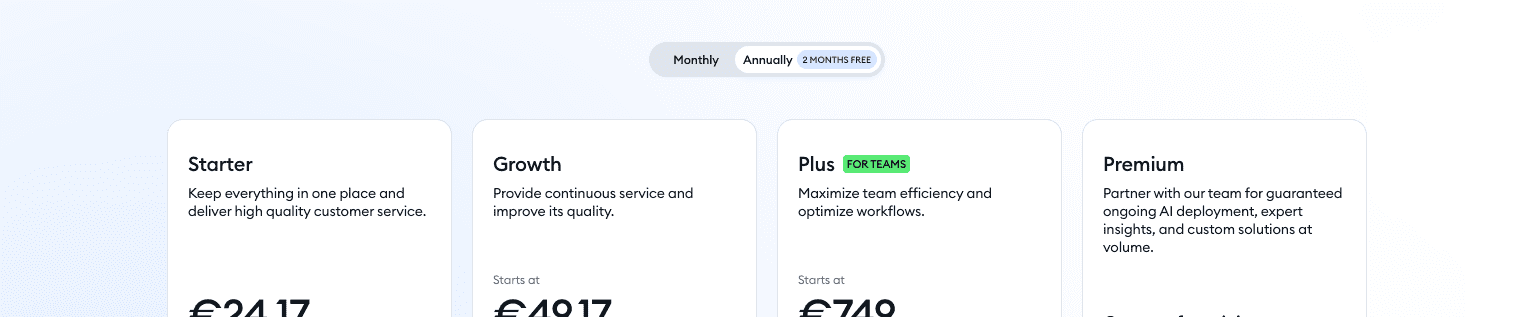
WordPress users looking for current Tidio deals will see offers change with billing cycles, seasonal promos, and plan choice – Starter, Growth, or Unlimited. Public discounts often sit between 10% and 36%. The bigger savings usually show up on annual plans, where the effective monthly price drops below the monthly rate.
There isn’t a hidden WordPress-only promo page, but many promos do highlight how well Tidio works with WordPress and other CMS tools. Be careful with third-party “36% off” claims. Often that number is just the difference between monthly and annual pricing, not a coupon code applied at checkout. Coupon stacking is rare. Most promos don’t stack with student deals or partner credits, and it may take trial and error at payment to confirm.
Use one source for live deals: Tidio’s official pricing page. It auto-applies valid promos, avoids guesswork on coupon codes, and helps dodge expired offers elsewhere.
On this page
- Where WordPress users can find current Tidio discount codes
- How to apply a Tidio coupon code during checkout
- Pricing factors in Tidio that change your final discount
- Best practices for WordPress sites before you buy Tidio
- How to spot real versus fake Tidio coupon codes
- Common Tidio promotions you may see
- What WordPress users say about Tidio pricing and deals
- Before you pay, verify the live Tidio deal and save your receipt
Where WordPress users can find current Tidio discount codes
Start on Tidio’s pricing page. It shows active discounts right in the plan selector and at checkout, so expired coupons don’t get in the way.
Their onboarding emails and newsletters sometimes include limited-time links that auto-apply a lower price. It’s worth watching your inbox after signup.
During big sales like Black Friday or Cyber Monday, Tidio’s social feeds often share direct promo links. Those links usually trigger the offer without a code.
Be wary of coupon sites promising huge cuts. Many are stale or misleading. If visiting partner or affiliate pages, click through and check the cart total. Trust it only if the price drops before paying.
Coupon extensions rarely work well with SaaS checkouts like Tidio. Compare the subtotal before and after any code or link to confirm the discount.
Logged-in users may see upgrade offers that don’t show when logged out. Clearing your cache or using incognito mode can refresh outdated banners and reveal current promos.
Bottom line: stick to official sources – pricing page, in-app banners, emails, and social posts – to find valid, current deals without extra hassle.
How to apply a Tidio coupon code during checkout
- Go to Tidio’s pricing page and pick a plan that fits the site’s needs. Choose monthly or yearly billing.
- Click Get Started or Upgrade. Log in to the Tidio account tied to the WordPress site if prompted.
- At checkout, look for a box labeled Have a coupon? or Add promo code. If it’s missing, the discount might already be applied through a link or banner.
- Paste the coupon code exactly as provided. Match uppercase letters, avoid extra spaces, and then click Apply to refresh the total.
- Review the cart. Confirm the plan price, any add-ons like chatbots or email tools, taxes or VAT, and the discount showing correctly.
- If nothing changes after applying the code, try switching between monthly and annual billing. Some coupons only work on certain plans or first purchases.
- Before paying, take a screenshot of the cart with the discounted price. It’s useful proof if an issue comes up later.
If you are still deciding whether the subscription is worth starting at all, our Tidio review walks through the features and the pricing tiers in full.
Pricing factors in Tidio that change your final discount
Tidio pricing often feels confusing, especially when hunting for coupons and deals. The biggest savings usually come from paying yearly instead of month-to-month. The “save X%” line almost always refers to the discount for paying for a full year upfront. Some add-ons don’t follow that rule, though. Chat automation volume, email credits, and SMS credits often stay at standard rates even if the base plan is discounted.
Promos tend to apply to the first bill only. Intro prices usually disappear at renewal unless Tidio offers a new deal for existing customers. Seat and contact limits matter a lot. Prices jump when a site crosses certain thresholds tied to traffic or user counts. Choose a plan that matches expected activity to avoid surprise costs.
Taxes and VAT depend on location and usually don’t get reduced by coupon codes unless stated. A promo code may lower the plan price, but taxes still show up on the final invoice.
Multi-account discounts are rare for teams running several WordPress sites. Each workspace or subscription is priced separately without bundle deals across accounts. Mid-cycle upgrades often use proration, so the bill reflects the time left in the term rather than applying the full promo value right away.
Best practices for WordPress sites before you buy Tidio
Test the Tidio plugin in a WordPress staging site first. It shows how it behaves with the theme and cache plugins without risking the live site. Treat it like a quick test drive before paying for a plan.
Check page speed right after setup. Use WebPageTest or Lighthouse to see if the widget slows pages. If it does, defer the widget, or load it only after a visitor clicks the chat icon. Keep the site fast and still offer support.
List the features that matter: live chat, chatbots, email tools, AI autoresponders. Nice to have, but unused features push you into higher plans. Match needs to plan tiers and skip extras that won’t get used.
Estimate monthly chat and bot traffic in advance. Plan for peak moments like launches and holiday sales. Pick a tier that handles spikes so conversations don’t get throttled.
Review payment details before checkout. Regional taxes and reverse charge VAT change the final price. Confirm methods and rates so the invoice matches the budget.
Expect some CSS friction with the theme. The chat widget styles might bend buttons or spacing. Plan a few small CSS tweaks to keep branding consistent without heavy custom work.
WooCommerce stores should test cart, coupons, and checkout triggers with Tidio. Confirm no conflicts with payment gateways, and make sure the chat doesn’t interrupt the purchase flow.
How to spot real versus fake Tidio coupon codes
Coupon sites promising Tidio codes often look exciting at first, then fall apart when it’s time to pay. Pages stuffed with random codes like WELCOME10 or SAVE20, no dates, no terms, no proof? Those usually fail at checkout and waste your time.
Real deals show their work. Look for a recent “verified” date, a screenshot of the discount in the cart, or clear terms that spell out who qualifies, whether it’s first-time buyers, or if it applies only to annual plans. Without that transparency, trust drops fast.
Many valid offers don’t need a code anyway. They use a special link that applies the discount automatically during checkout. Sites that demand a download or an email before revealing anything are throwing up another red flag. Tidio doesn’t require third‑party tools to redeem discounts.
Always compare the final price with Tidio’s official pricing page. If a “50% off” barely changes the total, someone padded the numbers to win clicks, not to deliver real savings.
Watch the fine print. Some discounts work only for new accounts made through a specific affiliate link. Switching links during checkout can cancel the deal. Try an incognito window to avoid cookie conflicts and see if the promo actually sticks.
- Avoid sites overloaded with vague codes lacking expiration info
- Use incognito mode and compare final totals directly on Tidio’s official page
Common Tidio promotions you may see
Annual plan savings often show a big “save up to” number, but it’s just the monthly rate compared to paying for a full year upfront. It isn’t a special coupon or hidden offer. It’s a push to commit for longer and pay less each month.
Upgrading during a trial sometimes triggers a first-term discount, usually within the first week or two. It doesn’t get much promotion. It appears as a lower price when moving from free to paid early.
Seasonal sales do the heavy lifting. New Year, Back-to-School, and Black Friday/Cyber Monday bring short windows with bigger discounts. Emails and social posts hype the countdown. The deals end fast once the clock runs out.
Tidio also rolls out bundles instead of straight price cuts. Extra chatbot quota or bonus email credits show up for the first term. It feels like added perks, not just a lower bill.
Location matters. Taxes and currency rounding change the real savings compared to the headline percentage. Two people seeing “30% off” might pay different totals because of local tax rules or exchange rates.
Most promos include rules such as “new customers only,” “one use per account,” or “no stacking.” Reading the terms avoids surprise rejections at checkout.
Auto-applied deals are common now. Checkout shows the lower price with a strikethrough on the original. No code needed, and valid discounts don’t slip by.
What WordPress users say about Tidio pricing and deals
People who use WordPress say Tidio is simple to set up. Live chat goes live fast, with no complicated steps to follow. They see more visitor engagement and more sales after adding chat. Chatbots pay off by handling common questions automatically and freeing up the team.
Payment plans come up a lot in reviews. Sites with steady chat volume often pick annual billing because it spreads costs and gives better value over time. Smaller blogs and niche shops usually start monthly as a low-risk trial, then switch once traffic grows.
Customer support gets mixed but mostly positive notes. Public reviews mention quick replies most of the time, with slower responses during busy hours. That speed matters more to buyers on higher tiers who expect faster help. WooCommerce stores that scale into bigger plans say upgrades feel pricey, yet necessary once chat requests increase.
Billing clarity gets praise. The checkout page shows discounts line by line before payment, which reduces surprises and builds trust. Reviewers also warn about extra costs for add-ons like more bot interactions or email credits. Those fees may rise faster than the savings on base plans, which can catch growing businesses off guard if they don’t track usage.
Plugin ratings on WordPress.org sit around 4.5 out of 5 stars. Strong satisfaction overall, not perfect. The score mirrors what reviewers say: easy setup, useful features, real gains, and a watchful eye on scaling costs and support timing.
Before you pay, verify the live Tidio deal and save your receipt
Check the exact discount and total on Tidio’s checkout page before paying. Verify the subtotal, taxes, and any promo lines to confirm they match what was promised. A code might not apply the way it was advertised or only work with certain billing cycles, so a quick review prevents billing hassles.
After the price looks right, save a screenshot or PDF of the cart and the confirmation email. Keep it somewhere easy to find. Proof makes billing follow-ups simple. Set a calendar reminder about two weeks before renewal to look for new deals or decide whether to switch plans.
Switching from monthly to annual after purchase changes your actual savings, so check the customer portal before renewals. If a coupon shown elsewhere fails at checkout, contact Tidio’s chat support with the screenshot. Agents often fix pricing issues manually.
Trying multiple codes? Enter them one by one. Stacking almost never works. Refresh the browser session if a code seems stuck or won’t clear.
Waiting for a major sale like Black Friday may lead to lower prices, but don’t delay a tool the team needs right now if live chat matters for customer satisfaction today.



Leave a Reply